
NotchPad
AI notes, folders, clipboard history, and snippets for Mac.
112 followers
AI notes, folders, clipboard history, and snippets for Mac.
112 followers
NotchPad turns your MacBook notch into a local-first workspace for rich notes, folders, clipboard history, snippets, Apple Notes, file import, and AI note edits.
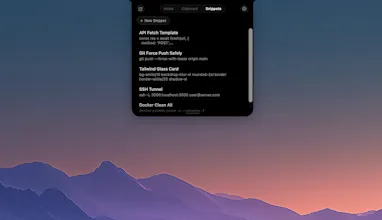
Write notes with images, tables, checklists, and typography controls. Organize notes into folders manually or with Apple Intelligence suggestions. Search copied text, links, colors, files, images, and videos with rich clipboard previews. Pro removes limits for notes, clipboard history, snippets, and AI edits with a one-time purchase.




Small but mighty update: NotchPad 1.4.0 is live.
I added two features that make NotchPad feel much more useful during demos, recordings, and screen sharing:
Ghost Privacy: an invisibility cloak for your notes. Not literally, sadly. Still waiting on the Hogwarts API.
But when it’s on, NotchPad stays visible to you while hiding from screen recordings and screen sharing.
Floating mode: NotchPad can now detach from the notch, move anywhere on screen, center itself, and snap back to the notch when you’re done.
I also improved Clipboard History and Snippets:
- visible copy buttons, so you don’t have to discover the right-click menu
- a visible more button for secondary actions
- copied Finder files like screenshots, PDFs, images, and audio files now show up as reusable clipboard entries
- tighter Pro enforcement for Clipboard History and Snippets
Thanks again to everyone who left feedback after launch. This release came directly from people using NotchPad in real workflows.
Hey everyone, quick update from me.
NotchPad has grown a lot since launch. It started as a tiny notepad in the MacBook notch, but it now covers a fuller local workspace:
Rich notes with images, tables, checklists, and typography controls
Clipboard history with previews for links, colors, files, images, and videos
Snippets for reusable text, prompts, code, replies, and commands
Apple Notes access from the notch
Drag and drop file import
NotchPad AI for rewrite, proofread, summarize, translate, titles, tables, and note cleanup on Macs with Apple Intelligence
Max width / Full height layouts for bigger work sessions
The privacy idea is still the same: notes, clipboard history, and snippets stay on your Mac. No subscription either. Start free, and Pro is $14.99 once if you want to remove NotchPad limits.
Would love feedback on the new rich notes and AI layer.
NotchPad now supports drag & drop file import! Drop files, create notes instantly. Drag documents and code files directly onto NotchPad to turn them into notes. Supports 50+ file types including txt, markdown, RTF, Word docs, PDFs, and popular code formats like Swift, Python, JavaScript, and more.
Small NotchPad update: folders are now live.
You can organize notes manually, or use Apple Intelligence on supported Macs to suggest folders from note titles and short summaries.
Locked notes are skipped, already filed notes are left alone, and you review every suggested folder before applying anything.
This one came from my own problem: I had too many notes, and search alone was not enough anymore.
Congrats on launch 🚀
Curious how you’re managing internal workflows as traction picks up?
@chibenishere Thanks! it's just me so the workflow is pretty simple. Build, ship, repeat 🙏