
Mouse Jiggler for Mac
Prevent your Mac from sleeping
78 followers
Prevent your Mac from sleeping
78 followers
Keep your Mac awake for presentations, webinars, live streaming, long downloads, and more. Maintain workflow without interruptions - simple and effective! Fully Free! Download Now!


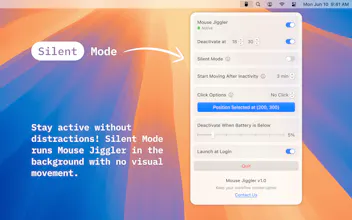


Hey everyone! 👋
I’m excited to introduce Mouse Jiggler, a simple yet powerful tool designed to keep your Mac awake during important tasks. Whether you’re presenting, coding, monitoring systems, or attending a virtual event, this app ensures your screen stays on - without interruptions!
🔹 Why use Mouse Jiggler?
• Prevents sleep mode during presentations, live streams, webinars, and downloads
• Maintains productivity by keeping your workflow uninterrupted
• Helps users with accessibility needs who struggle with frequent screen sleep
• Offers customizable actions like cursor movement, silent mode, or auto-clicks
• Includes smart deactivation based on time or battery level
• Works seamlessly in the background without disruption
The best part? It’s free to download! 🎉 Give it a try and let us know what you think. We’d love your feedback! 🙌
I’d really appreciate it if you could leave a review or a rating on the App Store! Your support means a lot! ⭐
@masump thanks a lot Masum!
Why not use something like @Amphetamine or @Lungo ?
Great question, Chris, thank you!
Amphetamine and Lungo prevent sleep by tweaking macOS settings, but Mouse Jiggler works differently - it simulates real cursor movement, just like a physical mouse jiggler device that many users already trust.
Since hardware jigglers are widely used and proven to work, people naturally feel confident that Mouse Jiggler will function the same way - without relying on system settings that some apps or remote sessions might ignore.
It’s built specifically for this purpose, with only the features users need:
Silent Mode – Prevent sleep without visible movement.
Click Simulation – Optionally mimic real user interaction.
Smart Deactivation – Stop automatically at a set time or battery level.
Unlike system-based solutions, Mouse Jiggler ensures activity is detected everywhere, making it a reliable and familiar choice for keeping your Mac awake.
Thank you again for your question, and let me know your thoughts!
@bohdanbilous like, is it to evade certain kinds of detectors? I understand that mouse jigging keeps a computer from going to sleep, but jiggling the mouse seems unnecessary if you can just set a system setting to prevent sleep.
There must be some value in the jiggling itself? e.g. a user can't toggle system settings but can install an app to jiggle the mouse to make it seem like they're working?
@chrismessina Unlike standard sleep prevention apps, Mouse Jiggler works in any scenario. There are a lot of apps and services (like below) don’t just check if the system is awake, they look for actual activity. That’s where Mouse Jiggler comes in.
Remote Desktop & Virtual Machines - Some apps like Citrix, VMware, and Microsoft RDP detect inactivity only through user input, not just system settings. Mouse Jiggler ensures the session stays active by providing subtle movement or silent mode to keep things running smoothly.
Cloud-based & Web Applications - Some time-sensitive platforms (e.g., security portals, auto-logoff dashboards, certain browser-based corporate tools) log users out if they don’t detect activity. Keeping the cursor moving bypasses these idle restrictions in a legitimate way.
Software Testing & Automation - Developers, QA testers, or IT professionals running automated tasks, scripts, or UI testing may need a non-intrusive way to simulate an active user.
Live Monitoring Dashboards - Some monitoring software (like stock trading apps, server dashboards, or real-time analytics tools) require occasional cursor interaction to remain fully functional.
Hope that answers your question and clarifies the distinct value Mouse Jiggler offers. Let me know if you have any thoughts - happy to discuss further.
@bohdanbilous it does — and those examples help me to understand the value and niche that Mouse Jiggler serves. Thank you!
@chrismessina Glad to hear that! Mouse Jiggler definitely has its niche, and I appreciate you taking the time to explore its value!
My friends will definitely need this as well, so I’ll share it with them! Congrats on the launch !🎉
@kay_arkain Thank you so much Kay! I really appreciate you sharing it with your friends. Hope they find it useful too! 🙌
I’d really appreciate it if you could leave a review or a rating on the App Store! Your support means a lot! ⭐
I’m sure a lot of people will love this for staying active on Microsoft Teams while working remotely! 🙊
@aishwaryalohi While some may use it for that, the original purpose of Mouse Jiggler is to keep Macs awake during presentations, webinars, live streams, system monitoring, and long downloads. 🙂
@bohdanbilous very useful indeed :)
This looks super useful especially for long downloads or those marathon webinars that always seem to go longer than expected. Curious, is the cursor movement subtle enough to stay unnoticed during screen recordings?
@jonwesselink Great question! Yes, the app has a 'Silent Mode' feature that ensures the cursor movement remains completely invisible, making it perfect for screen recordings, webinars, or any situation where you don't want distractions. Thanks for your interest!
I know how much effort goes into building something like this. You should be so proud! 👏 Wishing you great success!
@mohamed_zakarya Thank you so much Mohamed! That truly means a lot. It’s been a journey, and I appreciate your support! Wishing you all the best as well! 🚀