Modern for Wikipedia

Modern for Wikipedia

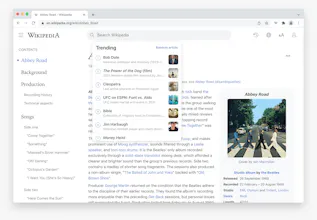
A beautiful, clean, modern web UI for Wikipedia

5.0
1 review

25 followers

Enhance your Wikipedia experience with a beautiful, clean, modern design that's fully customizable. Once installed, this free extension will simply apply the new look and features to existing Wikipedia article pages, without you having to do anything.
Modern for Wikipedia gallery image
Free
Launch Team
AppSignal
AppSignal
Built for dev teams, not Fortune 500s.
Promoted

What do you think? …

Steve
Hey PH, I made this free browser extension that modernizes the Wikipedia design. I started making this for myself just because I wanted more of a "reader mode" like experience (narrower column, nicer fonts, dark mode etc). Then I got a bit carried away and implemented everything I could think of for a modern redesign of Wikipedia. Hope you like it!
Anna Filou
@stevew this is so cool! It really makes Wikipedia much nicer to use. It’d be awesome if we could change the font size of the table of contents on the left too, but it’s not a big deal. I had no idea it’s possible to make an extension like this! Could you point me towards an article or a resource that would help me get started in this field? I can think of many sites I’d like to customize.
Steve
@anna_0x Hi Anna, glad you like it :) Thanks for the feedback. The latest update now includes settings to change the font size, line height and width of the table of contents. In terms of development, it's fairly easy to do. Here's a guide I found with a quick search: https://www.lateral.io/resources...
Anna Filou
@stevew ah, thanks a lot! Because I have no experience with these things, I was in no position to evaluate whether a tutorial is good/accurate, so thanks for the link :)
Maxime Ealet
This looks gorgeous, I wish it would be available on Safari :(
Steve
@theikid Thanks :) Would like to add a Safari version, just a bit more involved as you need an App Store developer account. Hopefully soon tho!
Travis Carr
This looks incredible. Are there plans to release it as a safari extension?
Steve
@travis_carr Thanks, yes hopefully soon!
Samkelo Drackner
Hey, this so cool, but weird at the same time. A good kind of weird. I love it bravo
David Hernández
Great extension, I like it! It would be great if it follows the color system theme changing themes, I use DarkReader and WinDynamicDesktop for the rest of websites and background that follows the AutoDarkMode time scheme for dark/light system themes.
Steve
@david_hernandez3 Thanks, glad you like it :) Good idea, I will add an optional setting to follow the system theme in the next version.
Steve
@david_hernandez3 Hi David, this has now been added as a setting in the latest version. It will auto change to whatever light/dark theme you've most recently selected within the extension settings.
monirom
Aniket Teredesai
@monirom Yeah. I am wondering the same as how it compares to WikiWand? @stevew
Steve
@monirom @aniketteredesai Similar concept (Wikipedia redesign) but Modern is built on top of the existing Wikipedia website and runs locally on your device, whereas Wikiwand host a copy and redirect you to their website. The extension approach used by Modern is better for privacy, and also ensures all the Wikipedia features still work, including user accounts etc (and that it's always showing the most up to date articles). Apart from that, Modern is just a different design approach (more minimal) and has some extra features (history etc). I like Wikiwand though, I think they get a lot right. Not sure how active their development is nowadays (last social media posts were a few years ago).
Aniket Teredesai
Just installed it. Love it!
Steve
@aniketteredesai Glad to hear it :)
Артём
+1 upvote, question: can I somehow expand the content area? On my display it seems to be a bit narrow
Steve
@verrok If you click the "aA" icon top right, you can adjust the content area width with the slider :)
Артём
@stevew cheers
123
Next
Last