
Mispher
Dictate, rewrite, translate, and an agent in a single device
117 followers
Dictate, rewrite, translate, and an agent in a single device
117 followers
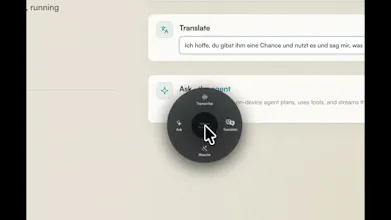
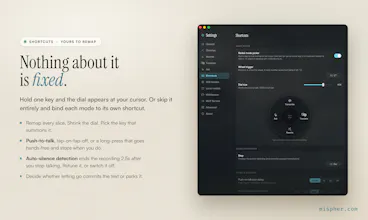
On-device transcription, plus an agent that actually does things. Transcribe: Parakeet EOU (English), Parakeet TDT (25 European languages), CTC (Chinese), Nemotron (~40), Qwen3-ASR Ask: a local LFM2.5 agent that plans and calls tools, Apple Notes, clipboard, files, MCP support. Fully customizable: remap the dial, hotkeys, three HUD styles, tool approvals, swap any model or any prompt. Gemma 4, Qwen3.6 and Ornith 1.0 are coming next. No cloud, no accounts. Free, MIT. Apple Silicon, macOS 26.



Free
Launch Team

Tines The single, secure environment for agents, apps, and automations.
Promoted
How does the local agent actually handle tool approvals on macOS without the cloud, does it prompt every single time or can you whitelist actions for a session?
@bedirhantrgk
Permissions are scoped per action, not just per connector. Each connector expands into its individual tools, and every tool has its own three-state permission gate: Approve (runs silently), Ask (requires human approval on every call), or Deny (blocked entirely).
So, for example, Notes is not controlled by a single switch. “Read note” and “List notes” can be set to auto-approve, while “Create note” and “Update note” remain behind an approval prompt.
How does the local agent actually decide when to call a tool versus just answering, and is that planning step visible somewhere so I can audit what it's about to do?
@minekld0
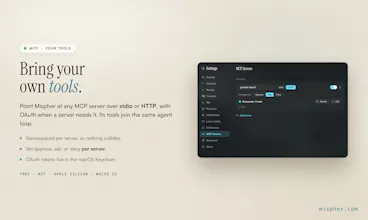
It decides based on your prompt to use which tools. Also, you have full control over which built-in tools or MCP tools are available for access.
Additionally, you can see the plan in the Ask view, similar to what is shown below.
How does the on-device agent handle tool approvals when the LFM2.5 model needs to call something sensitive like Apple Notes, and can I pause approvals globally for trusted actions?
@grkemv2h0
Permissions are scoped per action, not just per connector. Each connector expands into its individual tools, and every tool has its own three-state permission gate: Approve (runs silently), Ask (requires human approval on every call), or Deny (blocked entirely).
So, for example, Notes is not controlled by a single switch. “Read note” and “List notes” can be set to auto-approve, while “Create note” and “Update note” remain behind an approval prompt.
the rewrite-in-place feature is the one that'd actually sell me - highlight a sentence anywhere, say make this shorter, and it swaps in place. how does that hold up in apps that don't expose a normal text API, like electron apps or browser textareas buried under heavy JS overlays? does it degrade gracefully, like falling back to a clipboard paste, or does it just fail to find the selection in those cases?
@galdayan
Thanks a lot for your comment. I have tested it in the Electron apps or browser, works fine. Also, there is this auto-copy when finished behavior.
@dsaad good to know, and smart having the auto-copy as a safety net. one thing I'm curious about: when it falls back to clipboard instead of an in-place swap, does the app tell you that happened, or does it look identical from the user's side either way? if it's silent I could imagine someone assuming the rewrite landed in the doc when really it's just sitting on their clipboard waiting for a manual paste.
@galdayan This is a really valuable feedback. No, at the moment there is no indicator. I will add it.
@dsaad appreciate you taking it seriously. one thought on the fix itself - a subtle status-bar icon is easy to miss mid-flow since most people aren't staring at the menu bar while dictating, might be worth a brief on-screen toast right where the cursor is, same place the rewrite would've landed, so it's impossible to miss in the moment it actually matters.
The "entirely on your Mac, no telemetry" bit is exactly why I'd try this over cloud dictation — but I want to understand the agent step: when Mispher "goes and does it," is that agent running fully local against on-device models, or does the agentic action call out to an API? And is the rewrite/translate the same local model as transcription, or a separate one I'd need to pull down?
@hi_i_am_mimo
For Transcription (just speech-to-text), you need to select a model. There a list of models from different providers.
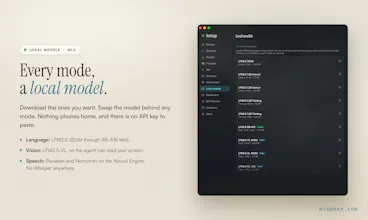
For rewrite and tranlate and ask mode, you need to download a Small LLM model based on your preference or based on your need, but it is suggested that you download LFM2.5-8B (the larger model, downside you need more memory) for Ask mode (agent mode) because it has better tool-calling capability.
Also, you can say for which mode and which model you want to use.
List of speech-to-text models:
List of local LLM models:
Selecting a model for rewrite mode:
Selecting a model for translate mode:
Selecting a model for Ask mode (agent mode):
@dsaad Thanks Daniel — the local-LLM download for rewrite/translate/ask makes sense. The one thing I still want to pin down for the privacy claim: the transcription models "from different providers" — do those all run on-device, or can some route audio to a cloud API? Just checking whether "no telemetry" holds across every mode, or only once you are on the downloaded local models.
On-device is the underrated headline here. In voice work the two things that actually block adoption are latency and privacy — a local model that never ships audio to a server kills both at once, and for anything with sensitive data (legal, medical, insurance) that's the difference between "can't touch it" and "ship it." Curious how accuracy holds up on proper nouns and numbers locally vs the big cloud models — that's usually where on-device stumbles. Nice to see transcription + a real agent in one place. Congrats on the launch 🚀
@david_marko Thanks a lot for your kind comment!