Make a Chart

Make a Chart

Instant charts on Slack

98 followers

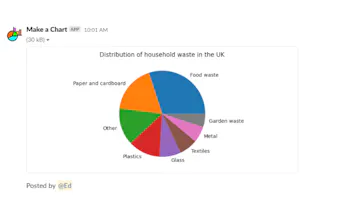
This app aims to make it as easy as possible to produce instant charts in Slack. There are no third party services or websites to deal with. Simply type or paste your data into the popup window, pick a chart type and an instant chart will be produced.
Make a Chart gallery image
Free
Launch tags:Slackβ€’Messagingβ€’Data Visualization
Launch Team / Built With
Unblocked AI Code Review
High-signal comments based on your team's context
Promoted

What do you think? …

Daniel Ball
I wanted a similar experience to displaying instant GIFs in a messaging app but for data visualisations. The goal was to make it as quick as possible to produce, say a pie chart, without having to deal with selecting data sources and adjusting settings in a 3rd party app window. This is the result! If you would like to try this out without installing it to your own workspace I have setup a community (Westsmith Apps) where it is installed. Please head over to https://westsmithapps.slack.com/... to give it a go!
Ashit Vora
Congrats on the launch @daniel_ball. Idea seems super cool. Do you see a premium model or other monetization paths in the future?
Daniel Ball
@ashitvora I just want to make a tool that users love first. I have made no other plans beyond this.
Nika
Haven't seen something like this. Cool! :)
Daniel Ball
@busmark_w_nika Thank you
William Jin
This could save me so much time! How do you handle large datasets?
Daniel Ball
@william_jin Thanks. Have you tried it? Small datasets is the target market but I'm happy to take suggested improvements. Feel free to email (info@makeachart.app) me with test data and we can work on getting the chart you want out of the system.
Daniel Ball
Quick question to anyone following this. Do you think this will also work as an add-on for MS Teams or Discord?
Vaibhav Pareek
@daniel_ball can you try creating a chat bot for whatsapp. Where we could message the chart data and it would send us the chart back?
Daniel Ball
@vaibhav_pareek2 Yes, that seems possible but would require a change to the user experience. The current behaviour is that you get a chance to configure and preview the chart before you send it to a channel. Slack allows you to do this without leaving the app because it has buttons, drop downs and other UI components that let me create a rich user experience without leaving Slack. To re-create this in WhatsApp, I (think) would have to augment the WhatsApp Chatbot with a third party web and/or mobile UI.
Huzaifa Shoukat
Congrats on the launch! πŸŽ‰ This looks like a handy tool for making charts right in Slack. What's the max number of data points you can include in a chart?
Daniel Ball
@ihuzaifashoukat, good question! It's limited to 1000 rows at the moment. Happy to discuss changing this though.
Alyssa Rose
Just tried it out - great work!
Daniel Ball
@rosealyssa6272 Thank you!
12
Next
Last