Launched this week
LudiHub

LudiHub

Your central gaming hub on iOS

2 followers

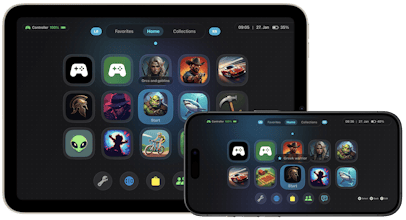
Transform your iOS gaming experience with LudiHub - the beautiful game launcher and hub for iPad & iPhone. Organize, customize, and launch all your games with controller support, themes, and quick shortcuts. Download now on the App Store.
LudiHub gallery image
Payment Required
Launch tags:iOSGamesApple
Launch Team
Wispr Flow: Dictation That Works Everywhere
Stop typing. Start speaking. 4x faster.
Promoted

What do you think? …

Hunter
📌
Hello Community, my name is Poly. I am the developer of LudiHub. I decided to develop LudiHub when I bought my first telescopic game controller for my iPad Mini. I searched the AppStore for a nice gaming launcher but I found out that there was no app that fit my needs. I wanted an application that lets me use it with any controller and give me that handheld experience. The first version was for the iPad, it was a rough start but after community feedback and helpful beta testing. I am happy to introduce you version 1.3. How does it work? You get introduced by the tutorial welcome sheet, it has two steps. The first step tells you to add the LudiHub iOS Shortcut to your device with the tap of a button and the second page tells you how to easily add games. You can share any installed game from your home screen and add them to LudiHub. Are you a poweruser and want to add ROMs or games that are no longer available in store? I got you covered, you can add games manually and map your own shortcuts to them. In the latest version I added support for Delta and Provenance deep links. You can copy the game url and paste it in LudiHub in the shortcut name field of your game. LudiHub consists of three pages: Favorites: Here you can see all the games you marked as favorite no matter where they are (Folders or Home) Home: Here you can see all games that aren't in a folder or recently added games Collections: Here you can see all your folders or create new one to sort your games LudiHub comes with a detailed FAQ guide inside the app translated in all supported languages (English, German, French, Spanish, Dutch, Portuguese (PT and BR) LudiHub comes with 6 pre-built color themes that adapt to light and dark mode. You have the option to toggle an animated background for every color theme but also use your own wallpapers. When using your own wallpapers or an animated theme, an extra Toggle appears where you can toggle crystal clear glass that refracts colors or frosted/solid. Whatever matches your taste. LudiHub also has 4 bottom customizable buttons, you can move existing games there or map a custom shortcut. LudiHub has built-in universal controller support. How much does it cost? LudiHub is a universal app. It costs one time 3.99$ / 4,99€, no IAP, no Ads, no Data Collection. Everything you do stays on your device. The App will continue to grow with feature updates based on community feedback.