Kyugo

Kyugo

Your Time, Your Rules, Your Life.

4.6
5 reviews

921 followers

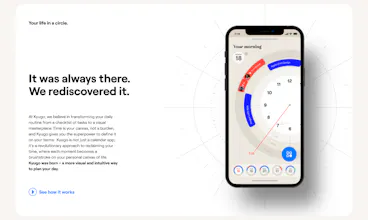
Traditional time management often feels like a burden, an endless series of checkboxes waiting to be ticked. But what if we could perceive time as a superpower? A unique freedom to choose what moments to prioritize? You choose how to live. Define your day, your way. Kyugo allows you to customize your day to what your life and its tasks mean to you. Visualize your day your way, not be dictated by what your phone tells you to do. Remember, you have the power to define what a task is.
This is the 2nd launch from Kyugo. View more
Kyugo 2.0

Kyugo 2.0

Time is your superpower, visualize your day your way
Enter Kyugo, a breakthrough in the world of task applications. Why not redefine how you perceive and utilize time? Start setting your clock – your time zone, right now with Kyugo – and experience the power of time on your terms.
Kyugo 2.0 gallery image
Free Options
Launch tags:AndroidiOSProductivity
Launch Team
Vy - Cross platform AI agent
AI agent that uses your computer, cross platform, no APIs
Promoted

What do you think? …

Tom Garcy
Hello, ProductHunt community 👋, for the past 5 months, we worked hard to improve and redefine Kyugo, which we see as a breakthrough in the world of task applications. Original Kyugo was all about work-life balance. But we realized one thing. Work-life balance is a lie. 🤯 There's no universal rule to achieve it. Each of us is unique. Traditional time management often feels like a burden, an endless series of checkboxes waiting to be ticked. ☑️☑️☑️ But what if we could perceive time as a superpower? A unique freedom to choose what moments to prioritize? You choose how to live. Kyugo allows you to customize your day to what your life and its tasks mean to you. Visualize your day your way, not be dictated by what your phone tells you to do. Remember, you have the power to define what a task is. 🧘‍♂️ We believe in transforming your daily routine from a checklist of tasks to a visual masterpiece. Time is your canvas, not a burden, and Kyugo gives you the superpower to define it on your terms. 🚀 Kyugo is not just a calendar app; it's a revolutionary approach to reclaiming your time, where each moment becomes a brushstroke on your personal canvas of life. 🧑‍🎨 Embrace the fluidity of your day. Define tasks, events, and priorities in a way that suits your unique lifestyle. Plan, adapt, and visualize your time that resonates with your work and life balance. Welcome to a world where guilt is replaced by choice, and your day is a work of art in progress. Kyugo was born – a more visual and intuitive way to plan your day. ❤️ What's new in this version: ✅ Apple Calendar integration ✅ Android version ✅ Rename your layers to whatever you care about currently in life ✅ Set fixed daily blocks or don't have any fixed times per layer separately ✅ All-day events ✅ Improved UX ✅ Performance upgrade
Daniel Feles
Kyugo 1.0 was a hit, and I can't wait to try 2.0; it looks amazing; great work, @tom_garcy !
Tom Garcy
@dfeles thanks for your support, let us know your feedback!
Eugene Yarovoii
@tom_garcy Your launch looks amazing! Such a beautiful design! Followed you on Twitter to see more :)
Frank Denbow
@tom_garcy love what youre doing. Well done on the website and curious about the app enough to download it. More thoughts: https://youtu.be/ePyVCVZc9L0
Frank Denbow
@tom_garcy should be public now!
Lukas Rüger
Very interesting UI! I like the 3 circles of meet, work and live! How did you come up with it? Is it the result of some A/B User testings? Excited to hear about your story!
Tom Garcy
@lrueger In the new version, you can actually rename both Work of Life layers to anything you like, because from version 1.0 we learned that each of us is unique and we should provide more freedom :)
Lukas Rüger
@tom_garcy Ahhh really nice, sounds good! I would love to use it but I'm already very happy with my "backend" of calendar organisation. I use Fantastical to combine my different calendars and To-Do Lists and really love this from a planning-perspective. But for the "frontend", so the UX during the day, I am not too happy. Your tool looks really cool for that. Can I also use it to "just" use this clock-UI to display my different calendars? Or do I need to do all the planning etc. in your tool?
Tom Garcy
@lrueger Kyugo works on Google Calendar, or Apple Calendar, so it displays your current calendar in our UI :) Kyugo should be your day in your pocket. For complex planning, you can still use your existing calendar.
Lukas Rüger
@tom_garcy Very nice, then I'll give it a go!
Rick Fan
Congratulations, it's really cool UI and UX, after a brief period of use, I have several pieces of feedback: 1. It starts up a bit slow: It could be due to network issues, as there's a 4-5 second delay on a blank view when I launch the app, which is quite noticeable. 2. The font size for tips is too small, making it hard to read. 3. When the new user guide got to the "what do you care about?" view, I couldn't proceed. All the buttons were clickable, but the view wouldn't switch to the next step. It was only after I killed the current process and reopened it that I realized there should be a Next button at the bottom right of that step, but for some reason, it didn't appear the first time I entered.
Tom Garcy
@rick_fan thanks for the feedback! We worked on the performance quite a lot, still room for improvement. Thanks for the #3 – the next button only appears when you give names to both of the layers, otherwise you can't proceed
Asmita Gupta
I tried the iOS app, but keep getting stuck on the "What do you care about?" page. Unable to move ahead from there. Is the updated version available on iOS?
Tom Garcy
@asmita_gupta you have to pick a name for the two things you care about, to name your layers, then you can continue. Is it somehow not working? Thanks for your feedback.
Asmita Gupta
@tom_garcy Yeah I have picked up the two categories. Still not progressing :(
Tom Garcy
@asmita_gupta thanks for letting us know, the bug is fixed, please restart the app ❤️
Asmita Gupta
@tom_garcy Yay! It's working now. Superb speed :)
Sambit Bhaumik
This looks really great. The visuals of a schedule reimagined as a physical clock is a refreshing take on the boring linear schedules. I used your Android app and it seems that its slow to load? I hope I wasn't the only one. Also the tutorials didn't work for me sometimes, for example when I am instructed to swipe to see the afternoon. I'm not sure if that was intended as a real-time dynamic tutorial or not. I appreciate the work you've put into the little things people forget while creating a thumb navigation based UX, like left handed users etc. I'll be following your progress as I am curious to see the new features you have in store like Wind down. Congrats on the launch!
Tom Garcy
@sambit_bhaumik Thanks for the feedback! We'll double-check the Android version for sure, thanks for pointing that out!
Veit Josef Schneider
Wow, Kyugo sounds absolutely fascinating! I love the concept of redefining how we perceive and utilize time. I am happy to test it now :) Are there any plans for integrating with other productivity tools or platforms? Keep up the great work!
Veit Josef Schneider
@tom_garcy not directly for me, but let's say iCal as an alternative to the google calendar. Also, can you make that when a user registers in your app that they can use one of their linked google accounts in their device instead of the need to manually login?
Caroline Schmidt
The app looks very nice and seems intuitive to use. However, on Android, I was not able to get through the tutorial, as it was somehow buggy. When it said, "Swipe to see the afternoon," I tried swiping in each and every direction, and nothing happened, so I had to skip the tutorial. Also, I would like to split my time up into more than three sections - do you plan to allow more than three in the future? Congrats on your launch and on this idea, I really like it! ✨
Tom Garcy
@caros thanks for the feedback! Yes, we plan on having an option to set the number of your layers, from 1 to 5. What layers would you use?
Caroline Schmidt
@tom_garcy I would love customizable layers as, at least for me, my priorities change from time to time. I personally would also like to be able to split layers, e.g., I would split the "work" layer into several layers like "programming," "administration," and specific layers for projects I'm working on. But this may be a personal preference, I don't know what other users would prefer - maybe you could do a poll and ask your users. :)
123
•••
Next
Last