
Knock
Secret button to control your Macbook!
184 followers
Secret button to control your Macbook!
184 followers
Knock is a shortcut app that lets you control your Mac by simply knocking on it. Tap the sides of your laptop and it runs any shortcut you want — screenshot, open apps, mute sound, and more. It uses your Mac's built-in accelerometer to actually feel the vibration of your knock and react in real time, no extra hardware needed - just knock and go.


Stash
Wordwand
@will_gee1 This is one of those ideas that sounds like a gimmick until you actually think about the use cases. Tapping to play/pause while your hands are off the keyboard, or switching desktops without reaching for the trackpad mid-flow - that could genuinely become muscle memory fast.
The fact that you built a live sensitivity tuner shows you've thought about the real problem here, which isn't detecting a knock - it's not detecting everything else. How does it handle false positives in noisy environments? Like if I'm at a coffee shop and someone bumps the table, or if I'm typing aggressively - does the accelerometer distinguish between a deliberate knock pattern and ambient vibration?
Also curious whether you've considered double-knock or triple-knock as separate triggers. That would open up a lot more actions without overlapping.
Really creative use of hardware that's just sitting there unused. Following this one.
Stash
@diegodau Thanks Diego, really appreciate the thoughtful comment. You’re exactly right that the hard part isn’t detecting a knock, it’s filtering everything else. Knock looks for short vibration spikes that match the timing of a tap rather than general motion, which helps separate a deliberate knock from background desk movement.
It also temporarily pauses detection while you’re typing. There’s a 500ms suppression window after the last keystroke so aggressive typing won’t accidentally trigger gestures.
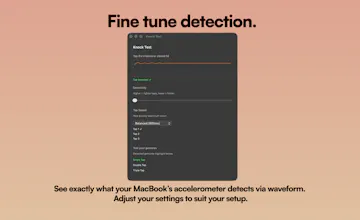
Sensitivity can also be tuned depending on the desk setup, and the Knock Test view lets you see the accelerometer waveform in real time so users can dial it in.
And yes, single, double and triple knocks are all separate triggers right now, so you can map different actions to each. I’m definitely interested in expanding the gesture system further as the app evolves.
Appreciate you following along!
Capso
Fellow Mac developer here — this is a brilliant use of the Apple Silicon accelerometer. I've worked extensively with macOS system APIs and always wondered why nobody tapped into (pun intended) the motion sensor for UX. The 500ms typing suppression is a smart design choice. Quick question: have you looked into using the accelerometer's frequency spectrum analysis instead of just impulse detection? Could potentially let you distinguish between knocks of different intensities for even more gesture types. Really impressive first release, congrats!
Stash
@lzhgus Appreciate it, means a lot coming from another Mac dev.
At the moment Knock is using an impulse + decay-based approach rather than frequency analysis, mainly to keep things responsive and reliable across different environments.
I’m basically looking for sharp spikes with a quick falloff, then grouping them into single/double/triple taps within a timing window, with some filtering for typing and vibration noise.
Frequency/intensity-based gestures are definitely something I’ve thought about exploring though - feels like there’s a lot of potential there if I can keep it intuitive.
Trufflow
This is actually really interesting! I didn't know that MacBooks could detect knocks! Other than the physical interaction aspect for Knock, are there features that Knock offers that others (like Raycast) doesn't?
Stash
@lienchueh Great question! The main difference is that Knock focuses on physical interaction with your Mac. Instead of using the keyboard or opening a launcher like Raycast, you can trigger actions just by tapping your MacBook. It’s meant to be a quick, hands-free layer on top of macOS for things like muting audio, pausing music, or triggering actions while you’re away from the keyboard.
Capso
@lienchueh The key difference IMO is that Knock operates in a completely different input layer. Raycast and Alfred are keyboard-first launchers — they're great when your hands are on the keyboard. Knock fills the gap when your hands are OFF the keyboard. Think about it: you're reading documentation, sipping coffee, or sketching on paper — and you just tap to pause music or switch desktops. That's not something a keyboard launcher can do. Two very complementary tools.
Stash
@lienchueh @lzhgus Spot on 👆
That’s exactly how I think about it - not a replacement for Raycast/Alfred, just something that fits in when you’re not on the keyboard. Appreciate you explaining it so clearly 🙏
@will_gee1 This innovation looks fun as hell. Can you reveal more about the technical part of Knock? How does it work? How did you make this possible? Can the mac get damaged in the long-term by trying to use it in a non-intended way? (this last one is really silly, but I wanna know lol)
Stash
@dingleberryjones Thanks! Modern MacBooks have a built-in accelerometer, which is essentially a motion sensor that can detect small changes in movement and vibration. Knock reads that motion data and looks for very short impulse spikes that match the pattern of a tap on the laptop chassis or the desk it's sitting on.
Those spikes are then interpreted as gestures (single, double, or triple knocks), which trigger whatever action the user has assigned.
A big part of building it was filtering the signal properly so it ignores normal movement or keyboard vibration. There’s a sensitivity slider so people can tune it for their setup, and gestures are also temporarily suppressed while typing to prevent false triggers.
Knock isn’t doing anything unusual to the hardware. It’s just reading motion data from the sensor, similar to how other apps read system sensors.
Stash
@krisba95 Thanks! The detection sensitivity is adjustable with a slider so users can tune it depending on their setup (desk material, laptop position, etc.).
The detector also looks for very short impulse spikes rather than general vibration, and gestures are temporarily suppressed while typing to avoid triggers from keyboard vibration if sensitivity is set high.
I also added a Knock Test tool so people can see how their specific Mac reacts before using it.
Humalike
Super creative use of the built-in accelerometer. How do you handle distinguishing between intentional knocks and vibrations from nearby objects, like someone else working at the same desk? Also curious if you plan to support custom gesture patterns beyond single, double, and triple knocks. Looks great!
Stash
@mcarmonas Thanks!
The tricky part was making sure it reacts to intentional taps but ignores everything else. Knock focuses on short vibration spikes that match the timing of a knock rather than general motion, which helps filter out background movement like someone shifting the desk.
It also pauses detection while you’re typing. There’s a small 500ms suppression window after the last keystroke so heavy typing doesn’t accidentally trigger gestures.
Users can also tune the sensitivity and watch the live waveform in Knock Test to see exactly what the accelerometer is picking up on their setup.
For now it supports single, double and triple knocks, but expanding the gesture system and timing options is definitely something I’m interested in exploring in future updates.