
HyperCaps for macOS
Turn CapsLock into a Super Key & Boost Productivity
112 followers
Turn CapsLock into a Super Key & Boost Productivity
112 followers
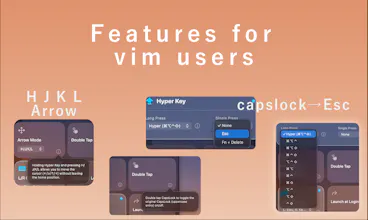
Stop "finger gymnastics" with complex shortcuts! HyperCaps turns your wasted CapsLock key into a macOS productivity superpower. 🪄 Core Features: ✨ Hyper Key: Hold CapsLock to trigger Cmd+Opt+Ctrl+Shift. 🚀 Vim Mode: Navigate using H/J/K/L without leaving the home row. 🧠 Smart Tap: Tap for Escape or CapsLock. Native, lightweight (SwiftUI), and privacy-first (zero logging). 🎁 PH Community: Use code PHLAUNCH20 for 20% off lifetime access!




@curiouskitty
Hi Curious Kitty! 🐱
That is a fantastic and very specific question. You’re absolutely right—reliability is the ultimate feature for a tool like this. To avoid the common pitfalls of key remapping on macOS, I made several strategic engineering choices:
Hybrid Architecture (hidutil + CGEventTap): Unlike many tools that rely solely on an Event Tap, HyperCaps uses hidutil to remap CapsLock to F19 at the HID level. This ensures that the system recognizes the modification natively, significantly reducing "stuck modifier" issues compared to pure software injection.
Active HID Reset Monitor: To handle sleep/wake glitches or the connection of external keyboards, I implemented an IOKit-based HID monitor. It listens for system wake notifications and device connection changes to re-apply the hidutil mapping automatically.
Native SwiftUI & Memory Safety: By building with SwiftUI and Swift's modern concurrency, I’ve minimized the risk of memory leaks and race conditions that often cause remappers to hang or crash after long periods of uptime.
Smart Secure Input Handling: We prioritize a "clean" event stream. By using a lightweight CGEventTap focused only on specific keys, we reduce interference with Secure Input fields, ensuring the system remains responsive even in sensitive contexts.
My goal was to build a tool that feels like a native part of the OS, not a "hack" layered on top of it. I'd love for you to give it a try and see how it holds up to your workflow!
Hey there!! Congrats on your launch!!
Since Hyper key is great for window managers (Rectangle, Magnet, etc.) and custom shortcuts, have you tested compatibility with heavy Karabiner users or other remappers?
Any edge cases where conflicts pop up, or tips for smooth layering?
@cathcorm
Hi Catherine! Thank you so much for the congrats! ✨
You’re spot on—Hyper Key + Window Managers (like Rectangle/Magnet) is exactly the "dream combo" I had in mind while building this!
Regarding compatibility with Karabiner-Elements and other remappers:
Compatibility: HyperCaps is designed to be as "good a citizen" as possible. Since we use a hybrid approach of hidutil for the initial CapsLock-to-F19 remap and a standard CGEventTap for the logic, it generally plays well with others.
Potential Conflicts: The main "edge case" occurs if another app is also trying to remap the physical CapsLock key at the same time. If Karabiner is already capturing the raw CapsLock events before they hit our hidutil layer, one of the two apps might "win" while the other loses track.
Tips for Smooth Layering:
One Remapper for One Key: My best tip is to let HyperCaps handle the CapsLock/Hyper Key logic and use Karabiner for your other complex keyboard-wide remappings.
Check Permissions: Ensure both apps have the necessary Accessibility permissions, but try to avoid overlapping functions on the same physical keys.
We’ve tested it alongside common window managers and it’s been buttery smooth. If you’re a heavy Karabiner user, I’d love to hear how it fits into your specific setup!
@auramarkstudio Thanks for the detailed breakdown, it's super helpful!
If I run into any quirky edge cases with my setup (Karabiner + a few custom mods), I'll ping you with details, would be awesome to help refine it further ahaha
Congrats on the launch! This is the kind of tool I wish I'd found years ago. I've been using karabiner-elements to remap keys but the config files are a pain. The double tap to restore actual caps Lock is a nice touch.
Question ... does the H/J/K/L navigation work inside any app including terminals and code editors? I'd love to use it in VS Code but I'm wondering if it conflicts with keybindings when you're already in Vim mode. Thanks!
@leonardkim
Hi Leo! 👋
Thank you so much! I completely agree—Karabiner is incredibly powerful, but diving into complex JSON files just to set up a basic Hyper Key or Vim navigation was exactly the pain point that drove me to build HyperCaps. I'm so glad the Double Tap feature is helpful for you!
To answer your question: Yes, the H/J/K/L navigation works flawlessly inside any app, including terminals and VS Code!
Here is why it won't conflict with your existing Vim mode: HyperCaps intercepts CapsLock + H/J/K/L at the system level and converts them into pure, raw Arrow Key events. By the time the event reaches VS Code, the editor simply thinks you pressed a physical arrow key. This means you can use it to navigate even while you are in Insert Mode!
One more thing for a Vim user like you: You can also configure HyperCaps so that a quick single tap of CapsLock acts as the Escape key, while holding it remains the Hyper/Navigation key. It’s the ultimate Vim combo, straight out of the box without touching a single config file!
Give it a try in your workflow, and let me know how it feels! ⌨️🚀
Thanks everyone for the great feedback on our last launch!
We've released v1.1 with performance optimizations and new features based on your requests.
In v1.1, we added the App Launcher and per-app exclusion settings.