Capture HDR Photos like a pro or the easy way Auto mode: capture HDR photos using artificial intelligence to choose the best EVs. Manual mode: adjust ISO and exposure time for each area in the scene. Discover more great features in the app
Hello, Hunters & Makers!
HDR Plus+ has been rewritten completely to make use of the latest technology that iOS and iPhones have to offer.
As a starter, we have trained an AI to quickly choose the best exposures the should fit the scenario for you. Also, a processing queue was implemented to process the photos right after you capture them. Deghosting was added along with some cool new filters.
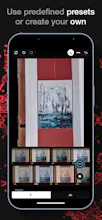
As far as editing goes, you can now use the filters to create editing presets. You can then apply these presets to any other photo.
You can also use any custom or pre-defined preset as your default one, meaning that it will be applied to every photo you capture.
Capture HDR Photos like a pro or the easy way
- Auto: capture HDR photos using artificial intelligence to choose the best EVs.
- Manual: adjust ISO and exposure time for each area in the scene.
- EV Presets: create your own EV Presets (ex -2, 0, 2) and choose the one you need with a touch.
- Disable HDR and capture photos like your iPhone would with control over ISO, exposure time, and white balance.
Edit HDR captured photos or import some from your phone.
- Use any of the following filters to edit your photos:
- HDR: MergeStyle, Colors, Definition, Vibrance, BW, Skin smooth, deghosting, depth control
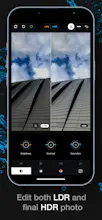
- LDR + HDR: Brightness, Contrast, Saturation, Exposure, Gamma, Denoise, Hue, RGBT Levels
- Create presets with these filters and apply them to any image.
- Edit LDRs while checking real-time how it impacts the final HDR photo.
- User the LDR Manager to quickly remove exposures from being used as inputs to check if one does not damage the HDR photo.
Any feedback regarding the app is more than welcome. Feel free to discuss it here or send an email to contact@hdr-plus.com.




Venus: Daily Quote with artwork by AI
Venus: Daily Quote with artwork by AI
Venus: Daily Quote with artwork by AI
Venus: Daily Quote with artwork by AI
The Newsroom
Venus: Daily Quote with artwork by AI