
Launched this week

GoLogo.app
The fastest way to batch watermark photos. Free & Private.
8 followers
The fastest way to batch watermark photos. Free & Private.
8 followers
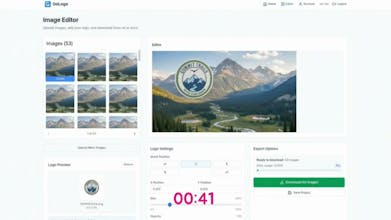
GoLogo is a simple, browser-based tool designed for creators, photographers, and business owners. Drag and drop to watermark hundreds of photos instantly. ⚡ Features: Batch Processing: Add your logo to multiple images at once. 100% Private: All processing happens locally in your browser. No photos are uploaded to any server. Customizable: Easily adjust transparency, size, and position. Free: 50 free downloads daily on free subscription


Hey Hunters! 👋
I’m Sar, the maker of GoLogo.app
I built this tool purely out of frustration. Back when I worked at a real estate agency, my mornings were a repetitive nightmare. I had to watermark dozens of new listing's photos daily before uploading them.
I tried every tool out there, but nothing fit. Using Lightroom or Photoshop just to add a logo felt like using a sledgehammer to crack a nut - heavy, slow to load, and total overkill.
Canva is great for design, but way too many steps, it was click-fatigue hell. Dragging, dropping, and positioning 50+ separate images nearly drove me crazy. And other online tools we're just too slow.
I just wanted to drag, drop, and be done. I didn't want to launch another heavy piece of software just to perform this one simple task - i wanted something quick and easy.
So, I built GoLogo.
It turns that tedious process into a few seconds in the browser:
• Upload all images: instantly upload tens or even hundreds of images to the editor
• Set it once: Upload the logo, resize, and place it perfectly on the first image.
• Apply to All: Click one button, and that exact style is replicated across all photos instantly.
• Smart Positioning: the logo is automatically placed relative to the image's espect ratio, so you can upload horizontal, square or vertical images at the same batch and get the logo perfectly positioned in all of them
• Smart Workflow: you can save your project. The next day, when you have new images, you don't start from scratch. You just load your saved project, drag in the new photos, and they are ready to download. The logo is already positioned from last time.
And since I hated waiting for uploads, everything runs 100% locally in your browser. Your photos never leave your device. 🔒
Who did I build this for?
🏠 Real Estate marketers (like me!) needing to brand 50+ property shots daily.
📸 Photographers sending out quick, watermarked previews to clients.
🛍️ E-commerce & Etsy Sellers looking to protect their product images from theft.
📱 Social Media Managers who need to brand batches of content assets on the fly.
It saved me from the daily editing headache, and I hope it helps you too.
I’d love to hear your feedback—what’s the biggest friction in your current image branding workflow?
Thanks for checking it out! 🙏