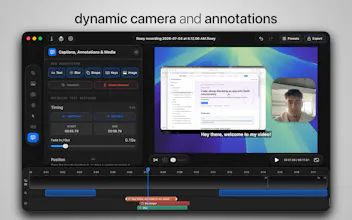
flowy is a professional recorder & editor that automatically turns your recordings into polished presentations, based on your interactions • On-device AI integration, Audio Transcription and professional editing tools such as dynamic camera layouts, animations, speed adjustments, captions, media & annotations • Pricing that puts the user first - buy once, own forever. All future updates included.
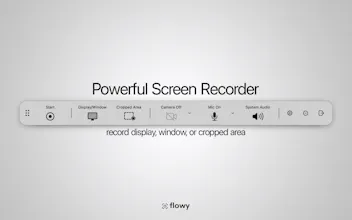
professional recorder & editor, now featuring on-device AI
The 2.0 update introduces on-device AI integration, Audio Transcription and professional editing tools such as dynamic camera layouts, in-depth animations, speed adjustments, captions, media & annotations.
🎬 Since the first launch, flowy touched 3.2K devices and received 33 updates. Today marks the biggest one - after months in the making, version 2.0 is finally here.
Pricing stays one-time payment for a lifetime license with all future updates included - flowy has always endorsed fair pricing that puts the user first.
Packed with new functionalities:
— On-device AI and Audio Transcription: turn your microphone, system audio, or both into text; add it as captions or export as SRT/VTT files. Enhance transcriptions or generate summaries using the on-device AI models from your Mac.
— Dynamic camera layouts: switch between grid, full-screen, side-by-side, and hidden camera layouts at any time during the recording with custom transitions.
— Annotations: overlay text annotations, blur effects, shapes, and uploaded images, with keyboard shortcuts for faster editing.
— Full animation control: personalize zoom movement, easing, transitions, and motion blur in the new Animations tab.
— Animated cursor: smooth/normal/snappy movement, dynamic pointer (changes with your action, e.g. hovering over text), auto-hide and loop back to the start position.
— Playback speed: adjust any recording segment from 0.25x to 4.0x, with suggestions when typing is detected during recording.
flowy
🎬 Since the first launch, flowy touched 3.2K devices and received 33 updates. Today marks the biggest one - after months in the making, version 2.0 is finally here.
Pricing stays one-time payment for a lifetime license with all future updates included - flowy has always endorsed fair pricing that puts the user first.
Packed with new functionalities:
— On-device AI and Audio Transcription: turn your microphone, system audio, or both into text; add it as captions or export as SRT/VTT files. Enhance transcriptions or generate summaries using the on-device AI models from your Mac.
— Dynamic camera layouts: switch between grid, full-screen, side-by-side, and hidden camera layouts at any time during the recording with custom transitions.
— Annotations: overlay text annotations, blur effects, shapes, and uploaded images, with keyboard shortcuts for faster editing.
— Full animation control: personalize zoom movement, easing, transitions, and motion blur in the new Animations tab.
— Animated cursor: smooth/normal/snappy movement, dynamic pointer (changes with your action, e.g. hovering over text), auto-hide and loop back to the start position.
— Playback speed: adjust any recording segment from 0.25x to 4.0x, with suggestions when typing is detected during recording.
& more...