Eraser

Eraser

AI for technical design and documentation

4.9
12 reviews

1.9K followers

Eraser is an AI tool for technical design and documentation. Generate beautiful diagrams from natural language prompts in seconds. Connect your codebase to Eraser and generate diagrams from your codebase that automatically stay updated.
This is the 4th launch from Eraser. View more
Eraser AI

Eraser AI

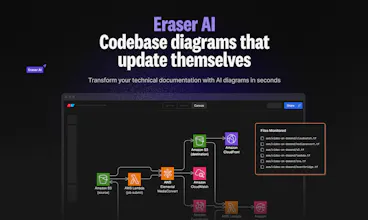
Codebase diagrams that update themselves
Generate live diagrams from your codebase that stay up to date automatically. Visualize your infrastructure, system architecture, data models, and application logic with minimal manual effort. Set it up once, and let Eraser AI keep your documentation in sync.
Eraser AI gallery image
Free Options
Launch Team / Built With
agent by Firecrawl
agent by Firecrawl
Gather structured data wherever it lives on the web
Promoted

What do you think? …

Shin Kim

Hi Product Hunt! 👋


Every technical team wants great diagrams for their codebase, but they take forever to create and quickly become outdated. With Eraser AI, you can generate diagrams directly from your live codebase and keep them automatically updated.


Over the past two years, Eraser AI has generated 2.5 million+ AI diagrams, and today, we’re launching again with deep codebase integration and CI automation to make documenting your code easier than ever.


Here's what's special about Eraser AI:


⚡️ Codebase diagram generation – Create infrastructure, system architecture, data model, and app logic diagrams directly from your codebase. Eraser AI finds relevant files and generates accurate diagrams.


🤖 Eraserbot (CI action) – Automate your diagrams! Eraserbot monitors your codebase and updates diagrams whenever a PR is opened, keeping everything in sync without extra work. Set it up once and Eraserbot handles the rest.


💬 PR comments with visual diffs – Eraserbot adds visual context by commenting directly on PRs with the updated diagram. Speed up code reviews with visual references that instantly communicate changes.


Here are some prompt ideas for codebase diagrams:

  • "Draw a cloud architecture diagram using .tf files in the /terraform/dev folder."

  • "Draw a high-level flowchart of the new user signup process."

  • "Draw a data model using the schema.prisma file."

  • "Generate a sequence diagram for API calls in the handlers/ folder."

  • "Generate a service architecture diagram for the payment-processing service."

Try Eraser AI for free! www.eraser.io/product/eraserbot

Shin Kim

@masump Yes, you can specify what you'd like it to focus on via prompting. You could specify a folder path or filenames, or you could describe what you're looking for via natural language.

Dineshan

@shin_kim1 Keeping diagrams up to date is always a pain, but Eraser AI's deep codebase integration and CI automation solve that effortlessly. Congrats on the launch

Shin Kim

@dineshan_sithamparanathan Thanks Dineshan! Let me know how it goes when you take it for a spin!

Hitesh Choudhary
Eraser is my goto tool to explain in depth concept in all of my coding bootcamps. Whole of our team as well as students love eraser ❤️
Vitalii Kukhar

@hiteshchoudhary That’s awesome! Really cool to hear Eraser is a go-to for your bootcamps and your team loves it 😌. Appreciate the support! 🙌

Shin Kim

@hiteshchoudhary Thanks so much for dropping by on our launch post! Honored that we can play a role in your teaching!

Yoel Tadmor

@hiteshchoudhary Thanks for kind words Hitesh. As a bootcamp grad once upon a time, it's amazing to see something I've worked on help others on their journey.

Mohamed Gaber

Hello,
I have been using this product from almost 6 months now and it saved me hours of working. I even wrote about it on my linkedin https://www.linkedin.com/posts/mhgaber_good-morning-tech-entrepreneurs-as-someone-activity-7302277306041958401-YgGD?utm_source=share&utm_medium=member_desktop&rcm=ACoAAAPrHfoBaSLpVRL1yXCHr2Nam8t9QB5QSi4

Thumb up!

Shin Kim

@mohamed_gaber4 Thanks so much for sharing this. Your workflow of using Eraser AI along with Claude is really clever and a smart strategy!

Vitalii Kukhar

@mohamed_gaber4 That’s great to hear! Huge thanks for your support and for sharing it on LinkedIn—means a lot! 👍

Yoel Tadmor

@mohamed_gaber4 Thanks for the kind words and support Mohamed.

Sauron918

I've been using Eraser for a few months now and really love it. Thanks to markdown support and code block highlighting, it is particularly useful for maintaining documentation, system architecture overviews etc when diagrams and code examples live together.


One notable drawback is the lack of full keyboard support for navigation. I find it frustrating to switch between mouse and keyboard for certain actions. Enhanced keyboard navigation would greatly improve usability.


But overall, it's a good tool and a daily driver.

Vitalii Kukhar

@sauron918 Thanks for the love! 💙 We’re glad Eraser helps with your docs and system overviews.

Totally hear you on keyboard navigation, have you tried `CMD+K` (or `CTRL+K` on Windows) feature? You might find it helpful, let us know what is the biggest pain for you with keyboard nav. 🚀 Appreciate the feedback!

Shin Kim

@sauron918 Really appreciate the feedback! Noted on keyboard shortcuts – there are admittedly a few missing ones!

Yoel Tadmor

@sauron918 Thanks for the kind words and the feedback as well! Would love to hear what navigation specifically you're looking for - come find us on our Slack so we can chat!

Tania Bell

love the sound of this. upvoted and bookmarked. will give it a spin.


good luck with the launch


Shin Kim

Amazing! Thank you Tania and let us know how it goes!

Vitalii Kukhar

@taniabell Hope you enjoy it when you give it a try 🙂 🙌 Appreciate the support!

Yoel Tadmor

@taniabell Thanks Tania. Looking forward to seeing what you make.

Piyush Garg

Awesome feature and video 😂 - How do you come up with these amazing product video demos.

Vitalii Kukhar

@piyush_garg4 Thanks! Glad you liked it! 😄 @shin_kim1 and @yoel_tadmor have a hidden talent when it comes to creating those videos!

Kay Kwak

he fact that the diagram gets automatically updated whenever a PR is opened, and you can instantly see the visual context of the code changes, is such a great feature. I’m curious about how this has impacted actual code reviews and what changes users have seen after using this feature.

Vitalii Kukhar

@kay_arkain This feature makes code reviews much more visual and efficient.🚀 If you get a chance to try it, we’d love to hear your experience! Glad you like it!

Yoel Tadmor

@kay_arkain I think our favorite comment from a user was that he loved this so much he had spent the last couple days showing it to all of his colleagues. It's changing how we think about documenting our code.

123
•••
Next
Last