Set of tools and block options built exclusively to help you build content easily; and improve your workflow for the new WordPress Gutenberg block editor.
@craigcpaterson This is really great news Craig! I'm glad that EditorsKit can fill the gaps between Classic Editor and Gutenberg. This will encourage more user to start writing using the new block editor.
Hi Everyone!
Got a few request for live demo to test drive EditorsKit. I've just created one https://editorskitdemo.kinsta.cl... 👏👏👏
Thank you very much for the upvotes and feedback!
Cheers,
Jeffrey
Report
@phpbits Looks awesome Jeffrey! Your stuff never disappoints.
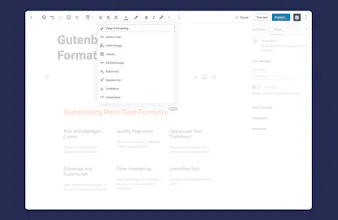
Hey all, I would like to introduce something that I've been working on these past few months. It's the EditorsKit Plugin for WordPress block editor which aims to provide set of tools to easily navigate the editor, write freely and improve content building workflows.
Below are the key features available on this free WordPress plugin :
Rich Text Formats
✔ Text and Highlight Colors
✔ Justify Paragraph Alignment
✔ Underline Text
✔ Subscript and Superscript
✔ Uppercase Text Transform
Block Visibility
✔ Devices Responsive Visibility
✔ Logged-in or Logged-out User State
✔ Custom Display Logic
✔ Advanced Custom Fields Visibility Integration
Block Styling
✔ Image and Cover Block Styles
✔ Full Screen Display Option
✔ Custom Utility Classes Suggestions
Productivity Tools
✔ Markdown Formatting
✔ Block Guide Lines
✔ Hide Title Option
✔ Block Drag and Drop Import; and Export
✔ Disable Auto Saving
✔ Features Manager
Thank you very much for your interest and upvote. I hope EditorsKit will be really helpful for your new WordPress writing workflow.
Report
The concept is truly great. Among other things, it will be useful for applying specific typographic rules, without having to edit the html, adding inline styles by hand.
Example : the white-space:nowrap css property, which is by default a pain to apply on pairs of words / numbers / units that should never wrap.
The typical example is a price list where the currency symbol wraps at the end of the line, in responsive mode, depending on screen size, looking bad. €10 is 10 € in France, for instance.
Another suggestion would be to be able to apply inline css styles to text in batch mode. For instance, not only would I want to add the white-space property, but also change the color to red and make it strong. All inline. In one go. Meaning the user should be able to easily add multiple css styles as variables - defining his own set of css features.
Right now it has to be hardcoded first.
But I digress :) This toolkit is a must have. Thanks Jeffrey !




Iceberg Editor
Iceberg Editor
Iceberg Editor
Iceberg Editor
Iceberg Editor
Brush Ninja
Iceberg Editor
Iceberg Editor