DynaPictures

Dynamically generate images from spreadsheets

5.0
1 review

5 followers

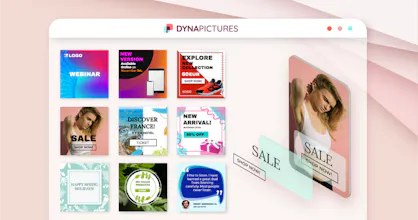
Auto-generate hundreds of personalized images in minutes for social media, e-commerce and emails. Connect preferred data source like Google Sheets or via No-Code to generate images and display your client names, products, coupons, or virtually anything else.
DynaPictures gallery image
Free Options
Launch tags:Design ToolsAPIMarketing
Launch Team
Auth0
Auth0
Start building with Auth0 for AI Agents, now generally available.
Promoted

What do you think? …

Oleksandr Vushkan
Hello Product Hunters! Thanks @markvitals for hunting us! I'm Oleksandr - Co-Founder of DynaPictures. I am very excited to launch and introduce DynaPictures to the community here! We have built DynaPictures for marketers and developers to help take away the pain from image preparation and processing in their daily routines. The goal is to optimise your efforts and provide you with tools to produce more visual content: - You can increase engagement on social media by generating banners and posting more. Here is what Sociamonials did [1]. - Increase response rate for your cold emails with personalized graphics. Here is our example [2]. - Better present your products by dynamically embedding them into mock-ups in your online store. Here is a quick demo [3]. - LinkedIn: Hire faster with automatically generated attractive ads. - Apps: create beautiful device mock-ups and promote your app. - E-commerce: Increase engagement and sales with personalized coupons for Christmas. We have opened DynaPictures to the public few months ago, listened to feedback and worked hard to implement majority of those: - Online spreadsheet, import from Excel and CSVs, bulk generation and download. - No-Code: Pabbly and Integrately were added in addition to Zapier. - Online Forms that you can share with other team members and delegate banner production. - Thousands of Google Fonts. - Media Library and Unsplash integration. - PNG, JPEG, WEBP and AVIF formats. Most of us don't have enough time and this is where design automation can help us. Please do get in touch and I will be happy to answer any questions you might have. [1] https://youtu.be/fnHH_8lbmUI?t=124 [2] https://dynapictures.com/blog/in... [3]
Aaryan Salman Zorabian
@ovushkan congratulations!
Oleksandr Vushkan
Thanks @aaryansalman ! Hope you will find it useful
Anna Vital
I needed some like this when I was running an infographic agency. Some customers asked to create hundreds of personalized infographic images based on different parameters. In the end my team used data merge (variable panel) in Adobe Illustrator. I remember it wasn’t easy to use, so we we were thinking about creating our own script or a tool.
Anna Vital
I‘m curios to know how this is different from Illustrator Data merge or Data in Sketch app, and data plugins in Figma? I mean this one: https://www.sketch.com/docs/desi... https://www.figma.com/community/... https://helpx.adobe.com/illustra...
Oleksandr Vushkan
Hi @annavitals ! Thank you for your message, indeed, many of our users run their agencies and use DynaPictures to create many personalized images quickly. Curious to hear your feedback about the design, UI, maybe there are any design trends we should also cover in our template library
Oleksandr Vushkan
@annavitals thanks for the question, in general these tools are similar, but require more manual work and are not that convenient as our cloud-based solution. If you go in details further, there is Unsplash integration for loyalty-free images and many other tools like Forms, etc that you can also use in addition
Preetam S Chaudhary
One of the best investments I made. Saved me hours!!!!
Oleksandr Vushkan
Many thanks @preetam_s_chaudhary ! Appreciate your feedback. Please let me know if you need anything in the product - maybe new kinds of templates or integrations.
Preetam S Chaudhary
@ovushkan Hi, I think it will be nice to import templates from canva, crello etc.
Oleksandr Vushkan
Thanks @preetam_s_chaudhary , understood. Added to the list. What about Figrma, Adobe Illustrator and similar tools? Would you be interested in importing from there as well?
Preetam S Chaudhary
@ovushkan I usually don't use them much, but the more integrations, the better user coverage.
Oleksandr Vushkan
@preetam_s_chaudhary understood, thank you!
Daniel Po
This is really nice! Many people, such as myself, really do better with visual aid - so implementing images and layout designs so easily with very grey spreadsheets is super valuable. Good luck with your product! :-)
Oleksandr Vushkan
Thank you @daniel_pt , appreciate your feedback! Would you generate images for social media, or something else?
Daniel Po
@ovushkan Honestly I think it would be most helpful for me in presentations -- taking tons of data and making it more memorable with images on top of tables and graphs, and obviously less text
Oleksandr Vushkan
@daniel_pt understood, thanks! We have bar charts at the moment and plan to expand the offer. If you need any other kinds of charts - please let me know!
Mark Vital
I was following trends in the design automation space and stumbled upon this product from Oleksandr. Basically, it helps to save time and improve productivity on one hand. On another hand, it opens new possibilities for those who want to provide better experience or new services to their clients, be it a social media agency, or SaaS product promoting events, speakers, etc. With support of such No-Code tools like Zapier, Pabbly and Integrately, there are many possibilities to produce more and better designs now.
Andreas Bufe
amazing german product with a fine roadmap and a lot of progress. i bought this some month ago and it is super to see the development progress. there is also a api you can generate pictures with. all with well documentation. thabk you
Oleksandr Vushkan
@andreas_bufe1 Thank you Andreas! We do our best, and there is even more to come in the next months!
Sergey Sh
If I understand it correctly, this tool allows me to add placeholders to my images to create new personalized images with different texts and image overlays. Is this correct?
Oleksandr Vushkan
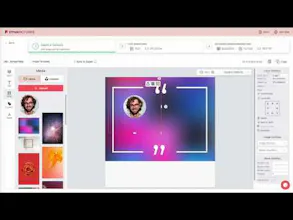
Hello @sergey_sh, yes, exactly. So essentially you can take any images and add text or image overlays to it. Every object in the image becomes a "layer" that you can customize later using our online spreadsheet, No-Code tools or API
Sergey Sh
@ovushkan How do I make sure every object is exactly in place, in the right position/layer?
Oleksandr Vushkan
Hi @sergey_sh , thank you for your question. If you start with a read-made template, then everything is already prepared for you, and each layer is positioned on the canvas. And in case you create a new image template from scratch, that you use our template editor to place and position elements/layers. Hope this helps, please let me know if you have any other questions
Sergey Sh
@ovushkan Oh I see, I didn’t realize I can use the editor…
Oleksandr Vushkan
@sergey_sh you can also use automatic positioning, for example, to say, that the image should be centerred within the rectangle, or stretched to its width...
123
•••
Next
Last