Launching today
Download Folder Customizer

Download Folder Customizer

Auto-organize Chrome downloads with dynamic patterns

1 follower

A Chrome extension that automatically organizes your downloads using smart folder patterns. Create dynamic paths like ${year}/${month}/${domain} to sort files by date, source, and file type—no manual work needed. Features: • Smart variables: year, month, day, domain, extension, MIME type • Advanced conditional rules (e.g., "PDFs → /Documents, images → /Pictures") • Export/Import settings for backup and sharing Perfect for anyone tired of messy download folders.
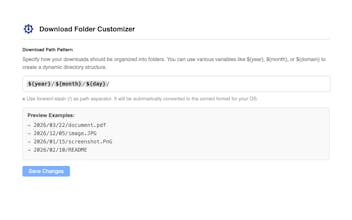
Download Folder Customizer gallery image
Free
Launch Team
Turbotic Automation AI
Build powerful automations without code. 1 Month Free!
Promoted

What do you think? …

nukesaq88
Maker
📌
Hey Product Hunt! I built Download Folder Customizer because I was tired of manually organizing hundreds of downloaded files every week. As a developer, I download documentation PDFs, code samples, and screenshots constantly—and they all end up in one giant mess. What makes it unique: Instead of just moving files to fixed folders, you create dynamic patterns like: • ${year}/${month}/${day}/ → Automatic date-based archiving • ${domain}/ → Organize by source website • ${ext}/${year}/ → Group by file type, then date And with Advanced Mode, you can set conditional rules like "Save all PDFs from docs.google.com to /Work/Documents" automatically. I'd love to hear your feedback! What variables or features would make this more useful for your workflow?