Launched this week

DockAMP Webstack Manager for Docker
Web interface to manage Apache/Nginx, PHP, DB containers
19 followers
Web interface to manage Apache/Nginx, PHP, DB containers
19 followers
DockAMP is a Docker image with a responsive web interface to manage official Apache/Nginx, PHP, MySQL/MariaDB/PostgeSQL and proxy containers in Docker.



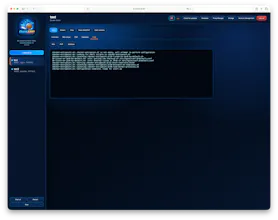


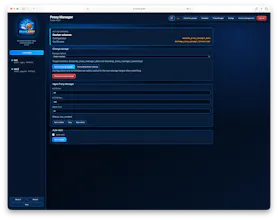

DockAMP Webstack Manager for Docker
DockAMP can run on any Docker-compatible environment. The image includes support for both linux/amd64 and linux/arm64.
🚀 Main features
- Browser-based management interface in English and German
- Apache or Nginx for each server
- Automatic PHP version discovery with legacy PHP versions available
- Advanced PHP, Apache, and Nginx configuration with structured dropdowns for common values
- Apache and Nginx security header controls for X-Frame-Options, Referrer-Policy, CSP, and related directives
- MySQL, MariaDB, and PostgreSQL
- Shared global or dedicated per-server database containers
- Automatic database image and data migration checks
- Nginx Proxy Manager integration
- phpMyAdmin integration
- Adminer integration for PostgreSQL databases
- SQL dump exports
- Container logs and status overview
- Live visitor overview with active request paths and per-server traffic speed
- Automatic free web-port selection starting above DockAMP's own port
- CPU and memory limits based on the available Docker host resources
- Docker volumes or host paths for persistent storage
- Initial setup can detect and choose Docker volumes or host mounts for /data and /sites
- Separate storage handling for DockAMP configuration and website/runtime files
- Storage migration between Docker volumes and host mounts where supported
- Host folder browser for document roots, host mounts, additional server mounts, and backup targets
- Folder creation and safer folder deletion dialogs in folder browser views
- Website file browser for document roots and additional mounts
- Upload files or whole folders directly through the browser
- Rename, copy, move, delete, and download website files or folders
- Download folders as compressed archives
- Webserver permission checks for document roots and additional mounts, with a repair action for safe read and traversal permissions
- Global image update checker for DockAMP-managed images, including DockAMP itself, web servers, PHP runtimes, database tools, proxy, Adminer, phpMyAdmin, and helper images
- DockAMP-managed unused image cleanup
- DockAMP-managed unused volume overview with individual delete actions
- User login and account management
- Automatic container restart and auto-start options
- Backup and restore support for Docker volumes and host-mounted storage paths
- Backup selection for DockAMP config, sites/runtime files, mounted web paths, dedicated databases, global database, and Proxy Manager data
- Optional restore selection per backup archive plus backup download as a compressed archive
- DockAMP automatically exports Docker Compose files so your containers can be started without DockAMP if needed.
The web-UI-over-Docker approach makes sense for the LAMP-style stack specifically — most container managers are general purpose, so you end up doing a lot of manual wiring for something as common as Apache + PHP + a database.
The thing I'd want to know before adopting it: if I change a container's config through the web interface, does that write back to a compose file I can commit, or does the UI become the source of truth? I've been burned before by tools where the running state slowly drifts away from what's in the repo, so I'm curious how you handle that.
DockAMP Webstack Manager for Docker
@ark_y_k Great point you have there. At the moment it writes only the settings in a json file in /data and creates runtime config files to copy in the nginx/apache/php-containers. But i will have a look into it to also let the system create compose files. I will ad this feature in the next update. 👍🏻
DockAMP Webstack Manager for Docker
@ark_y_k The automatic and manual compose file export is now implemented and available in version 1.2.4. If DockAMP should not be available in the future for some reason it is now possible to run the whole webstack with the compose files. All needed files are exported automatically in /data/compose-export with every change in the settings. The files are also included in the implemented backup function with exporting the whole /data volume or hostmount to the tar.gz file.
Thanks for your input, this helps to improve DockAMP. ☺️👍🏻
@keepcoolch That's a fast turnaround — I didn't expect the question to turn into a release. Thank you for taking it seriously rather than filing it away.
The reason it matters to me is exactly the line you put in there: if DockAMP isn't available for whatever reason, the stack still runs. That's the difference between a management layer and a lock-in. I'd trust a tool with my stack much sooner knowing there's a plain compose file underneath that I can commit and hand to someone else.
One small thing I'd be curious about now that export exists — is the export a snapshot, or does the file stay in sync as I change things through the UI? Snapshot is completely fine, I'd just want to know which one I'm holding when I commit it.
DockAMP Webstack Manager for Docker
@ark_y_k You're welcome. I take every useful idea very seriously. The compose files always renewed after each settings change so they are up to date. When you want to create multiple snapshots it is the best way to make a snapshot via backup function in the storage section manually or let the system handle the backup automatically with the chosen interval. 🙂
I also did a quick fix in the latest version a second ago which i saw with the folder permissions check. Please feel free to report me any issues, when you come across one. I'm very happy to help and fix the bugs, when something is not working as expected. I think now DockAMP is in a stable state to use it without hesitation. I'm also very open to new additions like your request. 👍🏻 With the built in Image Update manager it is very easy to check out the new version, if i'm releasing one.
the feature list here is genuinely comprehensive for a side project, especially the permission repair action and the image update checker. one thing I didn't see addressed - given the file browser, upload, and account management features, is DockAMP meant to sit behind a reverse proxy/VPN by default, or is it hardened enough to expose directly to the internet on a VPS? a web UI with folder browsing and file upload built on top of container management is a pretty juicy target if someone points it at a public IP without extra protection in front.
DockAMP Webstack Manager for Docker
@galdayan Please never ever expose the DockAMP dashboard to the public internet. It is meant to be accessed locally or behind a VPN because it's so powerful. You only expose the nginx reverse proxy container with port 80 and 443 to the public internet and point at the container port from your site e.g. 8085, because the proxy container and site containers don't have any rights to change anything in the background. Also don't expose your proxy dashboard with port e.g 81 to the internet. I hope this answer helps. ☺️
@keepcoolch clear answer, that matches how I'd want to run it - proxy on the edge, dashboard staying internal only. good to know you're thinking about the exposure surface deliberately rather than leaving it up to whoever deploys it to figure out on their own.