Explore the architecture of your app with an interactive graph and objectively measure its complexity. Dependencies supports your favorite programming language whether it is Swift, SwiftUI, Objective-C, C++ or Qt.
No reviews yetBe the first to leave a review for Dependencies for macOS
Firstly, huge respect for the author - I'm a tools and visualisation nerd who's been around from the earliest days of OO. I appreciate the amount of work that goes into the deep parsing as well as visuals of this tool.
I'm a bit irritated by the claim of lack of theory, as I just tweeted. The author takes a shot at the dumb old McCabe complexity but fails to mention the massive amount of work in the 90's.
This work includes (stuff I have so came to mind immediately):
Brian Henderson-Sellers' book "Object-Oriented Metrics: Measures of Complexity"
Lorenz/Kidd's book "Object-Oriented Software Metrics"
Robert Martin's paper "OO Design Quality Metrics" https://linux.ime.usp.br/~joaomm...
incorporated since into several of his books.
Note that it's not hard to find these - just typing "object-oriented metrics" into Amazon will list at least one of the books above.
Looking forward to upgrading to Big Sur (after my next major release) and trying this out. I'm really hoping he identifies the complexity from the common scattered snippets of code we have in closures - I've been concerned about this for a decade since lambdas came to C++ and Objective-C added the blocks feature from Smalltalk.
Just tone down the claims, and have a bit of respect, please.
@andydentperth1 Hey Andy,
Thanks a lot for your feedback! I greatly appreciate it.
One goal of Dependencies is to make it easy for any developer to visualize the architecture of an app:
- without having to set up a development environment
- without having access to the source code
As such you might be disappointed that Dependencies only creates an interactive graph of the dependencies between classes/structures. It doesn't analyze the source code of the app and won't display the closures/blocks.
Regards,
Alexandre
Hey folks,
I’m super excited to introduce Dependencies to you all. This side project started several years ago to solve some recurring problems I encountered:
- understand the architecture of poorly documented apps in order to add new features
- evaluate the quality of third party components without reading source code for weeks
- understand the architecture without having to set up a complex development environment (no source code, no need to compile the app, …)
Here’s a highlight of the Dependencies’s best features:
🧙 Easy to use
👆 Interactive graph
💪 Supports Swift, SwiftUI, Objective-C, C++, Qt, …
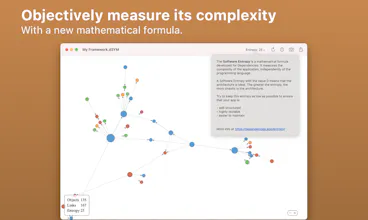
📏 Objectively measure the complexity of your app
🤝 Share screenshots and export the interactive graph as HTML
😎 Dark Mode support
🤖 Command Line for CI
🔎 Quick Look
🤩 Optimized for macOS Big Sur and Apple M1
How it works:
When you compile an app, Xcode generates a dSYM file which stores the debug symbols for your app. dSYM files are generally used to symbolicate crashlogs. But it turns out that you can recreate the whole architecture of your app just by analyzing its dSYM file.
How it measures the complexity:
I developed a new mathematical formula in the graph theory that I called 'Software Entropy'. Dependencies calculates the 'Software Entropy' score of your architecture to objectively measure the complexity of your app. This formula is documented at https://dependencies.app/entropy/
Thanks for checking it out 🙏 I’d love to hear feedback and will be happy to answer questions here or on Twitter @timacfr !




Dependencies for macOS
Dependencies for macOS