
DeckSpeed is a revolutionary AI presentation tool that creates professional, personalized slides based on your conversations, without templates. In other words, it's "Cursor for Slides", "McKinsey for everyone".



Free Options
Launch Team / Built With


Customer.ioAutomate Messaging Everywhere — Startups Get 12 Months Free
Promoted

Hello World, I’m Milton He Yan, founder of CoreSpeed Inc. and the maker of DeckSpeed.
I know “AI for Slides” might sound cliché by now — but DeckSpeed is a Truly Agent for presentation, one that may actually redefine what presentations can be.
Powered by our in-house Zypher Agent Framework, DeckSpeed supports:
• Checkpoint management
• Streaming feedback
• 🔌 MCP support & integration with a wide range of external tools
What you see today represents less than 20% of what DeckSpeed is capable of.
Feel free to push its limits.
Enjoy!🚀
https://discord.gg/deMMZ2mm
coming!
@miltonheyan Sounds like an exciting platform, Milton! DeckSpeed's potential for enhancing presentations is really intriguing especially with the Zypher Agent Framework. Kudos to everyone on the successful launch!
@shadmannazim Thanks Nazim!
@miltonheyan I tried your platform. After signing to the free trial it gives me Oops, something went wrong
We couldn't start the AI assistant that powers DeckSpeed. This might be because of a temporary issue with our systems. Please try again in a moment.
can you please make sure I don't get charged for the monthly fee and cancel my trial???
Can I edit the design with integrated design tools, or only with propmt?
If it's the latter one, can I export it as ppt or google slide?
@pritraveler you can try by yourself and then you would be surprised!
@pritraveler Great question! Right now, DeckSpeed is fully prompt-driven — there aren’t integrated drag-and-drop design tools yet. But the agent gives you fine-grained control over layout, visuals, and structure through natural conversation.
You can simply tell the agent what to change, like:
“Make slide 3 more visual — turn the bullet points into icons.”
“Add a pie chart comparing Q1 and Q2 revenue on the last slide.”
“Replace the image on slide 1 with something more technical.”
Even better — you can take a screenshot of the slide, highlight the area you want to change, and upload it with your prompt. The agent will understand the visual context and apply the change accordingly!
Currently, we support PDF export, and we’re exploring PowerPoint and Google Slides export based on user demand — so feedback like yours really helps us prioritize!
Let us know if that’s something you’d use — we’re actively shaping the roadmap! 🙌
@divyansh_tiwari7 Appreciate!
@divyansh_tiwari7 Thank you 🥰
@divyansh_tiwari7 Thanks so much, really appreciate the kind words! 🙌 We're actually using DeckSpeed internally for all our own decks — it's made our process at least 10x faster. We just drop in our rough ideas — DeckSpeed makes them shine. Excited to keep improving it with feedback from the community!
This product is amazing in many ways:
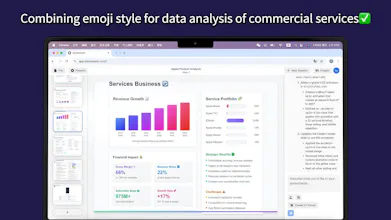
1. This is basically lovable for slide webpages; instead of making a consumer product for slides; It generates web pages(react?) for each slide instead. And use maybe web search for data retrieval with amazing charts and graphs; It finds the cites the source for data which is amazing.
2. I think this is probably an very expensive product looking at how many calls to Sonnet is made during the construction of a single prompt.
3. Some bugs/no instruction on how to get a 3d images I tried 2 queries with no results; Please post on what queries to make; Here's mine "Generate a 3d image of a rocketship and the word contact us on a page"
Actually one huge bug is there is no way to get seperate files and once you create one, when you go back again, there is a bunch of empty slides;
Congrats to the founder and team!
@rwanghacker Really appreciate the thoughtful and in-depth feedback — this is incredibly helpful! 🙏
1️⃣ You’re absolutely right — each slide is essentially a live, web-native page (yes, React!) which gives us a lot of flexibility in layout, interaction, and data rendering. It also allows the agent to dynamically pull in data, charts, and references — glad you noticed that!
2️⃣ About the cost — great observation, but it’s actually more affordable than it seems. We use aggressive prompt caching, so even if multiple Sonnet calls are made during composition, most of the tokens are reused. It helps us keep performance high and cost in check.
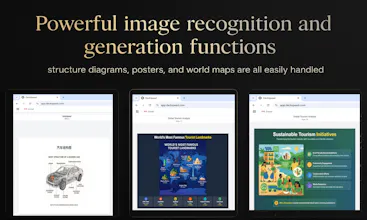
3️⃣ Regarding the 3D rocket example in our screenshots — yes! That’s powered by Three.js, which isn’t preinstalled in every project yet. Right now, new projects come with libraries like Chart.js, but you can actually ask the agent to install and use third-party libraries, including Three.js. That rocket scene is fully generated via prompt + agent scripting. We’ll be publishing some example prompts and how-tos soon!
4️⃣ As for the bug with empty slides and file state — thanks for flagging that. We’re actively working on UI fixes. In the meantime, a quick browser refresh usually resolves it, and you can also File → Save (top-left toolbar) to save your deck file and reload it later.
Thanks again for the kind words and deep dive — your feedback helps us make DeckSpeed better every day! 🚀
Recently, I have started learning MCPs and this product really excites me to continue learning and build something useful out of it!
@aryansharma17 thanks!
@aryansharma17 That’s amazing to hear — so glad DeckSpeed is helping fuel your MCP journey! 🙌 We’re really excited about the potential of Model Context Protocols too.
Quick heads-up: we’re launching an MCP/Agent Store very soon — it’ll make installing MCP servers and tools way easier. Plus, support for A2A (Agent-to-Agent Protocol) is coming as well!
Can’t wait to see what you build — feel free to share it with us anytime!
@haocorespeed That's great! I am waiting for your next thing.
@aryansharma17 Thanks, enjoy!🍺
Good idea. By processing user conversations, DeckSpeed generates presentation materials from the ground up. This method avoids templates to deliver content specifically shaped by the spoken or written input.
@cheersliu Absolutely spot on — thank you! That’s the core of DeckSpeed: we start from conversation, not structure. By listening first, the agent builds slides that fit your ideas, not force them into templates. Really glad you picked up on that — we’re just getting started!
@cheersliu Love how you put it — “from the ground up” is exactly our approach. DeckSpeed is built to listen first and generate content that’s truly shaped by your thoughts, not constrained by rigid templates. Thanks for capturing that so clearly!
@cheersliu Thanks Liu! 🙏 You nailed it—DeckSpeed’s core belief is that great presentations start with your ideas, not templates. By grounding everything in your natural input, we can generate content that’s truly tailored, not just formatted. Appreciate you seeing the vision!
How customizable are the generated decks? Would love to hear more about the AI's flexibility with tone and structure.
@azhu_azhu It's very customizable — you can specify the tone and structure you want from the start. After the first draft, you can ask our Zypher Agent to make precise edits, like “make the intro on the first slide more playful,” or even upload a screenshot and highlight exactly what you want changed. The AI will handle it for you.