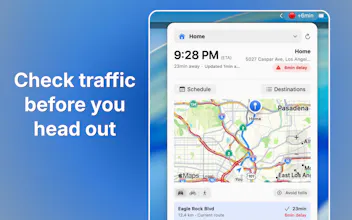
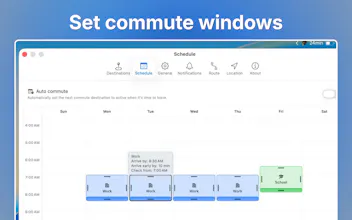
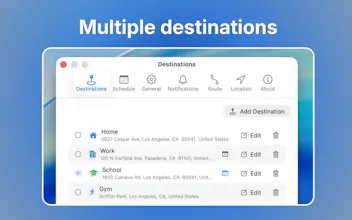
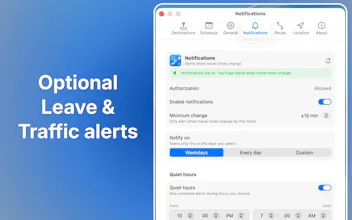
Glance at traffic. Leave on time. CommuteBar puts live commute times visibly on your Mac menu bar, no app-switching required. Save multiple destinations like office, school, gym. Schedule automatic switching for recurring commutes and get leave soon / leave now indicators and optional notifications. You also get route comparison, delayed traffic alerts and different travel modes.
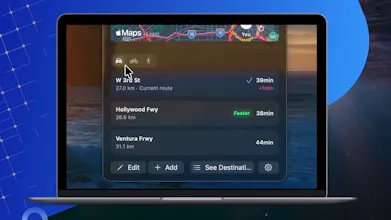
Today I'm introducing CommuteBar, which adds live commute times to your Menu Bar.
How did this idea come about?
One day, as I was about to start driving, I saw the roads were clear enough to head out. I thought for sure I'd be getting home early. Then, traffic showed up 15 minutes later, but only after I was already outside. That's when I knew what I was missing. A quick indicator within sight, sitting right next to my clock in the menu bar — the place I always check. Not another app to have to open and get distracted with while I'm already busy trying to do something.
With CommuteBar you get live commute times, always visible at a glance, that update when traffic changes without needing to open another Map app. Set it to automatically to switch to common commute destinations and then you can just look up when you need it. No need to set up events like in a calendar, just switch to any destination you have saved to monitor it at any time.
Location stays on your Mac. No accounts or logins needed. We respect your privacy.
CommuteBar is macOS 14+. Lifetime license, no subscription.
We're interested to hear how you handle leave timing today, and how we've saved you time staying productive on and off your commutes.
Get it at https://www.commute.bar
Available on Mac App Store.
Thanks for checking it out. Happy to answer anything 🙏
Just in time – I am travelling across countris so this comes handy!
Report
i wa also thinking that this is a quite unique product, its can be useful for traveling states to states.
Report
Nice work. Looks like a better way to know when to get going. Usually I have Waze running on my phone while I'm still at home on my computer. Good luck with this!
Report
Love that this lives in the menu bar instead of an app you have to open, turning "should I leave now?" into a quick glance rather than a decision.
Simple idea done right - this is exactly the kind of thing that should live in the menu bar instead of being its own app you have to remember to open. "Lifetime license, no subscription" for a small utility like this is also refreshing. One question: with the automatic destination switching, how does it handle a day where you have a stop in between (like dropping a kid off before work) - does it just show the next saved destination in sequence, or do you have to manually switch to it?
@galdayan Appreciate it Gal! The app handle overlaps like this: for the drop off time you mentioned, simply set that as the preferred window instead of work for that specific time in the scheduler. That will make it the target destination to switch to when its closer to the time. Only the slots you choose as "preferred" during an overlap will be overriden, the rest of the week for your work commute destination remains unchanged.
The Schedule view has an intuitive drag and drop interface, so you can arrange and adjust window with a drag of your mouse. You can use this to sequence commutes precisely one after another and setting the commute windows to be smaller in order to avoid overlaps in this case. Hope that helps!
@arthur_amshukov that makes sense, the preferred-window override is a clean way to handle it without needing a separate "stop" concept. thanks for the detailed walkthrough.
CommuteBar
minimalist phone: reduce your screentime
Just in time – I am travelling across countris so this comes handy!
i wa also thinking that this is a quite unique product, its can be useful for traveling states to states.
Nice work. Looks like a better way to know when to get going. Usually I have Waze running on my phone while I'm still at home on my computer. Good luck with this!
Love that this lives in the menu bar instead of an app you have to open, turning "should I leave now?" into a quick glance rather than a decision.
Dial
Simple idea done right - this is exactly the kind of thing that should live in the menu bar instead of being its own app you have to remember to open. "Lifetime license, no subscription" for a small utility like this is also refreshing. One question: with the automatic destination switching, how does it handle a day where you have a stop in between (like dropping a kid off before work) - does it just show the next saved destination in sequence, or do you have to manually switch to it?
CommuteBar
@galdayan Appreciate it Gal! The app handle overlaps like this: for the drop off time you mentioned, simply set that as the preferred window instead of work for that specific time in the scheduler. That will make it the target destination to switch to when its closer to the time. Only the slots you choose as "preferred" during an overlap will be overriden, the rest of the week for your work commute destination remains unchanged.
The Schedule view has an intuitive drag and drop interface, so you can arrange and adjust window with a drag of your mouse. You can use this to sequence commutes precisely one after another and setting the commute windows to be smaller in order to avoid overlaps in this case. Hope that helps!
Dial
@arthur_amshukov that makes sense, the preferred-window override is a clean way to handle it without needing a separate "stop" concept. thanks for the detailed walkthrough.