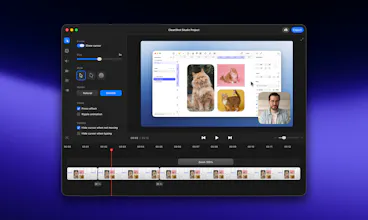
Create beautiful social media posts that stand out
🚀 Need to create a beautiful social media post? Say no more! In today's update we are introducing Background Tool!
✨ It's now easier than ever to make your screenshots pop with just a few clicks, right inside CleanShot!
CleanShot earns raves for speed, polish, and frictionless daily use—especially for quick annotations, scrolling capture, GIFs, and share links. Makers of
say it powers their product screenshots and routine team communication, praising its fast workflow and clean results. Users highlight native feel, robust video recording, OCR, and time-saving overlay/history. A few note frustration with the cloud-centric workflow and limited auto-dismiss options. Overall sentiment: a reliable, thoughtfully refined utility that teams adopt and rarely replace.
This app is worth every penny just for how much time it saves on styling. It’s important to me that screenshots look polished: CleanShot automatically adds a nice background (padding) and shadow, hides desktop icons, and standardizes the window size. What I used to do manually in Figma now happens automatically. The result is ready to be sent to Slack or pasted into a presentation immediately - it always looks professional.
What needs improvement
forced cloud usage (2)
vs Alternatives
Because of the attention to detail and aesthetics. It’s the only app that understands that a screenshot is a form of visual communication. The ability to automatically round corners, add padding, and drop shadows saves me hours of work in Figma. Plus, it works incredibly fast and feels like a native part of macOS, not third-party software.
Is there any inflexible workflow that slows you down?
The only issue is the overlay popup after taking a screenshot. Usually it's useful, but if you need to take a rapid series of shots one after another, it might cover the screen area you need. However this is solvable by setting up specific hotkeys for "save instantly" to a folder, bypassing the editing menu
I've become a great fan of CleanShot to quickly grab screenshots or small videos. I love the annotation tools and some of the small features when capturing video.
Something I would love for CleanShot to add are simple "highlight" tools, especially when editing video. For example, I would love it if I could record a video of me using some product and then edit it so that I can add a nice zoom-in at some point to highlight me doing something, then zoom back out, etc.
I currently do those kinds of videos with CleanShot + ScreenFlow (or just ScreenFlow), but I feel it could be a lot simpler and I trust CleanShot would do a great job with the UX of that.
I love cleanshot. As a customer facing, product person I can snap a shot, mark it up and send it where I need it. Also the the video cepturing is great. You feel how well thought through the flows and product as such is. Only thing that I would like to see is easier access to images I have already used once. Its no biggie, but it takes a few steps to restore an images that has been used before.
Money well spend. Warm recommendation.
OpenAlternative
CleanShot
ONES.com
Brew Money | Take control of your crypto