Launched this week

Brainlist Calendar
every notes entry shows up in your list AND your calendar
20 followers
every notes entry shows up in your list AND your calendar
20 followers
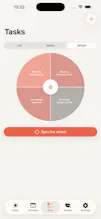
It's made from someone with ADHD for people who want to get tasks and events done. It helps you plan your day, with a list view that shows all events and tasks in one timeline AND a monthly calendar view that syncs automatically, as well as an Eisenhower importance/urgency Matrix and a spin-the-wheel picker for when you can't decide what to start with. With Brain Dump you quickly capture type or dictate a thought and then you can get back to it later without the note being buried away forever.









What do we get for paying for the pro version?
@sebastian_gherghe there are a bunch of things! you mostly pay to unlock AI planning. It estimates event times, breaks tasks down for you and preps reminders. If you record a meeting it can break it down into tasks. If you travel somewhere the Pro version also checks how long it takes to reach your event and reminds you when to leave. You can track your actual houseplants with watering and feeding reminders. You can subscribe Weekly, Monthly, or Yearly, each with a 7-day free trial. (Lowkey mainly to buy me a coffee)
Let me know if there are features you would want to see in the pro plan!!
Dial
the "brain dump now, triage later" flow is the part that would actually get me to use this daily - most task apps assume you can categorize a thought the second you have it, which is exactly the step that kills the habit. does the Eisenhower matrix view pull straight from the brain dump pile automatically, or do you still have to manually drag each dumped item into a quadrant before it counts as triaged?
@galdayan The capture is genuinely frictionless and the pile goes into the matrix on its own HOWEVER the Eisenhower triaging still needs to happen manually: two toggles, and a tap-out per item. You just made me excited to fix this though!
would you want a pop up after every item that lets you drag it into a quadrant or an AI deciding the quadrant for you? Thank you so much for your input!
Been using it for the past 2 days and yeah, really liking it so far.
The notes + tasks + calendar all in one place is pretty neat. Excited to see what you guys add next 😀
@khizar_alam Omg no way! I love that you are using it already!! If you ever don't like anything please feel free to text me! And if there's things you want added, let me know too! Thank you for your support!
Integration with ChatGPT's voice mode would be great! I plan my day by thinking aloud and would appreciate a more structured/visual output: https://developers.openai.com/api/docs/guides/live
@lukeribchester That’s a great suggestion! V2 is gonna be so much better!!