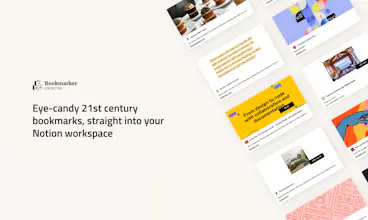
Unlock a new way of saving content into your Notion workspace, with candid URL previews which adapt to the content. Save anything from images, text extracts, articles, and much more!
Hey Product Hunters! ✋
If there’s something product management has taught me over the years: that would be that it’s not about the solution, it’s all about the problem 💥
We all know Notion is a blast, whereas you want a private table for personal finance, a collection for inspiration gathering, or any type o information structure, you may have it all in one place.
But there are still a couple of challenges around that:
- Saved links do not represent content faithfully
- Saving is thoroughly manual
And here is where Bookmarker for Notion plays its role. We created a ‘clipper’ that would focus on the content, ease the content-saving journey and offer the personalization flexibility Notion has.
We’ve got your back for:
✍️ Quick text extracts save
🖱️ Right-click speed image saving
🔗 Fast URL save
🧑🎨 Awesomely visual bookmarks for ease of search and recognition help
You may not even be able to fully imagine its potential so check all our inspo templates over our website.
And this is just the beginning, go take a look and stay tuned for more!
We will welcome all your feedback with leading gratitude.
Cheers 🤟
PS: Thanks @benln for the hunt, YOU ROCK!
Report
Maker
@benln@martin_gg really love to see the different previews for different sources! A greater differentiator from other bookmarks extensions.
@benln@imtiyaz922 Glad it comes in handy, we have several use cases on our website if you wanna check them out!
Report
Sorry for being plain stupid: how is this actually different from different Notion clippers? Most of them can add photos as the cover and icon of the Notion page, a d clip the URL, and other info of the webpage such as the title and description. And also include highlights, additional screenshots, and save other info as tags.
And yes you can show these as a gallery also.
I wonder if I just missed something.
@riia_jarvenpaa Hi Riia! Thanks for sharing your questions.
The first main difference is that we incorporate info on the actual cover and automatically, most clippers have the manual option and do it on the body of the page or properties. This delivers a greater ease of recognition within saved contents when you actually get back to your dashboards. You can see an example on e-commerce site use cases https://zeppelinlabs.notion.site... , and this will adapt according to the content, therefore providing and enhanced user experience. The aesthetics are also hardly different from any clipper out on the market.
We also have an extract saving method via right-click which enables quote and image saving and also takes information directly into the actual cover, making it more visual and content-adapted. This feature might be similarly available in one or two clippers but with a much less visual aspect. You can check our reference here https://zeppelinlabs.notion.site...
Hope this makes things more clear, and hope you test the product and provide any further questions or feedback you may have :)
Report
Call it an occupational hazard of mine. We do marketing and design and I couldn't help but notice a misspelling on your home page. It says: "Don’t loose an amazing shot on that slack channel anymore!" The word is "lose". You might want to go in and make that quick edit? Otherwise, great site and looks like a great product too!
I had the opportunity to try this one out very early on.
It's the best Notion clipper out there for aesthetics.
Congrats on the launch guys! All the best 🎉
I've been looking for a product like this for a long time 🤩.
I had tried many different solutions but I never found one as simple and practical as this one.
Thank you so much for launching this! It's amazing 🚀🔥




Deblank Colors
Deblank Colors
Deblank Colors
Deblank Colors
Deblank Colors
100+ AI Side-Hustle Ideas
Deblank Colors
100+ AI Side-Hustle Ideas
Deblank Colors
Mirro
Deblank Colors
Deblank Colors