

AI Product Manager
Bringing engineering discipline to AI development
59 followers
Bringing engineering discipline to AI development
59 followers
The AI Product Manager Agent automates your entire SDLC: generates PRDs, designs architecture, decomposes sprints, and orchestrates AI developers through Claude Code, cursor, trae or any of your favorite coding agents that work with MCPs. Ship 5x more features with zero manual handoffs. PRD to production in 72 hours, not weeks.


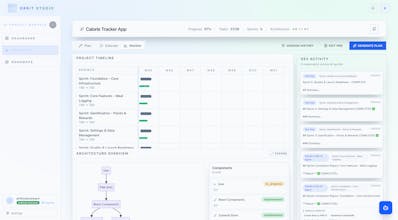
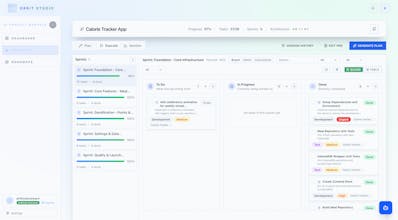


This came out of my own frustration while building a larger AI platform, every project felt scattered, and I couldn’t keep context straight between PRDs, prompts, and architecture.
So I built this to make my own workflow saner. It’s still simple, but it’s been genuinely helpful, so I wanted to share it here. Would love to know if it resonates with how you manage AI builds in Cursor or Claude Code.
@ojas_j Totally feel this — I’ve seen how messy AI projects get when context and dependencies slip through the cracks. From a customer success lens, giving teams clear visibility and helping them actually deliver on their goals is huge. Curious how others are managing progress and blockers in their workflows — what’s working, and what’s still frustrating?
As builders ourselves, we kept running into the same issue: AI projects move fast, but tracking progress, staying organized, and keeping a roadmap aligned often fell apart. Most IDPs focus on creation, not accountability.
That’s exactly why we built AI Product Manager. It brings the same engineering discipline and structure that traditional software development enjoys, but tailored for AI workflows.
We’d love to hear how you currently manage progress and planning in your AI projects: what’s working, what’s not? Your feedback will directly shape our next sprint.
@prakhar08 Absolutely, community feedback would be gold!
@prakhar08 Loved partnering with you on this!
Curious where you see this going long term, do you imagine AIPM staying focused on dev workflows, or evolving into a broader platform for running AI operations?
@rohit_pm Right now, AIPM is intentionally focused on AI dev workflows, just making it easier for builders to keep structure, context, and flow while they work in tools like Cursor. But the long-term vision is bigger.
This started as a companion for solo builders, but the direction is toward a broader AI operations layer, where agents, projects, and context all live in one shared workspace. The idea is that what begins as personal workflow discipline eventually becomes team-level orchestration.
For now though, I’m keeping it grounded in what I actually use every day. The platform vision will grow from there, naturally.
Great idea solving this specific organizational pain; is there a feature for tracking model performance metrics?
Thank you @masump That’s a great point, and honestly a really good idea.
Right now, AIPM tracks model consumption and outcomes across different projects so you can see where tokens are going and what each model is being used for. But we don’t yet measure output quality directly.
Tying performance metrics to actual quality or success of the output would be a huge value add, especially for comparing how different models handle the same task. Definitely something I’d love to explore as the platform evolves.
@ojas_j This is such a smart idea. If I’m already using Cursor, what’s the easiest way to plug AIPM into my current workflow?
@ram_singh39 Thanks! I wanted the setup to feel as lightweight as possible, no plugins or heavy integrations.
You just head to Settings → API Keys, generate one, and click to copy the ready-to-paste JSON snippet. Drop that into your mcp.json file inside Cursor, save, and you’re connected.
Then, when you’re ready, hit “Send instructions to MCP” in execute mode, Cursor will either pull the available job from AIPM or you can just paste the IDE prompt directly. From there, it runs with full context.
Takes less than a minute to get going. I tried to make it so builders could spend more time building, not wiring things up.
AI projects move fast and it’s easy for tasks or blockers to get lost. From a customer success perspective, giving teams clear visibility and accountability is what turns planning into actually delivering and that’s exactly why we built AI Product Manager
Curious how others keep their AI projects on track — what works, and where do you still get stuck
Product management has so many repetitive tasks ripe for automation, roadmap updates, ticket triage, stakeholder summaries. Would love to hear how your AI integrates with tools like Jira or Notion.
@david_br Those are such great ideas David, in the first release we focused on nailing the core workflow of architecture + Delivery plan generation and then building a bridge of communication between the PM Agent and Coding Agent, so progress can be tracked in an interoperable manner, next we're planning to embed the agent in the user's ecosystem, that would include, receiving ticket level info from Jira or exporting documentation to Notion and integrating with IM products to delivery status updates and HITL alerts.
I'd love your feedback on how you feel the instruction generation and communication between the agent and PM feels. Thanks! Ojas!