
AI Proctor by Qlay
AI Proctor: AI that protects fairness in hiring & tests
194 followers
AI Proctor: AI that protects fairness in hiring & tests
194 followers
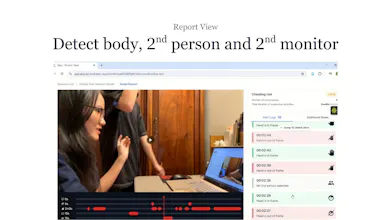
AI Proctor by Qlay detects the most sophisticated AI-assisted and other forms of cheating during online tests and interviews. It uses a mobile app that turns the candidate’s smartphone into a second camera. With object-detection AI, the app monitors the environment in real time and flags unauthorized devices as well as suspicious body, head, or hand movements.


👋 Toku here, CTO of Qlay.
The problem
Cheating in online tests and interviews has evolved.
Candidates now use AI tools and second devices, making cheating harder to detect with traditional proctoring.
Why we built this
We built AI Proctor by Qlay to help organizations stay ahead of AI-assisted cheating without adding friction for honest candidates.
How it works
AI Proctor by Qlay detects even the most sophisticated cheating behaviors:
Uses a mobile app as a secondary camera
Turns the candidate’s smartphone into a monitoring device
Applies object detection AI to flag:
Unauthorized devices
Suspicious head, hand, or body movements
Works in real time during tests and interviews
The result
Fairer, more transparent online assessments — for both candidates and organizations.
Try it & connect
If you’re a test administrator or hiring team, we’d love to hear your feedback.
Happy to answer questions and learn from the community 🙌
Hey team, wishing you good luck with the launch :)
@busmark_w_nika Hi Nika! Thank you for your support as always. Let us know if you need support anytime!
@busmark_w_nika Hi Nika! :) Thank you for your support!
@uyen_tr You are welcome :)
The dual-camera setup feels intuitive and easy to explain to candidates, which helps with transparency. Instead of secret monitoring, it clearly shows what is being checked and why, making the process feel more legitimate and less like covert surveillance.
@nguyen_minh_anh1990 :) Thanks Minh Anh! We'd love to know more if you have any more feedback.
I can see this being especially useful for technical interviews where candidates might try to reference another device. The second camera angle makes that much riskier and encourages candidates to rely on their own knowledge.
@phamvanhungglo2912 Thanks Canillo! Did you have any difficulty while setting up the proctor?
Hi PH fam! 👋 I’m Uyen from Qlay, and I’d love to share a POV as a uni student.
When I took the entrance exam for TUDelft, the setup took quite a while. I had to use my laptop camera to show every angle of my room and make sure my hands were always visible on camera by lowering the screen which made it quite difficult sometimes while reading.
Because of that experience, we’re focused on keeping things simple and improving step by step. If you’re a university or a student, we’d love to hear your feedback on what we can do better.
Thanks!
I like that the system monitors the environment rather than invading the candidate’s computer. That separation may feel more privacy-conscious while still giving administrators the visibility they need.
@ledesma_lian1989 Thanks Ledesma! :) Appreciate your feedback. Would love to know more if you have more feedback.
Congrats on the launch! 🛡️ Proctoring is a tough nut to crack regarding user privacy.
Curious about the data retention policy: Do you process the video feed locally on the device, or is it streamed/stored? As a founder focused on trust/compliance, I know how critical GDPR concerns are for European clients.
Good luck today!