MCP Gateway

MCP Gateway

Turn APIs into MCP endpoints,without changing a line of code

35 followers

🧩 MCP Gateway - A lightweight gateway service that instantly transforms existing APIs into MCP servers with zero code changes. Features Docker deployment and management UI, requiring no infrastructure modifications. - mcp-ecosystem/mcp-gateway
MCP Gateway gallery image
Free
Launch Team / Built With
AssemblyAI
AssemblyAI
Build voice AI apps with a single API
Promoted

What do you think? …

Leo
Maker
📌
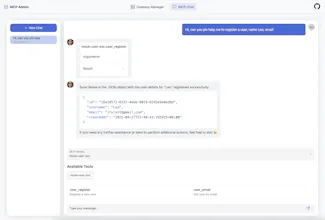
👋 Hi Product Hunters! I’m excited to finally share MCP Gateway with you! MCP Gateway helps you turn existing REST/gRPC APIs into MCP (Model Context Protocol) services — effortlessly and without touching your original code. 🚀 It’s lightweight, open-source, and designed for developers who want to bridge traditional APIs into the future of AI ecosystems. We built this to make it easier for more projects to tap into AI-native workflows without having to rewrite everything. I’d love to hear what you think! 💬 Feel free to ask questions, share feedback, or just say hi! Thanks so much for checking it out! ❤️
Leo
Maker

As the MCP ecosystem continues to grow, more projects and B2B services are starting to adopt MCP.


When MCP is truly applied in production environments, adapting and integrating existing API services will inevitably become a challenge — often requiring significant engineering and system investments.


That’s why I believe there is a real need for an “Nginx-like” reverse proxy at the MCP layer — a tool that enables individuals and businesses to quickly connect their existing APIs into the MCP ecosystem at low cost, allowing them to validate ideas and markets without heavy upfront refactoring.


Currently, Higress is the major gateway solution supporting MCP, and it demonstrates strong technical advantages in large-scale scenarios. However, in terms of access cost, documentation maturity, and development flexibility, it may pose a higher barrier for some projects — especially when second development is needed, given the complexity of the Istio/Envoy/Wasm stack.


Based on this background, I built and open-sourced MCP Gateway — a lightweight, platform-neutral, and low-overhead MCP gateway that can be quickly deployed on local machines, standalone servers, or Kubernetes. Through simple configuration, you can easily transform existing API services into MCP servers.


The future of this market is still uncertain, but I truly believe building a tool that fills this gap and lowers the adoption barrier is something meaningful.


You’re warmly welcome to try it out — and I’d love to hear your feedback and suggestions! ❤️

Matteo Rider

@ifuryst Congratulations on the Launch.

Leo
Maker

@matteo_rider Thanks a lot, Matteo!❤️

Daniel Reed

This is such a brilliant idea effortless API transformation without any code changes is a massive win for agile teams. Does it come with built-in support for rate limiting or caching, or would that need to be managed separately?

Leo
Maker

@daniel_reed3 Hi Daniel, thanks so much for your kind words!


Regarding rate limiting, it’s not built-in yet, but it’s already on our roadmap.


We’re rapidly iterating on high-availability features to ensure MCP Gateway is stable and reliable for production use, and rate limiting is part of this plan.


As for caching, could you clarify which kind of caching you’re referring to? I’d love to hear more, and if it fits, I’ll make sure to include it in our roadmap as well! 😄

Carlos Finley

This feels like a fantastic upgrade for API-driven systems. The seamless deployment and Docker support make it a no-brainer for development teams eager to integrate MCP without any hassle.

Leo
Maker

@carlos_finley Hi Carlos, thanks for your feedback!


You’re absolutely right. I believe this is a major gap in the current market. While MCP adoption today is still mostly client-side, with many MCP Servers implementations focusing on stdio, we’re confident that as the protocol matures, server-side applications — especially over SSE and Streamable HTTP — will become much more common.


In fact, we’re already seeing Anthropic actively evolving the MCP spec to better support server-side and enterprise production use cases, which is very encouraging for the ecosystem overall.

Matteo Rider

Is the transformation process instantaneous or does MCP Gateway need any schema tweaks before an API is ready for MCP?

Leo
Maker

@matteo_rider Hi Matteo, thanks for the great question!


No modifications are needed on your existing API — you just need to set up some simple configurations.


You can check out an example I shared here:

https://www.producthunt.com/posts/mcp-gateway?comment=4563701

Grayson Parker

Since MCP Gateway requires no code changes how does it maintain API compatibility across different versions?

Can it automatically adapt to breaking changes in the underlying API?

Leo
Maker

@grayson_parker2  Hi Grayson, great question!


MCP Gateway operates at the protocol translation layer and is non-intrusive — it simply forwards and transforms requests without interfering with the underlying API logic.


For example, if your API evolves from /api/v1/users/ to /api/v2/users/, you can easily configure MCP Gateway to route them separately based on their paths.


BTW, there’s a small trick here: when LLMs interact with similar API definitions, they might get confused about which version to use, especially if the descriptions are not clearly distinguished. Handling LLM-side ambiguity goes beyond the scope of MCP Gateway itself, but it’s something to be aware of when designing multi-version APIs.


Hope this helps!

Brooklyn Campbell

@ifuryst Is the transformation process instantaneous or does MCP Gateway need any schema tweaks before an API is ready for MCP?

Leo
Maker

@brooklyn_campbell Hi Brooklyn, thanks for reaching out!


No modifications are needed on your existing API. You just need to set up some simple configurations.


For example, you can call your API directly like:

curl http://localhost:5236/users -X POST -d '{"username":"Leo","email":"ifuryst@gmail.com"}'

and get a normal response:

{
  "id": "2167bc63-9567-4444-a31d-80dbc9a2f19b",
  "username": "Leo",
  "email": "ifuryst@gmail.com",
  "createdAt": "2025-04-28T19:55:17.637497+08:00"
}

Then, with minimal configuration, like this:

name: "mock-user-svc"

routers:
  - server: "mock-user-svc"
    prefix: "/mcp/user"
    cors:
      allowOrigins:
        - "*"
      allowMethods:
        - "GET"
        - "POST"
        - "OPTIONS"
      allowHeaders:
        - "Content-Type"
        - "Authorization"
        - "Mcp-Session-Id"
      exposeHeaders:
        - "Mcp-Session-Id"
      allowCredentials: true

servers:
  - name: "mock-user-svc"
    namespace: "user-service"
    description: "Mock User Service"
    allowedTools:
      - "user_register"
      - "user_email"
    config:
      Cookie: 123

tools:
  - name: "user_register"
    description: "Register a new user"
    method: "POST"
    endpoint: "http://localhost:5236/users"
    headers:
      Content-Type: "application/json"
      Authorization: "{{.Request.Headers.Authorization}}"
      Cookie: "{{.Config.Cookie}}"
    args:
      - name: "username"
        position: "body"
        required: true
        type: "string"
        description: "Username"
        default: ""
      - name: "email"
        position: "body"
        required: true
        type: "string"
        description: "Email"
        default: ""
    requestBody: |-
      {
        "username": "{{.Args.username}}",
        "email": "{{.Args.email}}"
      }
    responseBody: |-
      {
        "id": "{{.Response.Data.id}}",
        "username": "{{.Response.Data.username}}",
        "email": "{{.Response.Data.email}}",
        "createdAt": "{{.Response.Data.createdAt}}"
      }

  - name: "user_email"
    description: "Get user by email"
    method: "GET"
    endpoint: "http://localhost:5236/users/emai..."
    args:
      - name: "email"
        position: "path"
        required: true
        type: "string"
        description: "Email"
        default: ""
    responseBody: |-
      {
        "id": "{{.Response.Data.id}}",
        "username": "{{.Response.Data.username}}",
        "email": "{{.Response.Data.email}}",
        "createdAt": "{{.Response.Data.createdAt}}"
      }

MCP Gateway can expose it directly as:


SSE:
http://localhost:5235/mcp/user/sse
http://localhost:5235/mcp/user/m...

Streamable HTTP:
http://localhost:5235/mcp/user/mcp

On the MCP client side (for example in Cursor), you can easily configure it like this:

{
    "mcpServers": {
      "user": {
        "url": "http://localhost:5235/mcp/user/sse"
      }
    }
}

That's it 😎