Launching today

What runs on my GPU
Pick your GPU, see which open AI models fit on it
1 follower
Pick your GPU, see which open AI models fit on it
1 follower
Start from the hardware you have, not the model you want. See which popular and trending open models fit on your GPUs, with the memory math behind every verdict. Free, no sign-in, in five languages. For teams that keep AI on their own hardware.


Free
Launch Team

AWS Activate CreditsCredits that fuel your startup’s next milestone
Promoted
Hi Product Hunt, Pawel here, maker of What runs on my GPU.
Picture 2 a.m. A reporter has a 400-page leaked document and a source who has stopped answering. An AI could read it in minutes. She can't paste it into a cloud service: if the document leaves her desk, her source could lose everything. (The scene is invented. The numbers below are not.)
So the question is not "which model is best?" It is "what can run on the hardware I can put on that desk?" Most tools start from a model and ask what it needs. This one starts from your hardware.
What you can do:
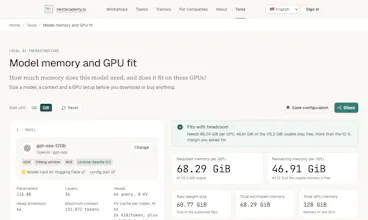
Pick a GPU (a whole card, a MIG slice, a DGX Spark) and how many. Set the context length and the number of parallel requests.
See the popular and trending open models from Hugging Face that fit, each in the best precision that fits, with the memory left over.
Open any result to see the formula behind it: weights, KV cache, overhead. No black box.
Size the model you like in detail and get vLLM or llama.cpp commands to run it.
Share a setup with a link.
A few numbers from the tool:
One NVIDIA DGX Spark (128 GB) holds gpt-oss-120b: 117 billion parameters, Apache 2.0, 68.3 of 115.2 GiB. 30 of the 55 models in the catalogue fit on that one box.
With eight RTX PRO 6000 Blackwell Server Edition cards in one server, models of almost 400 billion parameters fit (Qwen3.5-397B, 59.8 of 86.4 GiB per GPU).
Honest limits: this is memory math, not a benchmark. "Fits" says nothing about speed, and a few KV cache figures are flagged as estimates.
Free, no sign-in, in English, German, French, Spanish and Russian. Which GPU would you try first, and which model should I add? Built by Next Academy.