Launching today

Wenlan
AI wiki that tells you what it can’t back up..
3 followers
AI wiki that tells you what it can’t back up..
3 followers
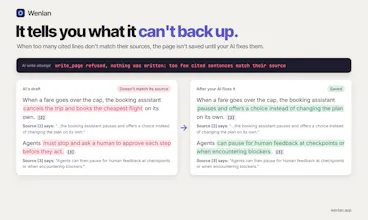
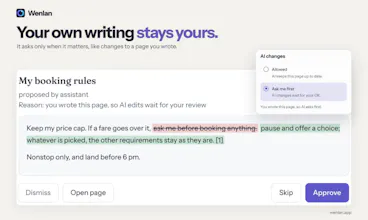
Most AI will happily cite a source that doesn’t support the sentence. Wenlan checks every cited sentence against the original and refuses to save a page when too few citations match. It then tells your AI why so it can fix it. When a source or code changes, related pages get flagged. You stay in control of which pages AI can update. Turns your notes (.md), code, docs, and AI chats (memories) into one wiki on your machine. Free, open source, local-first. Works with Claude, Codex, and Obsidian.





Dear Product Hunt, I’m Qi-Xuan. Wenlan is a wiki your AI writes from your notes, code and chats, and it shows you where things came from and checked against them.
I’m a software engineer, at startups and big tech, and I’ve been building this on my own since February. This is my first time launching product here.
The moment that got me was realizing I couldn’t trust what my AI wrote into my notes. Even after another model checked it and wrote it back, a lot could still be wrong. And keeping a vault healthy felt like a war that never ends. Stuff contradicts itself, goes stale, ends up scattered everywhere... I stopped wanting to open my notes at all. I kept seeing Obsidian folks say the same thing, a big vault, AI messing it up, and a pile of plugins to babysit.
It started with Karpathy’s LLM wiki idea. I built agent memory first, then saw the bigger problem was my stuff scattered across files, code and every AI tool’s chats.
So Wenlan does a few things
• pages link back to their sources
• it won’t save a page it can’t back up, and tells your AI why so it can fix it
• when a source or your code changes, the pages built on it get updated
• it only changes your existing notes if you say OK
I just want people to open their notes again. AI build upon their knowledge pages more reliably and have them actually help you and your AI solve the next problem.
Free, open source, runs locally on Mac and Windows. Works with Claude, Codex, Cursor and more.
What do you worry about most when AI organizes your notes?
Tried this out myself with Kimi, and it works flawlessly with my notes and docs - thanks for the user-friendly UI. No plugin problems after setup - it just connects and works.
@lev_future glad that really works for you, let me know any more issues happen, I should attend to those in time