
CleanShot
A superior way to capture your Mac's screen
4.9•55 reviews•1.1K followers
A superior way to capture your Mac's screen
4.9•55 reviews•1.1K followers
Discover a superior way to capture your Mac's screen with built-in annotation and amazing Quick Access Overlay.
This is the 6th launch from CleanShot. View more

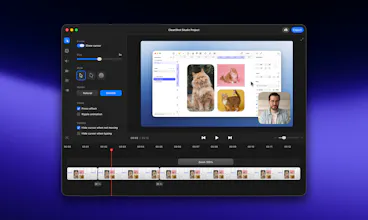
CleanShot 5.0 with Studio Mode
Launching today
CleanShot is the definitive Mac-native toolkit for screenshots, recordings and collaboration.
The new Studio Mode is all you need to turn a simple screen recording into a polished, professional video — with the quality you expect from CleanShot.
Available now on all plans. No subscription required.



Payment Required
Launch Team


CleanShot
Hey Product Hunt! 🚀
I'm the co-founder of CleanShot, and I'm super excited to finally launch CleanShot 5.0 with Studio Mode and the new Video Editor!
Our mission with this was very simple: make the editor as powerful as possible while keeping it minimalistic and beautifully designed.
And the best part? It's still a fully native Mac app with great UX and performance.
The Studio Mode is available on all CleanShot plans. No subscription required.
We're just getting started, and we have a lot of new stuff planned for the Video Editor, but I'm excited to hear your feedback! 🙌
Coldtea
@lukaszmtw QQ: Do Setapp users get the same update?
CleanShot
@ohansemmanuel yes! The update is already available in Setapp. 😊
Coldtea
@lukaszmtw Brilliant! had to do a manual udpate. Thanks!
devlogs.gg
I love this app. It's essential on a Mac. Looking forward to giving 5.0 a shot.
fred's point abt screenshots giving agents context is exactly what i'd use it for. does studio mode keep the raw cursor path so zooms can be redone after?
CleanShot
@niveditha_patluri1 Yes! You can even save an editable CleanShot project for later.
Cleanshot has been one of my favourite mac apps for a while, I've evangelised numerous colleagues to get it and use it dozens of times a day to bring context to agents and humans. The new release looks like a huge addition that I'm sure I'll use for the more polished screen recordings I need to do!
CleanShot
@fredrivett Happy to hear that! 🤝
DiffSense
Can it do these kinds of 3d pano animations of screen recordings. The ones that look really interesting for Hero sections on websites etc?
I dont quite get the upgrade from the build in Mac OS functionality to take screenshots, record video. not trolling can you give me 2 sentences of what this enables me to do ? I see editing but thats bout it, no? downloading a copy know but wish the value was more clear. thank you
Looks like Cleanshot is slowly pivoting towards screen recording to compete with Screenstudio and others