Write your day by hand on iPad. Penlog reads your notation, so a task stays a task and carries forward onto tomorrow's page until you cross it off. That part is free. When you want it, your Notion and your AI assistants can read the page and write back.
Hi, I'm Rick. I built Penlog, and this is my first Product Hunt launch!
I have years of handwritten journals, usually one notebook per quarter, on the bottom shelf of the bookcase in my home office. I know exactly where they are. That's not the problem (and never has been). I am usually somewhere else when I want something out of them, and even then I have to figure out which volume to dig out first.
It seems like every app that solves this asks you to stop writing by hand and type instead. That does work, but it's not for me. The writing is where I do the thinking.
So for a long time I ran a workaround (or 4): GoodNotes, export, drop the PDF into Notion, have Notion AI pull the text out, then retype the tasks. It kept the notes reachable. It also flattened the messy thinking into tidy rows and threw the rest away.
Penlog is what I built instead. You write your day by hand on an iPad. It reads your notation, so a task you write stays a task, and it carries forward onto the next day's page until you cross it off. Just marking it off tells Penlog the task is closed. That part is free for all users.
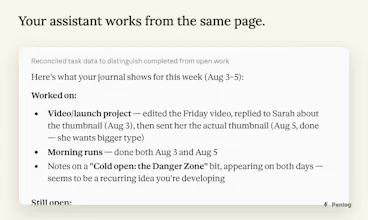
If you want more than that, your Notion and your AI assistants can read the page and write back to it. There is an MCP server, so Claude can ask what you wrote last Tuesday, or put tomorrow's tasks on tomorrow's page before you open it. Those connectors are the paid tier.
The limits: It is iPad and Apple Pencil only, iPadOS 18 and up. A vision model reads the page, so it is not deterministic. It holds up on my handwriting, which is bad, but I cannot promise it holds up on yours.
Try it and tell me what your handwriting does to the OCR.
https://apps.apple.com/app/id676...
Report
No reviews yetBe the first to leave a review for Penlog