
Doculigent — record, transcribe, share
Record it once. Never explain it twice
5 followers
Record it once. Never explain it twice
5 followers
Doculigent is a privacy-first AI meeting assistant that records, transcribes, and analyzes meetings locally using Ollama or Whisper.cpp, or your own AI provider. Beyond summaries, AI Project Managers automatically review your team's recordings to identify completed work, blockers, action items, and deadlines. Chat with any meeting instead of rewatching hours of recordings, and share knowledge securely across your team.




We’ve been working on making Doculigent videos easier to understand without making the editing process more complicated.
One thing that kept coming up was: “How do I make it obvious what I’m talking about on screen?”
That’s where Callouts came in.
You can now highlight specific parts of your screen while editing — a button, field, feature, or anything else you want the viewer to notice.
It’s a small addition, but it makes product demos and walkthroughs feel much more natural. Instead of explaining where something is, you can simply point it out.
Would love to hear how you currently handle this in your screen recordings.
#ProductDemo #ScreenRecording #VideoCreation #SaaS #Productivity #ProductMarketing #NoCode #AI #Doculigent
We’ve been expanding Doculigent’s recording capabilities, and the goal is to make it a more complete alternative to tools like Loom and Screen Studio.
You can now record without worrying about recording limits, capture your screen, camera, microphone, and system audio, and keep editing after the recording is finished.
Doculigent can also automatically add zoom animations to help focus attention on important parts of the screen, along with cursor tracking, click effects, annotations, and camera overlays.
For exports, you can choose 1080p or 4K, with support for up to 60 FPS.
We're also working on making sharing simple, so you can go from recording to sharing without adding unnecessary steps.
What we're trying to build is not just another screen recorder.
The bigger idea behind Doculigent is to bring together:
Screen and camera recording
Automatic zoom animations and visual effects
Cursor tracking and click effects
Video editing
Instant sharing
1080p and 4K exports up to 60 FPS
Transcription and AI insights
And because Doculigent is open source and local-first, you have more control over where your recordings and data live.
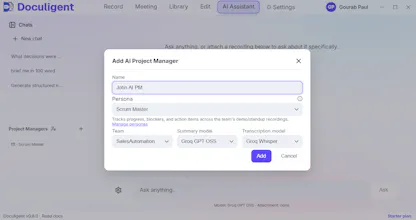
Meet John — your AI Scrum Master.
Explain the 2–4 hour team recording → blockers → progress story.
Doculigent is now available on Windows, macOS & Linux 🚀
We’ve just released support for all three major desktop platforms.
Why pay for another license and another storage subscription when you already have Google Drive?
You already have the storage. You already have the files. So why pay again just to record, polish, and share a demo video?
Doculigent let you Record your screen, and turn it into a polished demo video in seconds with:
- Automatic zooms
- Click effects
- Sound effects
- Clean, professional video output
And now, Doculigent comes with native Google Drive storage.
Connect your own Google Drive and store your recordings and shared videos directly in your existing storage.
- No additional storage subscription.
- No vendor lock-in.
- No paying for storage you already own.
And Doculigent is free and open source.
Record. Polish. Share.
Your Drive. Your videos. Your workflow.
Why pay for storage you already have?
#Doculigent #OpenSource #GoogleDrive #ScreenRecording #Productivity