
Audeus
Read Aloud PDFs, GDocs, Email, & More - Works Where You Do
6 followers
Read Aloud PDFs, GDocs, Email, & More - Works Where You Do
6 followers
Audeus is an AI-powered text-to-speech reader that lets you breeze through PDFs, articles, documents, and even physical books while reducing eye strain and boosting your comprehension. Whether you're commuting, at the gym, or just want to step away from the screen, Audeus keeps you in the flow. Reading shouldn't be a bottleneck to your productivity. Following the successful launch of our Web app and Chrome Extension, we're bringing the power of Audeus to your iPhone.







Hey Product Hunt! 👋
Today, we’re incredibly excited to launch Audeus for iOS. 📱
Our members told us they loved saving time by listening to reading assignments, research papers, case studies, and articles, but they wanted to keep listening away from their desks.
We built the iOS app so you can turn almost anything you need to read into audio and take it with you during your commute, workout, walk, or daily routine.
🔥 What makes Audeus for iOS special?
📸 Scan and Listen
Take a photo of a textbook, printed document, handwritten notes, or upload a screenshot or scanned PDF. Audeus uses OCR to extract the text and read it aloud.
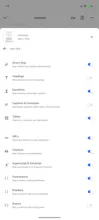
⏭️ Auto Skip the Distractions
Most text-to-speech readers try to read everything. Audeus can automatically skip page numbers, repeated headers and footers, citations, URLs, equations, footnotes, tables, and other interruptions while keeping the original text visible.
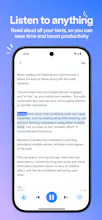
✨ Follow Along Without Losing Your Place
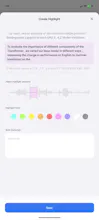
Word-by-word highlighting and auto-scroll stay synchronized with the narration. You can also tap any sentence to immediately continue listening from that exact spot.
🎧 Listen Your Way
Choose from lifelike voices and adjust the playback speed from 0.5× to 3.5× depending on whether you are studying closely or moving quickly through a document.
🔒 Keep Listening Anywhere
Continue listening in the background, control playback from your Lock Screen, headphones, or car, and download content for offline listening.
🔄 One Library Across Every Device
Upload a PDF from your computer, save an article using the browser extension, and continue listening on your iPhone with your library and reading progress synced.
Audeus supports PDFs, Word documents, EPUBs, articles, images, screenshots, scanned documents, handwritten notes, and plain text.
Our goal is simple: help students, professionals, researchers, and anyone with too much to read get through it without being tied to a screen.
We’d love to hear what you think about the mobile experience, voice quality, Auto Skip controls, or what you’d like us to build next.
Thank you so much for the support! ❤️
The mobile version feels really smooth, and being able to listen to my saved articles during my commute is a game changer. Surprised how natural the voices sound compared to other TTS tools I've tried.
Finally downloaded it on my iPhone and the natural-sounding voices surprised me the most, way less robotic than other readers I've tried. The PDF import was smooth too.