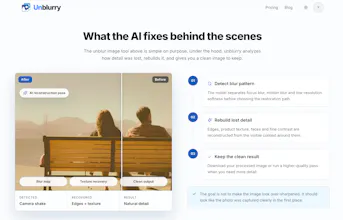
That blurry photo you thought was ruined? unblurry brings it back. Upload it and AI rebuilds the detail your camera missed — out-of-focus portraits, motion-blurred moments, grainy low-res scans. ✅ Reconstructs faces, edges and texture, not a blanket sharpen ✅ Rescues product shots, travel photos and old family prints ✅ Before/after slider, full-res download, no watermark Free to try, no sign-up. One-time credits, no subscription. → https://unblurry.tools
No reviews yetBe the first to leave a review for Unblurry
Maker
📌
Hey Hunters 👋
Every "unblur" tool I tried promised the same one-tap miracle — then handed back a watermarked mess, a subscription wall, or a photo that looked worse than before. I just wanted my own blurry shots back, so I built unblurry.
What it does
Drop in a photo and the AI figures out how the detail was lost — out-of-focus, camera shake, or a soft low-res scan — and rebuilds it. Faces, edges and texture come back, not just a blanket sharpen. Drag the before/after slider, download full-res, no watermark, no sign-up to try it.
I've watched it bring back a blurry product shot, a motion-blurred street photo, and a faded 1980s family print that looked gone for good.
What's special
• It diagnoses the blur type first, instead of over-sharpening everything into halos.
• Free to try with no sign-up and no watermark — you see the result before you spend anything.
• One-time credits, never a subscription.
Looking for feedback on
1. What photo would you most want to rescue — old prints, product shots, or motion-blurred moments?
2. Any use case you'd expect it to handle that it doesn't yet?
Thanks for taking a look 🚀
Report
ran a really old out-of-focus photo of my grandma through it and honestly the face came back way sharper than i expected, way better than just slapping a sharpen filter on
Report
Finally something that actually pulled detail back into a soft product shot instead of just sharpening edges. The before/after slider sold me instantly and the free try with no sign-up is a nice touch.
Report
finally tried this on an old photo of my grandparents and honestly the face detail came back way better than i expected, way beyond a normal sharpen tool
Report
Tried it on an old scanned photo of my grandparents and the face detail came back way sharper than I expected, without that crunchy over-sharpened look. The before/after slider sold me instantly.
Report
Honestly love that it shows what it's actually doing instead of just blanket-sharpening everything, the before/after slider makes it easy to trust the result. No watermark and pay-once credits is a really considerate touch too.
Report
The before/after slider is exactly the right way to show what this does, no marketing fluff or over-promised samples, just the real recovery on your own photo. Love that it’s free to try with no sign-up.
ran a really old out-of-focus photo of my grandma through it and honestly the face came back way sharper than i expected, way better than just slapping a sharpen filter on
Finally something that actually pulled detail back into a soft product shot instead of just sharpening edges. The before/after slider sold me instantly and the free try with no sign-up is a nice touch.
finally tried this on an old photo of my grandparents and honestly the face detail came back way better than i expected, way beyond a normal sharpen tool
Tried it on an old scanned photo of my grandparents and the face detail came back way sharper than I expected, without that crunchy over-sharpened look. The before/after slider sold me instantly.
Honestly love that it shows what it's actually doing instead of just blanket-sharpening everything, the before/after slider makes it easy to trust the result. No watermark and pay-once credits is a really considerate touch too.
The before/after slider is exactly the right way to show what this does, no marketing fluff or over-promised samples, just the real recovery on your own photo. Love that it’s free to try with no sign-up.