Q17 Private AI brings private on-device AI to Android: offline AI chat, vision, voice input, offline TTS, file attachments, AI agents, separate project workspaces, benchmarks, CPU Safe Mode, and on-device image generation. It supports CPU/GPU backends with Vulkan and OpenCL acceleration on compatible phones, plus UI translations for 11 global languages.
No reviews yetBe the first to leave a review for Q17 Private AI
Maker
📌
Hey Product Hunt, I’m Akshit Kushwaha, maker of Q17 Private AI.
I built Q17 because I believe Android users should have access to useful AI without depending on the cloud for every core task. Q17 is a private AI app designed around local on-device intelligence: offline chat, vision support, voice input, offline text-to-speech, file attachments, device benchmarks, separate project workspaces, AI agents, and on-device image generation.
A big part of Q17 is device-aware performance. The app supports CPU execution, CPU Safe Mode for compatibility, and GPU acceleration paths using Vulkan and OpenCL on supported devices. The idea is simple: if a phone can safely run faster, Q17 should use that power; if the device is unstable or unsupported, it should fall back to safer local execution instead of crashing or giving users a broken experience.
Q17 also includes separate project workspaces so users can organize different tasks, files, and chats without mixing everything into one messy history. That matters for real use cases like study notes, personal writing, coding help, document analysis, business ideas, and private research.
I also worked on global usability. Q17 includes UI translations for 11 global languages, because private AI should not feel limited to only English-speaking users. The goal is to make local AI more accessible for people who want privacy, offline access, and ownership over their data.
This is not meant to be “just another chatbot wrapper.” Q17 is built for Android-first private AI: local models, local voice, local vision, local image generation, project organization, compatibility checks, and multiple runtime paths for different phones.
I’d love feedback from the Product Hunt community on the positioning, onboarding, device compatibility, pricing, and which local AI workflows you would want next.
Report
how well does the on-device image generation actually hold up on mid-range phones without blowing up battery or throttling after a few prompts?
I built Q17 with real Android phones in mind, so I didn’t want local image generation to feel like a black box that just heats the device and leaves the user guessing.
It is still a heavy task, so I won’t pretend there is zero battery use or zero heat.
Q17 makes the process visible: progress %, denoise steps, elapsed time, ETA, and live thermal status are shown while the image is being generated.
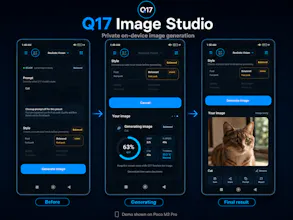
The screenshot above shows the full flow: before generation → during generation → final output.
The device in this demo is a Poco M2 Pro, which is already an older non-flagship phone, not a new high-end demo device. Even there, Q17 is showing 63% progress, step 3/5, 49s elapsed, 43s ETA, and thermal status at 33.3°C marked Normal.
Q17 also has CPU Safe Mode and different presets, so weaker phones are not forced to behave like newer flagships. Older / low-RAM phones should stay on lighter modes, while stronger devices can push faster or more detailed runs.
Real-world speed depends on the phone, RAM, and preset. Very old 3GB RAM phones can take a few minutes, mid-range phones are more practical with lighter presets, and newer flagships can get much faster results.
So the goal is not “magic zero-cost generation.” The goal is private local image generation that stays transparent, stable, and usable on actual Android devices.
Report
the CPU Safe Mode is a really thoughtful touch, especially for keeping things smooth on older devices while still letting people tap into local AI.
CPU Safe Mode was important because not every phone behaves the same with local models. Some devices can use faster paths, but others need a safer fallback so the app stays stable instead of crashing or overheating.
how well does the on-device image generation actually hold up on mid-range phones without blowing up battery or throttling after a few prompts?
@nevzat1636963Fair question.
I built Q17 with real Android phones in mind, so I didn’t want local image generation to feel like a black box that just heats the device and leaves the user guessing.
It is still a heavy task, so I won’t pretend there is zero battery use or zero heat.
Q17 makes the process visible: progress %, denoise steps, elapsed time, ETA, and live thermal status are shown while the image is being generated.
The screenshot above shows the full flow: before generation → during generation → final output.
The device in this demo is a Poco M2 Pro, which is already an older non-flagship phone, not a new high-end demo device. Even there, Q17 is showing 63% progress, step 3/5, 49s elapsed, 43s ETA, and thermal status at 33.3°C marked Normal.
Q17 also has CPU Safe Mode and different presets, so weaker phones are not forced to behave like newer flagships. Older / low-RAM phones should stay on lighter modes, while stronger devices can push faster or more detailed runs.
Real-world speed depends on the phone, RAM, and preset. Very old 3GB RAM phones can take a few minutes, mid-range phones are more practical with lighter presets, and newer flagships can get much faster results.
So the goal is not “magic zero-cost generation.” The goal is private local image generation that stays transparent, stable, and usable on actual Android devices.
the CPU Safe Mode is a really thoughtful touch, especially for keeping things smooth on older devices while still letting people tap into local AI.
@sinansmekpcsd Thank you Sinan 🙌
CPU Safe Mode was important because not every phone behaves the same with local models. Some devices can use faster paths, but others need a safer fallback so the app stays stable instead of crashing or overheating.
That device-aware approach is a big part of Q17.