Finally, a keep-awake app that actually gets the AI-dev workflow 🔥
Been using LidRun for a couple weeks and it solved a problem I didn't realize was killing me: I'd kick off a long Claude Code run or a Docker build, close the lid to go home, and come back to find the Mac had slept and the job died halfway. Felt like the agent crashed — turns out it was just macOS power management.
What I like:
Closed-lid mode just works. Shut the MacBook, walk away, the run keeps going. No clamshell external-display hack, no sketchy pmset changes.
It's guarded, not reckless. Battery + thermal guardrails, a timer, charging-only mode, and — my favorite — it sleeps the Mac before the battery dies instead of losing your work in a bag.
Auto Mode detects real workloads. It knows when Claude Code / Cursor / Ollama are actually running and only holds the Mac awake while there's work, then releases it.
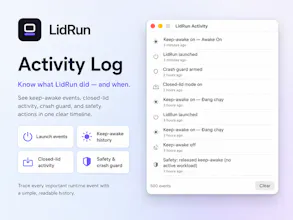
"Why Awake / Why Stopped" panel is genuinely great — no blind wake locks, you always see what it's protecting and why it stopped.
Pay once, no subscription. Refreshing. Free tier is real too.
Not just another Caffeine/Amphetamine clone — it's built specifically for AI and dev runs you want to leave behind. Easy recommend for anyone running agents or long builds on a MacBook. 👏

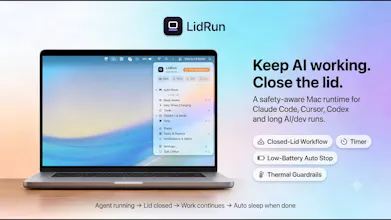




Hey Product Hunt 👋 I’m Henry, maker of LidRun.
I built LidRun because AI coding tools exposed an old Mac problem in a new way.
Claude Code, Codex, Cursor, Docker, Ollama,... and long-running terminal jobs can keep working long after you step away. But macOS still thinks in old idle/sleep patterns. Close the lid, walk away, or leave a long run overnight — and the work may stop at the worst time.
The usual fixes are caffeinate, Amphetamine, or pmset. They are useful, and I respect them. But for daily AI/dev workflows, I wanted something more explicit:
Keep work running when it is still active
Support closed-lid workflows carefully
Stop on low battery or safety limits
Avoid leaving a blind wake lock on forever
Show why the Mac is being kept awake
That is the idea behind LidRun:
Agent running → stay awake.
Agent done or unsafe → release.
LidRun is free to start. The core safe workflow is free forever, and Pro is one-time with no subscription.
I’m especially looking for feedback from Mac developers using Claude Code, Cursor, Docker, Ollama, local LLMs, or long-running terminal jobs.
What should LidRun watch for next?
Does the thermal guardrail actually throttle the underlying job or just kill it outright when temps cross a threshold?
@umuthwfs Great question.
LidRun does not throttle or kill the underlying job by default. It manages the LidRun runtime session — if conditions are no longer good, it releases the wake/closed-lid hold so macOS can manage sleep normally again.
For example, on very low battery, LidRun can let the Mac sleep around 4% instead of forcing it to keep running until a hard shutdown or restart. The goal is to protect the machine and reduce the chance of losing unsaved work or runtime data.
So LidRun is not secretly killing Claude, Codex or Cursor. It is stopping the “stay awake” layer when safety conditions are no longer good.
love that lidrun gives per-app controls instead of just blanket caffeinate flags, and the low-battery auto-stop is the kind of thing that should've shipped with macOS years ago. really thoughtful execution here.
@dursunipfi Thanks Dursun — you got exactly what I’m trying to solve.
A blanket wake lock is useful, but it is easy to forget it is still on. LidRun is built more around the workflow: what is actually running, whether the Mac should still stay awake, and when it should stop because battery or safety conditions are no longer good.
Low-battery auto-stop was one of the first guardrails I wanted in the product. <3
The thermal guardrails are a nice touch, especially since my MacBook tends to spin the fans when running Ollama for too long. Charging-only mode is exactly what I've been wanting instead of letting it drain to zero overnight.
@hilesizoza25171 Yes. AI is changing the way we work.
Computers can now become servers. Instead of manually monitoring them, use Lidrun.
I hope my little application will help you solve seemingly simple problems. :D
Small thank-you for the Product Hunt community:
Click LifeTime on this page, copy the code, then claim lifetime Pro here:
https://lidrun.com/redeem
Would love feedback from Mac developers running Claude Code, Cursor, Docker, Ollama or long AI/dev tasks.