
Prompt Shots
Instantly scan, save and share AI prompts from your pocket
64 followers
Instantly scan, save and share AI prompts from your pocket
64 followers
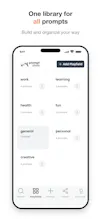
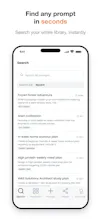
Prompt Shots is a personal AI prompt library built for speed with realtime sync across mobile and web. It can scan a prompt from any screen with a camera and create a prompt instantly. The prompts are ready to share via QR, text, or email. The embedded AI-helper builds smart prompts with input on goal, role, tone etc. It provides a workspace to organize searchable prompts and chain multi-step prompts into workflows. It works with ChatGPT, Claude, Gemini, Copilot, Perplexity, Grok & Meta AI.




Hey hunters 👋 I'm Lakshmi, founder of Prompt Shots and together with Dhyana, Co-founder, we built a solution that addresses a modern set of challenges that come with AI prompts for different models. Prompt Shots goes beyond just solving problems into the realm of enhanced user experiences with instant creating, refining and sharing of AI prompts.
I would come across great prompts online frequently on several platforms but I had no quick way to capture and save them. Screenshots helped to some extent but they would pile up and hard to search using text. So we built Scan. Point your camera at any prompt on a screen, browser or slide and it saves as a clean, editable prompt.
At work and in social settings, a prompt that worked really well for people would come up often. However, there was no easy way to hand it over. And that led to Sling. Share a prompt across the table by QR code, text, or email. No account is needed to receive.
I use multiple AI tools like Claude, ChatGPT, Gemini and more. I started to save my best prompts in notes or docs. I had no single place to organize and search them. Prompt Shots is tool-agnostic. Open a prompt from multiple AI tools of your choice.
I wanted both the agility to carry my prompts anywhere on mobile, and the room to work on them in depth on the web, where a laptop is just more convenient. So it's web + mobile, fully synced both ways. Under the hood it's a real workspace with playfields and packs to organize, prompt chains, and AI-assisted refinement.
It is live on App Store for iOS users and web users at Prompt Shots website.
Free for 14 days, then $10/mo.
I'd love your honest take. Do you find yourself discussing prompts with your colleagues and friends? And would you find it convenient to carry your prompts in your pocket, ready to share on the go? Or quickly capture interesting prompts you come across online with your mobile?
How does the realtime sync actually hold up when I'm scanning a prompt on my phone and need it on the web seconds later, is there any conflict handling if I edit on both?
@adilewib Great question and thanks for reaching out. Both your phone and the web app talk to the same backend and it is the single source of truth. When you scan a prompt on your phone, it's saved server-side immediately, and the web picks it up. In practice, that flow is exactly what it's built for.
On editing the same prompt on both at once, right now it's last-write-in wins. We keep the backend simple rather than trying to auto-merge two divergent edits. So there is no silent corruption and the most recent save is what sticks. True concurrent-edit conflict handling is on our radar as we see how people use multi-device. Would love to hear your use case if you're editing heavily across devices. That kind of feedback shapes what we build next.
How does the OCR scanner actually perform on screenshots with smaller fonts or unusual styles, and does it handle handwritten prompts at all?
@muammersare1wg Under the hood, the scanner uses Google's ML Kit text recognition, running entirely on-device. So it is fast and private.
It's tuned for printed/typeset text and holds up well on clean screenshots. Very tiny, low-contrast, or heavily stylized fonts can trip it up, like most OCR but it pulls text out line by line and you tap the lines you want. The garbled bits are easy to skip or fix before saving. Handwriting isn't reliably supported today as it is built for printed text. Great suggestion though, and noting the demand. If you hit a screenshot it struggles with, send it my way. The real samples help us tune it.
How does the camera scan actually work for prompts, is it reading text from a screenshot or something fancier, and does it hit any usage limits on the free tier?
@burakambaldh87 Good question. The scan reads text straight from the screenshot or image chosen by you and Google's ML Kit (on-device) pulls out the text line by line where you can tap the lines you want to be included in the prompt. This is real OCR with no cloud round-trip. This makes it fast and private.
The scan feature is unlimited with no cap on usage. The 14-day free trial has a generous cap of 100 prompts and the scan feature can be used any number of times during prompt creation.
when I'm scanning a prompt on my phone and need it on the web seconds later, is there any conflict handling if I edit on both?
@new_user___1742026d4c058531ec66560 Both your phone and the web talk to the same backend and there is only one source of truth. A prompt you scan on your phone is saved server-side right away and shows up on the web on its next refresh in a few seconds, as you'd expect.
On editing the same prompt on both at once, it's currently last-save-wins. We keep the backend simple rather than auto-merging two versions so that nothing gets silently corrupted. The most recent save is what sticks. Deeper concurrent-edit handling is something we're looking at as more people use it across devices. Happy to hear more on how you are using it.
The camera scan feature is genuinely handy for grabbing prompts off screenshots without retyping, and the QR share works smoothly between my phone and laptop.
@hamzay5w7 Thank you, this is great feedback. Ditching the retype of a prompt from a screenshot was exactly the goal and it's great that it clicked for you. Also glad that the QR share felt smooth across phone and laptop. The quick handoff is one of my favorite features of the app we built. If there are any additional features that you might find useful or evolve any of the existing features, we would be excited to hear about them.
The camera scan to capture prompts from screenshots is genuinely handy and saved me a ton of copy-pasting. Realtime sync between my phone and laptop worked smoothly during my quick test.
@cananou4d Love hearing that you found the scan feature useful. Thank you! Eliminating the copy-paste shuffle was exactly the problem we set out to solve. It's awesome that it landed for you. And glad the phone <> laptop handoff felt seamless.
If you hit anything unusual or would like a feature that might be useful, we are very open to your feedback. It'd help the app evolve further.