
LightTwist
Record & stream your show in a realistic virtual studio
139 followers
Record & stream your show in a realistic virtual studio
139 followers
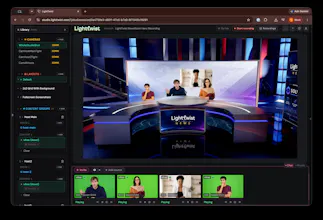
LightTwist lets you record & stream in a realistic virtual studio, even if your guests and co-hosts are remote. LightTwist is a virtual video studio that runs in Chrome, with a backend virtual production platform utilizing realtime computer vision for background removal and compositing, Unreal Engine 5 for rendering, and WebRTC for A/V streaming. It runs in realtime so you can live stream or record "live to tape", with a live preview so you see exactly what's getting streamed or recorded.




@vikasreddy This is so cool, Vikas. Would love to test and subscribe. Could you share the pricing page please?
Hello @rohanrecommends ! You can subscribe in the onboarding page here: https://studio.lighttwist.com/onboarding/
We currently have two plans: a $30/month plan that includes full access to our library of studios, and a $500/month plan where we build a fully customized virtual studio for you and priority support / guided onboarding.
One thing I haven't seen asked yet: what happens if a remote guest's connection drops mid-broadcast, since the compositing is happening live over WebRTC? Does their feed freeze on the last frame, get swapped for a placeholder, or does the scene just drop them cleanly while the rest of the show keeps going? For an actual live show that failure mode matters more to me than lighting or CPU load.
@galdayan
The guest stream will stay frozen for a little while, as the system attempts to recover, then the person will just disappear while the show keeps going.
The live-to-tape mode with a preview of exactly what's being composited is what sells this for me, not seeing the final key/comp until after the take is what makes green-screen streaming painful. Two day-one questions: since the UE5 rendering and compositing run on the backend and come back over WebRTC, is there noticeable lag between what I do on camera and the preview I'm reacting to? And when I record live to tape, do I get a full-quality composited file locally, or is export a separate re-render step?
@leo404
The latency between what you do on camera and the preview is less than a second!
When you record live to tape, the studio output is recorded in the rendering server and you can download it after the recording is done. We currently don't have re-render!
Thanks — sub-second latency and a downloadable render-server file covers both my blockers. On the no-re-render part: since the take is final once composited, do you also stash the raw camera feed (or separate foreground/background passes) alongside the flattened file, so a comp/key could be fixed later once re-render ships? Even just keeping the clean camera pass would make live-to-tape much less risky for a solo creator with no second operator watching the key.
@leo404 we did some experiments with local recordings at the clients being captured for re-renders and may get back to it! For now one path we currently support for this live-to-tape use case is to capture the take externally (regular video recording), then upload the raw take into LightTwist and be your own producer. The raw take can get processed just like a webcam stream (background removal) but with playback controls (seek/play/pause). This way you can change cameras and produce the show without the risk of a bad camera change spoiling the footage and you needing to start over.
That upload-the-raw-take-and-be-your-own-producer path is exactly the safety net I was after — seek/pause playback on the take kills the bad-camera-change-means-reshoot risk for a solo creator. When I upload that external recording, does the background removal match the live path's quality, or is the live WebRTC key tuned differently than processing a clean pre-recorded file? Wondering if the offline route is actually the higher-quality one to default to.
@leo404
The background removal process for uploaded external assets is the same as the live streams: the uploaded file is streamed by a computer vision server as if it was a live stream, and the background removal pass is executed live. This path is more reliable as the raw take is not subject to network issues as WebRTC streams are.
Congrats @vikasreddy for the launch, loved testing out the product!
Very cool product! My one question is how demanding is it on CPU/GPU for the host? I think my laptop would be fine, but my PC is pretty dated so I'm curious.
@mccamy_michael_s_ It is very light on the CPU/GPU of the host! All the heavy processing happens in the cloud so it should run just fine in a basic laptop!
how does the realtime compositing actually hold up when you have like 4-5 remote guests all talking at once, does it start to lag or fall apart?
@halit1279079 The background segmentation for participants happens in separate computer vision servers, so the rendering server doesn't have much extra work for each extra participant! Having 4-5 remote guests works just fine!