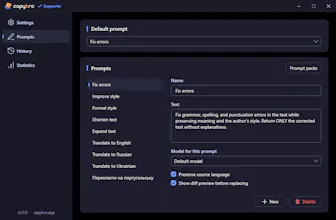
Select text anywhere in Windows (Word, Telegram, IDE, browser) and press Ctrl+Shift+E — AI rewrites it in place. Two backends: OpenRouter cloud (one API key for ~300 models) or Ollama local (text never leaves your PC). MIT-licensed core, $19 one-time Pro — never subscription. NativeNET 8 + WPF, 49 MB installer, <1s cold start. Built solo over 4 months.
No reviews yetBe the first to leave a review for CapyBro
Maker
📌
Hey Product Hunt 👋
I'm Roman, solo dev from Ukraine, and CapyBro is what I've been building for the past 4 months of nights and weekends.
The story: I was Alt+Tab-ing to ChatGPT 30+ times a day for tiny text fixes — one comma in a Slack message, a paragraph translation, a passive-aggressive DM rewrite. AI was trapped in a browser tab while every other Windows utility lives one hotkey away. So I built it.
What CapyBro does: Select text anywhere on Windows → press Ctrl+Shift+E → AI rewrites it in place. Word, Telegram, VS Code, your browser, Notepad — anywhere.
Two backends:
☁️ Cloud via OpenRouter (one API key gets you GPT, Claude, Gemini, ~300 models)
🔒 Local via Ollama (text never leaves your machine — true privacy)
Tech choices:
• Native .NET 8 + WPF (not Electron) — 49 MB installer, <1s cold start
• MIT-licensed core. The Pro features (curated Prompt Packs, settings backup, usage stats) are $19 one-time. Never subscription. I hate productivity-tool subscriptions.
What I'd love feedback on:
1. Is the workflow obvious from the homepage?
2. What prompts would you add to the built-in library?
3. Mac users: Avalonia port is ~2 months out. Would you use it?
Source code: https://github.com/phantasmat201...
Tech deep-dive on dev.to: https://dev.to/phantasmat2018/af...
Thank you for reading
— Roman