
Qordinate gives every teammate an AI clone that coordinates work across communication channels. Agents collect updates, chase blockers, draft replies, schedule meetings, and ask for approval when needed, with permission rules controlling what each agent can say, share, and do.



Free Options
Launch Team / Built With


MailChannels Email APISend transactional email with tenant-level abuse control
Promoted
 OpenClaw
 Hermes Agent
Hey Product Hunt 👋
Harpinder here. Rahul and I are the two makers behind Qordinate.
We built Qordinate because a lot of work gets stuck in tiny coordination loops.
A client asks for an update.
Someone on the team has the answer.
You need to check a doc, confirm a date, chase a person, then write the reply.
None of that is hard by itself. It just happens all day.
Qordinate is a personal AI assistant that can coordinate on your behalf. You can ask it to reach out to someone, get an update, find a doc, draft a reply, schedule a reminder, follow up, or manage work across your connected apps.
It works where your team already talks: iMessage, WhatsApp, Slack, Telegram, mobile apps, and MCP.
A simple example:
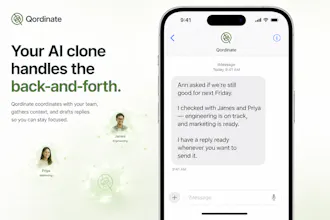
Ann asks if the launch is still on track for next Friday. Qordinate checks with James and Priya, gets the latest context, drafts the reply, and waits for your okay before sending.
That is the feeling we are going for. Less chasing. Fewer loose ends. More work moving without you holding every thread.
So far Qordinate has executed 50,000+ actions across connected apps. We are still early, and we would love feedback from the Product Hunt community.
We have a 3 day full free trial. For Product Hunt users, code PH60 gives 60% off the first month on the monthly plan.
Try it here:
qordinate.ai/imessage
qordinate.ai/whatsapp
Rahul and I will be around today answering questions.
What is one coordination task you would want your AI to handle for you?
sounds cool. does one agent connect with another one if all team members have them?
@ilyaforfun Yes. If multiple teammates have Qordinate, their assistants can coordinate with each other to gather context and move work forward.
From your side, it still feels simple, you just ask Qordinate to check with someone, and it handles the back-and-forth while respecting everyone's permissions.
If the other person doesn't have Qordinate, your assistant can still reach out and nudge them.
Curious, would you mainly use this for internal team updates or external follow-ups?
@singhcoder I'd start internally to see how it all works
@ilyaforfun That makes sense. Internal workflows are probably the best place to start.
A simple first use case is: "collect today’s updates from the team and surface blockers". It lets you see the coordination loop end to end without involving clients yet.
Looks great. Does this have proactive agents which can work for me in the background without me initiating the action? I have tried some personal AI assistant apps in the past, but their value seems limited if I have to initiate the action each time.
@madhav_sikka1 Yes. We don't want Qordinate to be something you have to manually prompt every time.
Today it can continue loops after you delegate them, like following up with someone, waiting for a reply, reminding them later, or drafting a response when new context comes in.
We're careful about the boundary though. It can move the work forward in the background, but for sensitive actions like sending external replies or sharing context, it asks first.
does it also coordinates and reports backs to upper management if something in project is not on time ?
@pranay19 Yes, that is a good use case.
You can have Qordinate collect updates from the team, spot blockers or delays, and prepare a summary for the right person. If something is slipping, it can follow up with the owner first and then report back with context instead of just escalating blindly.
We think the useful version is: fewer surprise status meetings, more timely visibility.
@singhcoder Are you also planning to integrate this with MS Teams ?
@pranay19 Yes!
MS Teams as a channel and MS Teams as a connector both are in plans.
Which one did you want?
@singhcoder I would have to check in my org first but tool does look good , i would be back in july third week , please check in with me then.
How do you ensure that the company data & conversations are secured?
@alok_gangaramany We only request the permissions needed for enabled integrations, encrypt data in transit and at rest, and don't use customer data to train models. Users can disconnect apps anytime. For team/company use, we're building Qordinate around explicit permissions and approval flows: what it can read, share, draft, or act on should be controlled by the user/team, not guessed by the AI.
I started paying attention to how much of my day was shallow work - not the hard thinking, just the coordination. Chasing an update, waiting on a reply, following up again. Easy stuff but it kept pulling me out of actual work.
Qordinate handles that layer now. I tell it to get a status from someone, it follows up, drafts the reply, waits for me to approve. The loop that used to take half my morning just ... runs in the background simply.
Been using it a few weeks. Setup was quick. If you're protective of your focus time, this is something worth trying.
@kkviks This captures the problem really well.
The work is not hard, but it breaks focus all day. That is exactly the layer we want Qordinate to handle: follow up, get context, keep the loop moving, and bring you back in when approval is needed.
Really appreciate you trying it and sharing this.
I tried and was burnt by openclaw, and then stumbled upon Qordinate. Fixed cost, better proactivity, and a reliable assistant that just works. I wish I had found this sooner.
@ribhuchawla This means a lot. We've put a lot of care into making Qordinate proactive, reliable, and predictable on pricing.
The goal is to make it easy to just hand work to your assistant once, then trust it to follow through.