
Pipali
An AI coworker for any computer work
203 followers
An AI coworker for any computer work
203 followers
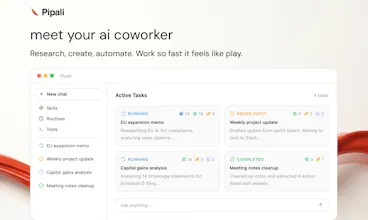
Pipali is an AI coworker that lives on your computer. It interacts with your files, browser and apps to get real work done. Pipali can handle most computer work — deep research, polished docs, browser tasks and routine errands. Teach it your workflows with Skills, run recurring tasks with Routines and integrate with your apps like Linear, Slack and GitHub via MCP.



Free Options
Launch Team / Built With


Framer AI AgentsDesign and publish professional sites with AI
Promoted
Hey Product Hunt 👋,
We built Pipali because we wanted AI to move beyond chat — not just answer questions, but actually operate your computer with you and finish useful work.
Pipali is a desktop AI coworker that can:
research across your files and the web
create briefs, spreadsheets, emails, reports, and personal apps,
run recurring tasks, react quickly to events (from releases to stock prices)
interact with your apps via MCP
work asynchronously and notify you when it needs help
stay safe with sandboxing, permissions, and explicit confirmations
It already helps folks manage investments, generate leads, publish apps and plan sprints.
Things to try:
Draft a weekly project update from your notes, Linear, and Slack
Create a personal newspaper from today’s top stories
Create investor update from your product metrics on PostHog
Optimize your finances from your bank statements or Bank MCP
P.S. We're open-source! Check us out on GitHub: https://github.com/khoj-ai/pipali
We’d love your feedback — especially: what work would you actually delegate to an AI coworker running on your own computer?
The async operation model is what separates this from a lot of screen-recording “agents” that still need you to supervise every step. Most desktop agents feel more like remote control with extra AI layers - Pipali running tasks in the background and only notifying you when intervention is needed feels much closer to a real coworker workflow. We tested a competing tool recently and abandoned it because it locked up a machine for nearly 20 minutes while “observing” the workflow. One question: is the event reaction system primarily polling-based, or does it support webhook/event-driven triggers for integrations?
@sathvika_yadav03, yeah exactly. Pipali is designed to be a co-worker that lives on your machine, so it has to work smoothly with you and on your machine. The async + notification operation model works the best for that.
Routines and new tasks can be triggered locally by webhooks/events. Pipali doesn't expose a public webhook endpoint to trigger tasks on your machine yet. It'll needs to be designed to ensure only trusted, scoped access to Pipali on your machine.
I like that Skills and Routines solve the recurring problem where most AI agents are great once but break on the second run. I'm curious as to how Pipali handles conflicts when a Routine triggers while you're actively using the same app it needs to control?
Hey @sailikhith thanks for the thoughtful question! Glad you like the Skills and Routines features in Pipali.
The conflict issue is real and can cause conflict at both the data and the UX layer. Pipali asks you when it wants control of an app, so you can choose when to hand over control to a shared app you're working on. It wouldn't just override your work without you knowing about it. You can also give it access to an isolated instance of the app (e.g Chrome with separate profile) or use a collaborative app (like Google Docs) to work with it in parallel.
Is there a specific workload you're wondering about where this cause problems for you?
@debanjum That makes sense ,the isolated Chrome profile approach is clever it didn't strike my mind. I was thinking about something like a CRM or Slack where you're actively mid-task and the Routine needs the same window. Sounds like the confirmation step handles that well though.
Most desktop agents I've seen treat every task like it's starting from scratch — no memory of how you handled something last Tuesday. The Skills feature is the first time I've seen that actually addressed properly. What I'm curious about is how it deals with apps that don't have clean MCP support yet — does it fall back to something like computer use or just fail gracefully
@ganesh_kumar_t good question! Pipali can interact with your filesystem, run terminal commands and control your chrome browser pretty seamlessly. But for desktop apps without MCP tooling or terminal controls, it doesn't have computer use yet (we need better safety, control and seamless handoff mechanisms first)!
"Any computer work" is a big claim curious what it handles best in practice. Is it more of a task automation tool or does it reason through multi-step problems?
@imad_elkhafi It's like an agent that can do multi-step problems, with the benefit of being on your own device and having access to your personal context.
While of course it can do some task automation, it's a desktop-based coworker, so it can use your browser, navigate your filesystem, run code. It allows you to work through deeper problems.
@saba_imran Desktop-based with filesystem and browser access is a much more powerful setup than a chat window. The personal context angle is what makes it useful vs generic AI tools.
The isolated chrome profile solution for app conflicts is cleaner than i expected. one gap i'm thinking about: for the event-driven routines, is triggering polling-based or can it hook into actual webhooks? if it's polling, the latency on reacting to something like a github release could make the whole "react quickly to events" claim feel sluggish.
@sujal_gupta12 yeah event driven is what makes such systems useful for truly time sensitive tasks. Routines and new tasks can be triggered by calling a local endpoint on events. But Pipali doesn't expose a public webhook endpoint to trigger tasks on your machine yet. That'll need to be carefully designed to ensure only trusted, scoped access to Pipali on your machine.
Note: Technically you can use ngrok, tailscale funnel etc. to trigger Pipali routines remotely but use that only if you know what you're doing.
The Skills + Routines concept is spot on. Every AI agent I've tried is great for a single task but can't repeat it reliably. Having a way to codify workflows and run them on schedule is where the real productivity gains are. How does Pipali handle multi-step browser tasks - does it use the DOM or computer vision?
@nossa_iyamu Yeah, everyone's use-case and workflow is different. Skills, Routines and Tools (for app integrations) allow Pipali to mold to your needs.
For browser tasks it uses the DOM when sufficient and computer vision for any visual evaluation.