
Novi Notes
Your notes become AI memory. Local-only, no subscription.
148 followers
Your notes become AI memory. Local-only, no subscription.
148 followers
Novi Notes isn't just a note app — it's a local AI memory layer for your Mac.
Any AI on your machine can instantly read and write your notes. Open Claude or any MCP client and ask. No API keys, no cloud, no config.
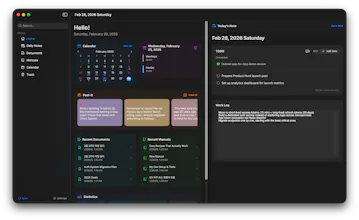
Rich block editor with 15 block types, wiki links, backlinks, daily notes, manuals, and post-its. Knowledge flows from quick capture to polished reference — AI works across the entire lifecycle.
One-time purchase. No subscription, ever. Your data never leaves your Mac.
This is the 2nd launch from Novi Notes. View more
Novi Notes 1.1
Launching today
Novi is your Mac's AI memory layer — a fast block editor for daily notes, docs, and post-its. Claude, Codex, or Gemini read and write your notes directly through MCP. No API keys, no cloud, no setup.
New in 1.1 — AI Skills: turn a repeated prompt into a one-click slash command. Write it in Markdown, deploy to Claude Code, Codex, or Gemini. Plus GitHub backup and Markdown reading modes.
Local-only. One-time purchase. No subscription.


Payment Required
Launch Team / Built With


Novi Notes
Hey again, PH! 👋 I'm Hojong, the solo dev behind Novi Notes — back with launch #2.
Where 1.0 left off
My first launch fixed one mess: my notes — and all my `CLAUDE.md` files, skills, and agent configs — were scattered across dozens of repos, and version-controlling them was a nightmare. So I built one local place where Claude could read and write everything over MCP. No cloud, no API keys.
That solved reading. But two itches stuck around: I was still retyping the same long prompts every session, and my Claude setup was still spread across project folders. So 1.1 closes both loops — let you build your own AI commands, and pull all your Claude assets into one place.
What's new in 1.1:
- 🤖 AI Skills — Turn a repeated prompt into a one-click slash command. "Write this week's review" becomes `/weekly-review`. Write it once in Markdown, deploy the same skill to Claude Code, Codex, or Gemini.
- 🗂️ Workspace — Every Claude and Codex project on your Mac in one tree. Read and edit `CLAUDE.md`, skills, and hooks right inside Novi Notes — no more digging through old folders.
- 🎙️ Meeting recording — Capture mic and system audio together; WhisperKit transcribes it on-device, then your AI shapes it into notes. Nothing leaves your Mac.
- 🔌 Zero-config MCP — Node is bundled in, so connecting is genuinely one click. 1.0 started with Claude; 1.1 adds Codex and Gemini.
- 💾 GitHub backup — Your notes, version-controlled in your own private repo. Your data stays yours.
And the promises haven't changed: one-time purchase, no subscription ever, everything stays on your Mac.
The funny part — making one skill deploy cleanly to three different AI clients in one click turned into its own rabbit hole 😅. But it's the thing I reach for most now.
I built 1.1 for the same person 1.0 was for — someone who lives in the terminal and IDE, leans on AI all day, and just wants one private, local place where their notes and their AI finally meet. Would love your thoughts: if you could turn one repeated prompt into a slash command today, what would it be?
Congrats on the iteration! As an iOS dev keeping a CLAUDE.md file in my repo right alongside the markdown chaos you described, the missing piece for me is mobile. Daily notes on Mac all day, but the moments I most want to dump thoughts into the memory layer are in transit. Is an iOS companion in the depth-vs-breadth tradeoff zone, or does the Mac-only constraint stay deliberate because cross-device sync would compromise the local-first promise?