
YouTube Transcript Tool
Convert YouTube videos to text instantly
189 followers
Convert YouTube videos to text instantly
189 followers
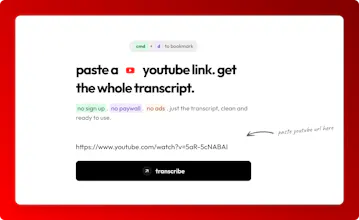
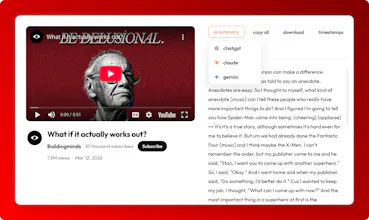
Convert any YouTube video into text instantly. Paste a link and get the full transcript in seconds. Copy, download, or export as TXT. No signup, no limits, completely free. Perfect for saving time, taking notes, creating content, or quickly understanding long videos without watching everything. Fast, simple, and built for everyday use.


Free
Launch Team / Built With


Render: Get up to $100K in startup creditsThe fastest way to deploy and scale apps and agents
Promoted


Hey everyone, do not forget to add your feedback if you use the tool please. Would help me improve it.
Honestly the no-signup thing sold me immediately. Every tool like this I've come across either hits you with a paywall after video #3 or makes you create an account just to see if it even works. This one just... works. Paste the link, get the transcript, done.
Only tried it once but it did exactly what it said it would. No complaints there.
One thing I kept wanting while using it, autoscroll synced to the video. So as the video plays, the transcript follows along automatically. Would make it way more useful for following along in real time rather than just grabbing the text and leaving. A "click a line, jump to that timestamp" feature would be a nice bonus too.
Good stuff, keep building.
@ryszard_wisniewski Thanks, feedback noted am going to add this for sure the transcripts synced to vid with autoscroll and the click a line jump to that timestamp. thanks!!
@ryszard_wisniewski Hey Ryszard, I added "click a line, jump to that timestamp" feature. You should give it a try on your next transcript. Thanks for the suggestion!!
@anusuya_bhuyan Yes if the video has a transcript in any other language it handles it. I am going to add a language feature as well.
Excellent tool, have used it several times and saves so much time when trying to find specific content within a Youtube video, especially long videos...
Does it also work in YouTube Shorts ?
@pat_tumelty No, but I'll look into it
Cool tool. I use CLI to download my videos to transcript for my RAG. One feature you could add is to collate the text every 30 seconds for RAG - this is my chat https://dosa.dev
@naveenkumar can you please tell me what you mean by collate the text every 30 seconds for RAG?
@naveenkumar so we have that, if you'll go to timestamps, you'll find every transcript in a timestamp
@naveenkumar Got it thanks man!!!
@naveenkumar Added 30 and 60s chunks, thanks man!!
Quick Update: Thanks for all the love and feedback so far! Since launch,I have added:
Timestamps chunks (30s and 60s)
Shareable Transcript Links
Auto Scroll Transcripts
Click to jump on Transcript
I’m actively iterating this week and would love to ship your suggestions. 🙌
Transcription is the unlock for everything downstream. I built local Whisper transcription into my YouTube workflow app and it changed how I handle metadata, Shorts, and captions — the transcript becomes the source of truth for the whole pipeline. What model are you running behind this? And are you doing word-level timestamps or segment-level? Word-level is where the real value is for clipping and caption syn