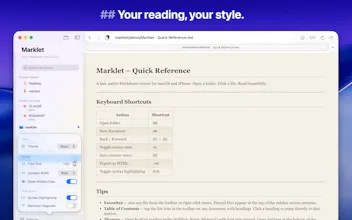
AI tools generate markdown constantly — Claude, ChatGPT, Cursor. No native place to read it beautifully on Mac. Finder shows raw text. Opening a coding editor just to read a file is a workaround, not a solution. Marklet is a local-first markdown workspace. Open any folder, browse your files, read them rendered beautifully. Themes, syntax highlighting, TOC, source editing. No database, no cloud, no account. Your files stay yours.
No reviews yetBe the first to leave a review for Marklet
Maker
📌
Hey Product Hunt 👋
AI became my daily companion some time ago but the real switch happened when I started to use Claude Code last year. As a non-coder, I convinced myself to start using Terminal and Claude Code locally to process my files and build entire workflows around them. Being in investing, I process tons of documents, reports, articles and analysis.
Realizing I can use AI models for financial analysis, financial documents processing, macro regime tracking, sector research etc. was a key change in how I operated and worked. So not coding apps, but building folders of dedicated documents, workflows, data and analysis was helping me to reinvent my work creating second brains for everything 😁.
Now you have it - all in markdown! How do I read it, review it, skim it quickly with so many markdown files generated? Tried it all, but as a non-coder, IDEs were a bit overkill for me and at the same time, I did not need a Markdown writing app, I did not need to copy and paste the files into apps that store all my documents somewhere on remote servers etc.
Just wanted to have a simple, but effective app to help me work with Markdown on a daily basis - a Markdown companion to my AI companions.
Could not find one to my liking. That is how Marklet was born - local-first, folder-based, no lock-in.
Marklet is for knowledge workers, marketers, sales, finance - simply all AI workflow users, and anyone who generates or works with markdown daily.
Next up: iOS twin for Marklet, theme import/export and more.
Would love to hear what your markdown workflow looks like — always curious how others are managing the AI output flood.