
Launched this week

Hearica
Turn all computer audio into captions for the deaf
90 followers
Turn all computer audio into captions for the deaf
90 followers
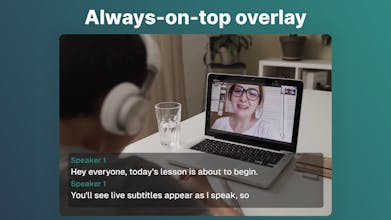
Most captioning tools only work inside one app. Hearica works across your entire computer. Any call, any video, any voice. It sits as a floating overlay on your screen and transcribes whatever you're hearing in real time. Save and replay with audio, export, translate into 60+ languages, add custom context for perfect accuracy. Never miss a word again 👂



Hearica
I started in 2024 with an open-source project, System Captioner, tinkering with OpenAI Whisper models to create a tool that could caption live streams and help me with my hearing loss. Although quite accurate, the size and clunkiness of the models meant the app wasn't as accessible to the public as I had wished.
Since then, I have been working on Hearica. It leverages cloud to run on any PC while being significantly more accurate than YouTube auto-captions or built-in transcription models that come with some operating systems. And adding context, even a short note like "A live stream of a medical lecture", makes it even more accurate.
What's your experience with real-time captioning and translation tools? Have you ever been in a situation where you wish you had real-time captions?
I'm bootstrapping Hearica solo and it's a passion project years in the making. I would love to hear your thoughts. Hearica is out on Windows today, with a macOS launch soon.
System-wide audio capture instead of
per-app is the right approach - surprised
nobody solved this properly until now.
60+ languages with real-time translation
is impressive. How does it handle
heavy accents or technical jargon?
Hearica
@alamenigma Hi Modassir, Hearica handles heavy accents and jargon quite well, the speech-to-text model is very accurate. There can be occasional edge cases, but you can iron them out using context and language hints. You might want to try our accuracy taster tool on hearica.com, it accepts file and microphone input (as does the main app).
Nice! Curious how it handles multiple speakers in the same room vs. remote calls — does it differentiate voices or just transcribe everything as one stream?
Hearica
@denious Hi Denis, Hearica can do either. If you enable speaker separation, it identifies speakers by the slight differences in their voices, and shows which speaker is talking. If you disable speaker separation and break detection, you get a simple continuous caption stream.
@evermoving Cool) The option to toggle speaker separation is smart — especially for mixed in-room + remote setups. Nicely thought through
Accessibility applications are always a win in my book. Can you filter out certain applications or no?