
The Leaderboard
by Product Hunt
Thursday, Jun 25
Thursday, Jun 25
Figma learned to move
gm legends, happy Thursday.
Today: Figma quietly comes for After Effects, a cloud computer that runs your coding agents while your laptop sleeps, and the app that ends the "where should we all fly?" group chat. Plus the forum on why your saved AI tools are useless.
Figma's canvas can animate now

Figma Motion adds a real animation timeline to the same canvas your designs already live on: keyframes, easing curves, presets, and the part that matters, a Dev Mode that hands developers the actual CSS, React, or motion.dev code for the animation, plus an MCP hook so a coding agent gets the motion itself instead of guessing from a video.
🔥 Our Take: Figma didn't win design by building a better Photoshop. It won by making most product work never need Photoshop, since the whole job lived in one shared file. Motion is the next thing it's doing that to. It won't out-animate After Effects, and it doesn't have to. Almost no product "animation" is cinematic, it's a hover state, a loading spinner, a screen transition, and all of that used to mean leaving the file, rebuilding it in After Effects or Lottie. Figma Motion pulls that into the canvas and exports the real CSS or React code, plus an MCP feed so a coding agent gets the actual motion. It's less Figma vs After Effects, more Figma vs the handoff, the same fight it already won against Photoshop. Bullish on that.
A home for your coding agents

Grass 2.0 gives your coding agents their own always-on cloud computer, so Claude Code, Codex, or OpenCode keep working when your laptop is closed, asleep, or off, paired with an iPhone app to watch, steer, and approve them mid-task. The pitch: agents stopped being tools you babysit and became workers you check in on, so Grass is their machine and your phone is the control room.
🔥 Our Take: There's something genuinely great about closing your laptop and having your coding agent just keep going. That's the bit Grass gets right: the agent lives on an always-on cloud box, your phone is the control room, and you can kick off a task and walk away. The honest caveats: anyone living in Claude Code can rig most of this with a Fly box and tmux, the lane's crowded (Omnara, Happy Coder, Claude Code Remote), and it's really a feature Anthropic ships natively the moment it wants to. But the agent running with your laptop fully off is the part the others miss, and the part that actually feels like the future. Worth a look, even if the long game belongs to whoever owns Claude Code.
Where everyone flies the cheapest
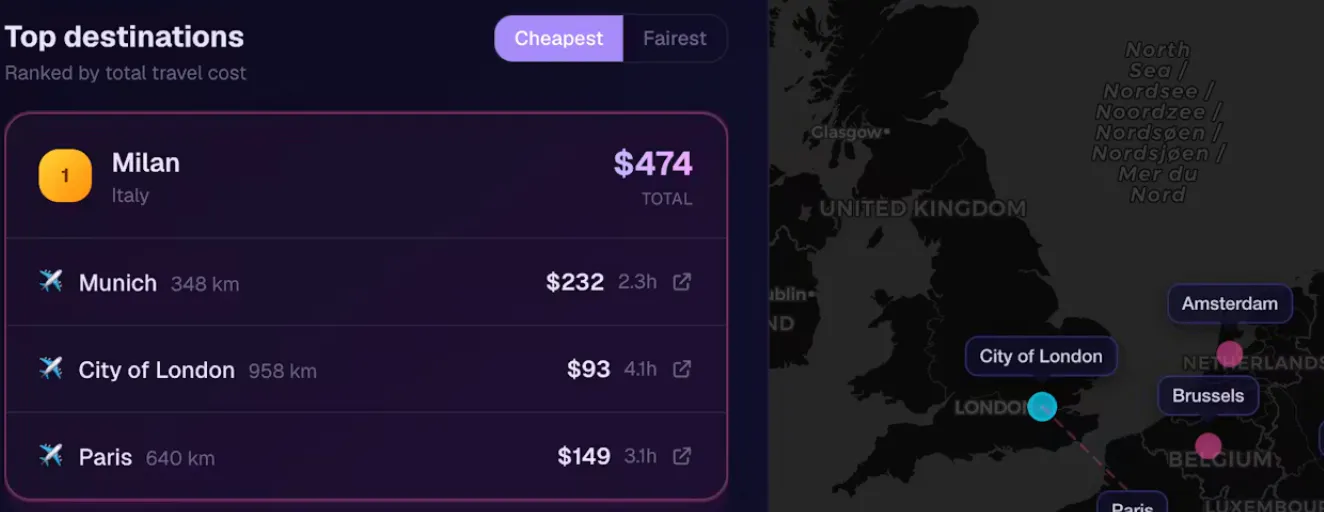
MeetPoint answers the group-chat spiral you know too well ("what about Barcelona?" "too expensive for me" "okay, Lisbon?", forever): built by Florens von Buchwaldt after living that exact debate, you tell it where everyone's flying from and it finds the city that's cheapest for the whole group, with a "Fairest" mode that picks the spot where nobody gets stuck paying way more than the rest.
🔥 Our Take: Every flight tool ever built optimizes for one traveler. Nobody solved the group: five people from five cities, where the question isn't "where's cheap," it's "why am I the one paying double." That's the part that stalls group trips, and it's a fairness problem, not a search one. MeetPoint's Fairest mode goes right at it, finding the city that shrinks the gap in what each person pays instead of just the lowest average. No big travel site bothered, because it's a feature, not a category, which is also the catch: it's free, a weekend to clone, and Kayak could add it whenever. So no, it's not a company, yet. But it fixes an argument instead of running a search, and that's rarer than it sounds.
Your AI bookmarks aren't knowledge

Artem (@artem_fedorovich) asked the thing every builder feels but won't admit: how are you actually keeping up with AI tools without drowning? Half looking for an answer, half checking whether the overwhelm was just him. It wasn't.
The thread agreed fast that the problem isn't access, every tool is one free trial away. It's that saving a workflow feels like learning it. Tessa (@tessa_lynch) put it best: "I keep telling myself I'll go back and try all those AI workflows I saved. Never happens. It's just storage at this point, not knowledge."
The fix people kept landing on: stop collecting, start shipping. Mustafa (@thenameisarian) had the sharpest version, follow who built what, not who recommended what. "The recommendation is someone's opinion. What got shipped is evidence." He says it cut his AI-tool reading by 90% and his actual learning went up.
Daily Top Products


Monday through Friday
Our ultra-fast Daily: Three takes on new products. Yesterday’s top ten launches. That’s it.