The Leaderboard
Monday through Friday
Revealed: Jack Dorsey's Homescreen📱
This newsletter was brought to you byWispr FlowRevealed: Jack Dorsey's Homescreen📱
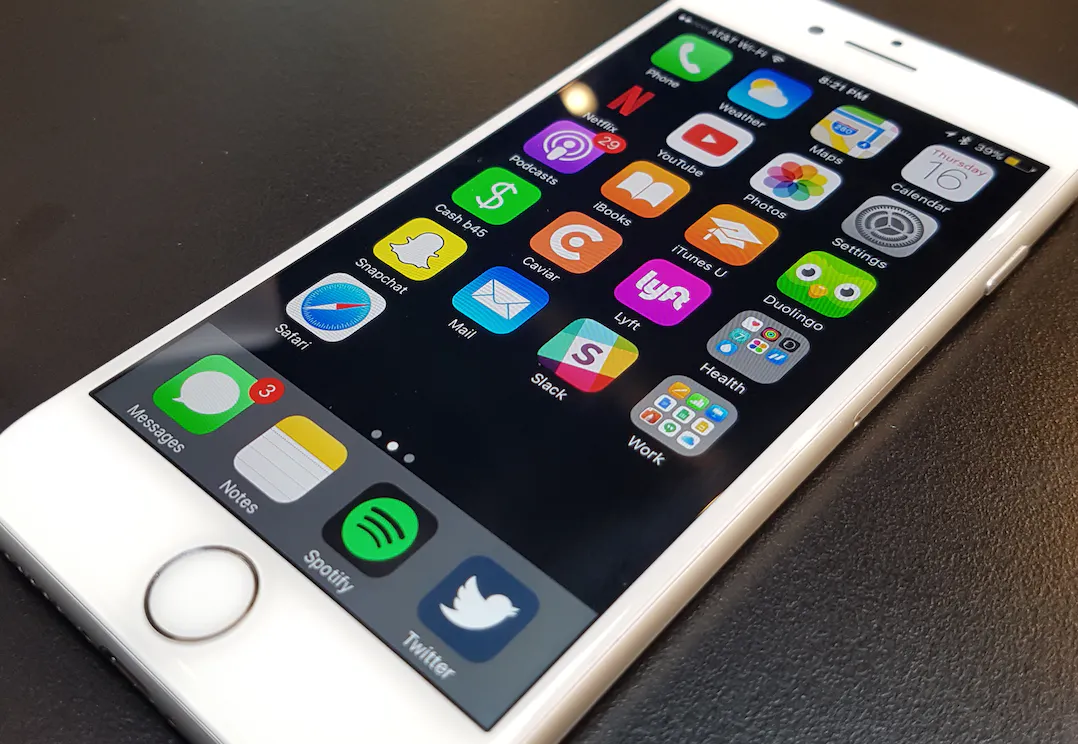
Through expert level social engineering, we obtained an exclusive sneak peek at Jack Dorsey’s homescreen. Let's analyze the Twitter & Square CEO's preferences and well curated list of apps.
First, Jack uses the supercool (employee-only) dark blue Twitter app, and gives special bottom bar placement to the default Notes app and Spotify. We also see that he has notifications turned off for most apps, except for iMessage and Podcasts. What's he listening to? 🤔🤔🤔
Apps to Watch:
👻 Snapchat has prominent placement (no Facebook or Instagram)
✅ Internal version of Square Cash, next to Caviar (acquired by Square)
🎈 Lyft over Uber
🌍 Hello Duolingo! (Jack is learning a new language)
🎓 iTunes U + iBooks right on the homescreen
🍎 Default: Mail, Weather, Calendar, and Apple Maps!
Jack also has a Work folder that includes Apple & Google's suite of Office alternatives, Hangouts, and iCloud Drive. There's also a Health folder that includes Apple's default Health, Activity, Watch + these little known apps. 👀
First, Jack uses the supercool (employee-only) dark blue Twitter app, and gives special bottom bar placement to the default Notes app and Spotify. We also see that he has notifications turned off for most apps, except for iMessage and Podcasts. What's he listening to? 🤔🤔🤔
Apps to Watch:
👻 Snapchat has prominent placement (no Facebook or Instagram)
✅ Internal version of Square Cash, next to Caviar (acquired by Square)
🎈 Lyft over Uber
🌍 Hello Duolingo! (Jack is learning a new language)
🎓 iTunes U + iBooks right on the homescreen
🍎 Default: Mail, Weather, Calendar, and Apple Maps!
Jack also has a Work folder that includes Apple & Google's suite of Office alternatives, Hangouts, and iCloud Drive. There's also a Health folder that includes Apple's default Health, Activity, Watch + these little known apps. 👀
Highlight
We're working on a super top secret project at Product Hunt. Want to try it out? Click here. 🤐
Ad
Are you really still typing?

Full disclosure: Wispr Flow is the AI dictation tool most of us at Product Hunt (use we still have a few holdout typers, what romantics). Hold a key, talk, and clean text drops straight into whatever app you're already in — Slack, email, Notion, your IDE, wherever your cursor lives. No switching windows. No copy-paste ritual. Just say the thing – yes, you can whisper it – and even your most run-on sentences will be turned into polished writing at 4x the speed of typing.
The Leaderboard
Monday through Friday
Our ultra-fast Daily: Three takes on new products. Yesterday’s top ten launches. That’s it.