


What's great
I'm extremely lucky to have discovered this website on January 21, 2024. This is incredible because I can save so much time storing text or specific vocabulary collections that I use repetitively.
With TextBlaze's help, I can distribute or use them repeatedly much faster because I just need to call the shortcut keyword. This luck didn't stop there. When generative AI became popular and there were prompts or System Instructions for AI, TextBlaze became a game changer for me.
This app can store hundreds of repetitive AI commands that I use daily to make my work easier as:
• Entrepreneur
• Educator
• Content Creator
Now, whenever I have ideas or AI commands that I use every day, I always save them in TextBlaze to make my time more efficient. This includes using apps on Windows.
In terms of appearance, the website interface is very easy to understand and feels smooth. Although some features are a bit technical, the general features are still very useful.
The most frequent use I experience is when I combine website scraping aspects with prompt instructions I save in TextBlaze. This makes any process much easier.
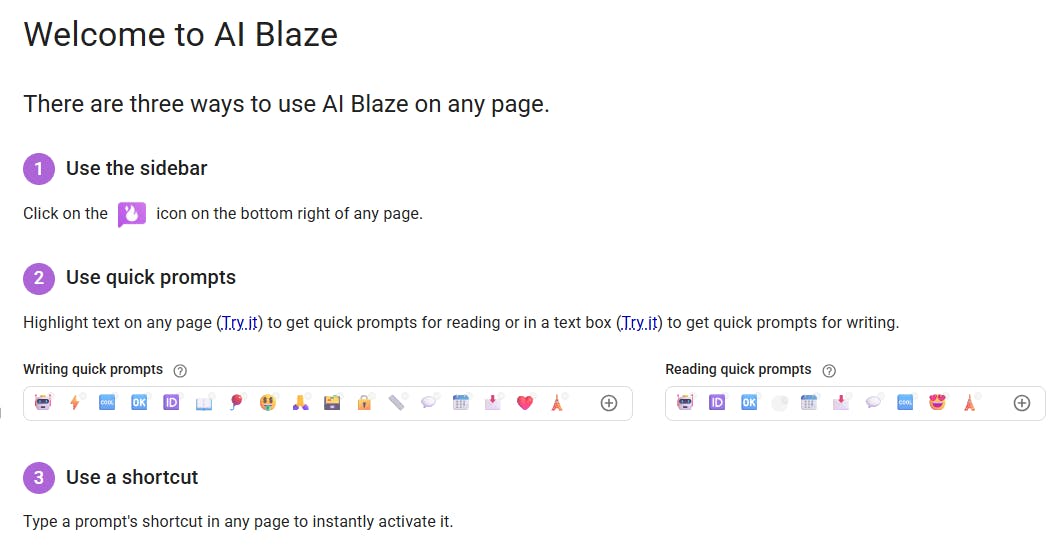
Additionally, AI Blaze that I use has outstanding performance. This tool has made my life and work faster and more efficient, so I can focus on essential things and get many things done in this era.
For me, this tool is a bridge to achieve higher satisfaction because:
• I can focus on essential things
• I don't need to think about or spend too much time on repetitive activities
• I can avoid annoying operational work
I want to thank you so much because TextBlaze is an app that really helps accelerate my various tasks. Because I'm satisfied, I often share information about TextBlaze to my community, both internal and external through social media.
I think this website or app tool is extraordinary. Everyone should use it in this era to increase daily work productivity, including for learning. When combined with Generative Artificial Intelligence, we can save many prompts to increase effectiveness and efficiency in learning, like helping write practice questions and so on.
Considering AI Blaze's extraordinary features, what I like most are:
• Various custom models
• Instant shortcuts to call commands quickly through toggle icon when we mark related text (this is very helpful regardless of the feature to save and execute commands)
• AI Blaze's ability to track the full screen
I'm very satisfied using it. Thank you so much to the TextBlaze team who always improve and update very useful and powerful features every month.
This is my TextBlaze performance:
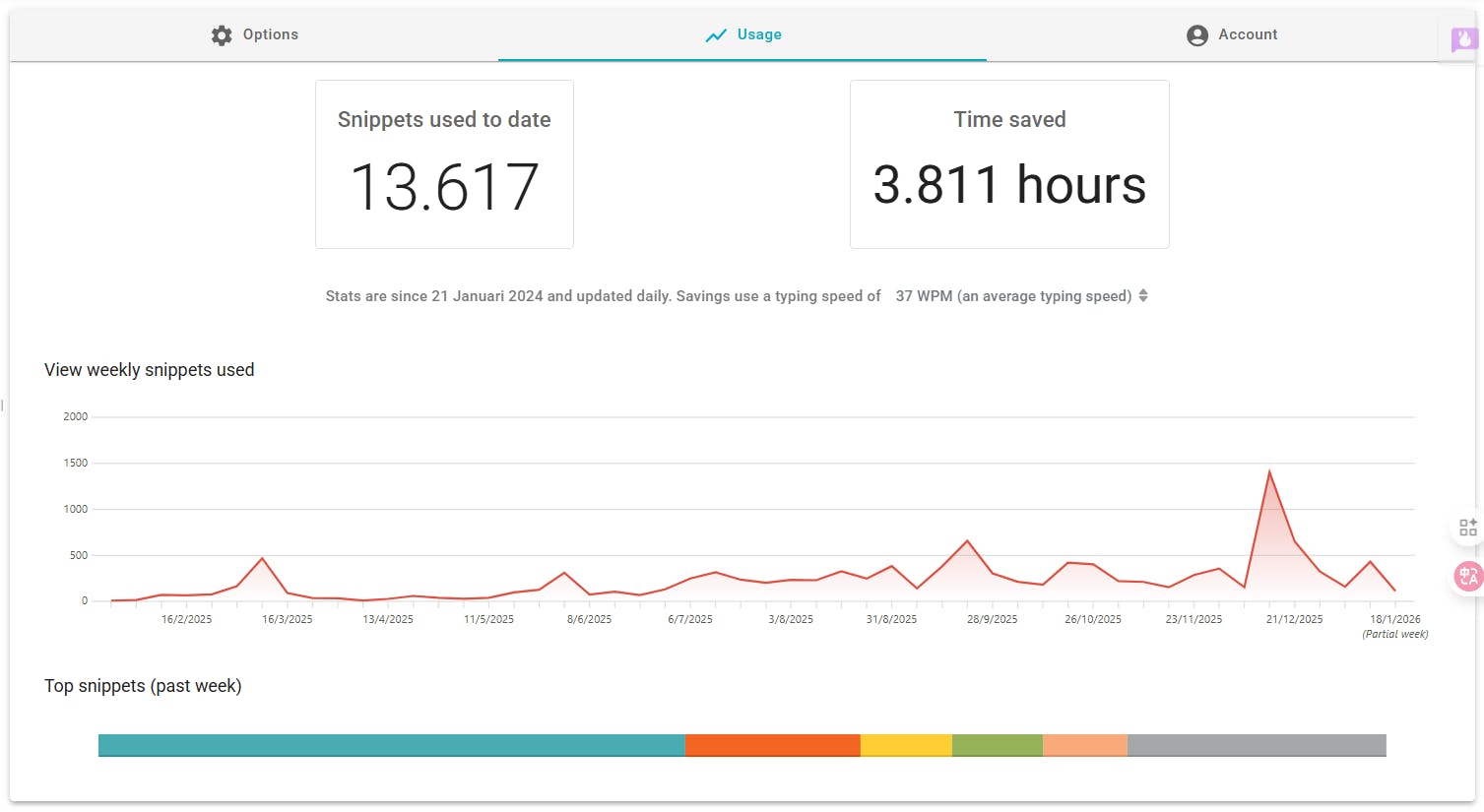
• Snippets used to date: 13,617
• Time saved: 3,811 hours
• Stats are since January 21, 2024 and updated daily.
Savings use a typing speed of 37 WPM (an average typing speed)
Especially for you who want to use Text Blaze immediately, you can click this
Thank you so much to the TextBlaze team. Wishing this company continued success and ongoing innovation for your product in the future.
What needs improvement
Feature-wise, I think it’s already good and complete, with solid customization. But for AI Blaze specifically, it would be great if the AI models included an option for open models.
Even better, users could add a custom API key externally so they can use these AI models for free. Another option is Text Blaze could ship with free, open-source models such as:
1. GPT-OSS
2. GLM
3. DeepSeek
4. And other models
I think this would be an amazing upgrade, giving users many model options that are free because they are open source. In my view, this improvement would be excellent.
vs Alternatives
 Keysmith
 Atext
Atext AutoHotkey
 Beeftext
 Espanso
 FlyMSG.io
I found Text Blaze while researching productivity tools. I tried alternatives like Beeftext, Espanso, and AutoHotkey.
I chose Text Blaze for three practical reasons. First, the interface is simple and ready to use without a long learning curve. Second, its AI features fit perfectly for my frequent reuse of AI prompts. Third, integration with DataBlaze and web scraping makes my workflow much more efficient.
Other tools like AutoHotkey are powerful but too technical. Espanso is good but its AI features aren’t as complete as Text Blaze. Beeftext focuses only on basic text expansion and lacks flexibility for my needs as an entrepreneur and content creator.
So I chose Text Blaze because of the mix of ease of use, advanced AI features, and a growing ecosystem.
Here are the reasons why I chose TextBlaze over other options:
1. Flexibility: It is available as both a browser extension and a standalone application.
2. Integrations: It integrates seamlessly with AI Blaze and DataTables, which I find very helpful.
3. Performance and Customization: Features like web scraping and other customization options work quickly. I rarely encounter errors and haven't found any significant issues.
4. Community and Support: The community is powerful, comprehensive, and loyal. There are updates from the team every month, so I never miss out on the latest features.


What's great

Honestly, Typeless is a massive game-changer for my workflow. I just checked my stats and I’m blown away: I've dictated over 21,000+ words at an average speed of 158 WPM just in 19 days. The app estimates I’ve saved nearly 10 hours of manual typing time. It captures my voice perfectly. Highly recommend this if you want to write at the speed of thought, Thanks Typeless teams!
What needs improvement
Hope there will be an Android version so for general user so i can use it on all my devices.
vs Alternatives
I needed to write faster and stay focused. Typeless lets me dictate at 158 WPM instead of typing. The interface is clean, no distractions. Saved me 10 hours in 19 days.


