
ZERTI
Easy woocommerce
7 followers
Easy woocommerce
7 followers
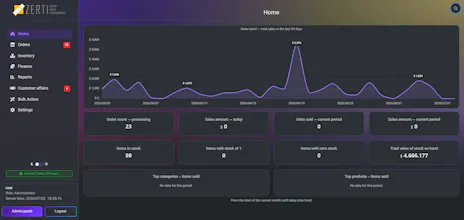
Instead of navigating through countless WordPress admin pages, ZERTI brings your most important workflows together to reduce clicks, save time, and make store management more efficient. Key features 📦 Order management 🛒 Manual order creation 📊 Business reports & analytics 📦 Inventory management 💰 Finance tools 📄 PDF invoices & packing slips ⚡ Bulk actions 📱 Responsive interface 🌙 Light & dark mode 🌍 RTL & multilingual support Built with ❤️ for WooCommerce merchants.




Free
Launch Team

Render: Get up to $100K in startup creditsThe fastest way to launch and scale your startup in the cloud
Promoted
How does this play with the existing WooCommerce admin pages, does it replace them entirely or just add a unified dashboard on top?
@muammerbozada Great question! ZERTI doesn't replace WooCommerce or WordPress admin pages—it adds a modern, unified management layer on top of them.
After installation, ZERTI opens as a full-screen application inside WordPress. The standard WordPress admin menus are hidden by default, giving you a clean, distraction-free workspace that feels like a native desktop app rather than a traditional WordPress page.
All of WooCommerce's original admin pages remain intact and accessible. At any time, you can return to the standard WordPress admin area with a single click if you need to use another plugin or a feature that's outside ZERTI.
Our goal isn't to replace WooCommerce—it's to make daily store management much faster and more enjoyable by bringing orders, products, inventory, customers, reports, and other operations into one responsive interface that works great on both desktop and mobile.
https://wordpress.org/plugins/zerti/
How does ZERTI handle real-time inventory syncing when orders come in from multiple channels at once, and does it conflict with other stock management plugins I already have installed?
@uur701440545451 Great question! ZERTI doesn't implement its own inventory engine or replace WooCommerce's stock management. It works directly with WooCommerce's native APIs and database, so WooCommerce remains the single source of truth for inventory.
If orders arrive simultaneously from multiple sales channels, WooCommerce handles the stock synchronization, and ZERTI simply reflects the latest data through its interface. We intentionally avoid bypassing WooCommerce's core logic to maximize compatibility.
The free version of ZERTI focuses on solving WooCommerce's UI/UX challenges. It transforms the way users interact with their store by replacing the traditional admin experience with a modern, full-screen application interface. Instead of navigating WordPress menus and multiple admin pages, users work in an experience that feels much closer to a dedicated e-commerce management application—while WooCommerce continues to do all the heavy lifting in the background.
The Pro version goes beyond UI improvements by introducing advanced operational capabilities, such as its own ETL pipeline for inbound SQL data analysis, business intelligence (BI) reporting, bulk operations, and other productivity tools that significantly enhance day-to-day store management.
Because ZERTI acts as a management layer rather than replacing WooCommerce's core functionality, it generally coexists well with stock management and synchronization plugins that follow WooCommerce best practices. And if anyone finds an edge case, we're committed to resolving compatibility issues quickly.