Launching today

xntfs
Read and write NTFS drives on Mac, without macFUSE
2 followers
Read and write NTFS drives on Mac, without macFUSE
2 followers
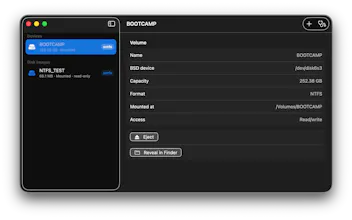
Read, edit, and copy files on NTFS drives from Finder. xntfs is an open-source Mac app powered by Apple FSKit and ntfs-3g, without macFUSE or kernel extensions. Includes read-only mounting and clear extension diagnostics.

Payment Required
Launch Team

Framer AI AgentsDesign and publish professional sites with AI
Promoted
Hi everyone, I'm the developer behind xntfs.
You plug an NTFS drive into your Mac, open your files, and then discover you can't copy anything back. That's the problem xntfs is built to solve: read and write NTFS drives directly in Finder, without reformatting them.
Under the hood, it combines Apple's FSKit with ntfs-3g. There's no macFUSE or kernel extension to install.
I wanted to keep the app focused: see your drives, check whether they're writable, and open them in Finder. It also shows whether a drive is using xntfs or macOS's built-in driver, with diagnostics to help when extension setup doesn't go as expected.
A quick compatibility note: xntfs supports macOS 15.4 and later, on Intel and Apple silicon. On macOS 26 and later, supported drives can mount automatically once the extension is enabled. On macOS 15, mounting with xntfs requires a per-volume Terminal command that the app provides for you to run.
The source code is on GitHub, and a ready-to-install version is available as a paid download on the Mac App Store. It's a tool for accessing your drives, not repairing damaged disks.
I'd especially appreciate feedback on the first-time setup: are the extension instructions and drive status clear enough to understand without knowing how file-system drivers work?