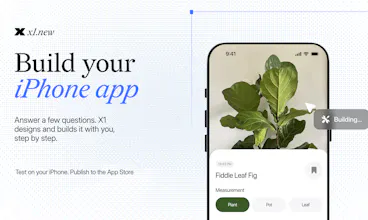
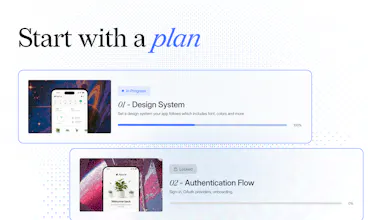
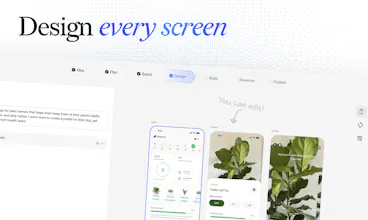
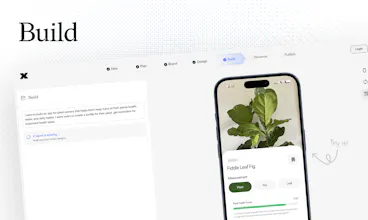
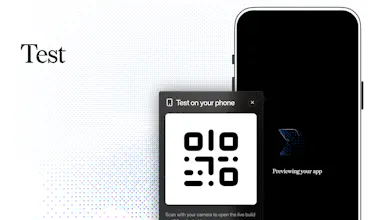
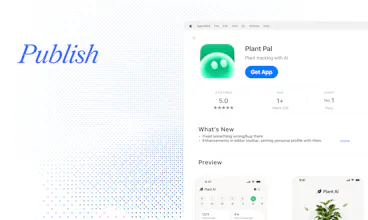
X1 is an AI app builder that takes you from an idea to an iPhone app you can publish on the App Store. Instead of trying to generate the entire app from one prompt, X1 guides you step by step. It asks focused questions, designs each screen for you to review and edit, then builds the app in stages. Preview and test it on your iPhone as you go. When it’s ready, X1 prepares your App Store listing, screenshots, and submission. No coding required.
@indigo_carpiniello Not yet, but it's coming and not too far out. The flow today is idea to App Store fully inside X1, building, testing on your iPhone and publishing through your own Apple Developer account. Export is a feature we're actively working towards. The tricky part is doing it properly, since a real app is more than the code, it's your schemas and data too, any designs or PRDs as well, and we want an export that actually hands you something complete rather than half the picture. More on that soon.
Report
Does X1 support native iOS features like notifications, camera access, location, or Apple Sign In?
@avery_thompson2 Push notifications, camera, location and Apple Sign In are all supported. X1 sets up the permissions and wiring as part of building the feature, so you don't deal with any of the plumbing, and Apple Sign In especially is baked in since it's core to most apps.
The main things we don't do yet are home screen widgets and standalone Apple Watch / watchOS apps, so if your idea leans hard on those it's worth knowing up front. For the core native stuff though you're covered.
Report
the ask focused questions approach sounds smart! what happens when a user gives X1 an unclear or contradictory requirement?
@barnaby_lloyd The "ask focused questions approach" is exactly for the situation you typed out. It actually starts right at the beginning in the idea phase, where X1 has a proper back and forth with you and does a feasibility pass on what you're describing, so contradictions and unclear bits get caught before anything gets built. When something's unclear or two requirements clash, X1 flags it and talks it through with you instead of quietly picking one and running with it.
It'll surface the contradiction, explain the tradeoff and let you decide, and for the smaller stuff (the decision on whats small and whats not is on you btw, its not a point of failure in X1, we accounted for that lol) that's obvious or easy to change later it just makes a reasonable call and keeps moving so you're not stuck answering a hundred questions.
The whole point is catching the ambiguity early, through that back and forth, before it turns into a bunch of assumptions baked into your app that you only notice 20 changes down the line.
Report
I like the idea of reviewing each screen before building! can users completely customize the generated designs?
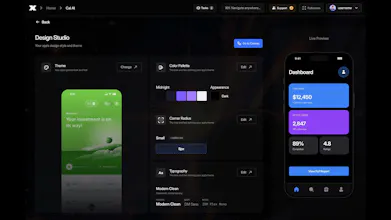
@imogen_wallace Absolutely. You can customize pretty much every part of the generated design theme, fonts, colors, spacing, styles, individual components, and the smaller UI details too. The generated screens are meant to be a starting point, not something you’re locked into.
Report
Hey Manil. I've built in Lovable before, mostly PWAs. Two questions: can X1 take an existing app and rebuild it as a native iPhone app, and how different does the day to day process feel compared to Lovable?
Report
this is an interesting take on AI app building! does X1 support apps that require login and personalized user data?
@olivia_bennett7 Yeah it does. Auth and per user data are core to most real apps so X1 handles that path directly, supporting apple sign in right off the bat. It sets up user accounts on the backend so each user gets their own data, then wires the screens to that instead of faking it with placeholder content. It also treats those as real product decisions, so it'll ask how people should sign in and what data belongs to a user, then build the flows around it. You end up with something that actually persists and personalizes, not just a demo that looks logged in lol
Report
The AI comments here suck. Nice approach, love that there is a nice guided structure to beginn with an app.
@samsc Appreciate it 🙏 and yeah the AI comments are getting so out of hand I genuinely can’t tell who’s real anymore lmao
The guided structure is really the whole bet though. We’re trying to make it feel less like staring at a blank prompt and more like having someone who knows what questions to ask, what to build next, and when something is actually ready to move on.
Congrats! Can users export the generated app and continue development outside X1?
x1
@indigo_carpiniello Not yet, but it's coming and not too far out. The flow today is idea to App Store fully inside X1, building, testing on your iPhone and publishing through your own Apple Developer account. Export is a feature we're actively working towards. The tricky part is doing it properly, since a real app is more than the code, it's your schemas and data too, any designs or PRDs as well, and we want an export that actually hands you something complete rather than half the picture. More on that soon.
Does X1 support native iOS features like notifications, camera access, location, or Apple Sign In?
x1
@avery_thompson2 Push notifications, camera, location and Apple Sign In are all supported. X1 sets up the permissions and wiring as part of building the feature, so you don't deal with any of the plumbing, and Apple Sign In especially is baked in since it's core to most apps.
The main things we don't do yet are home screen widgets and standalone Apple Watch / watchOS apps, so if your idea leans hard on those it's worth knowing up front. For the core native stuff though you're covered.
the ask focused questions approach sounds smart! what happens when a user gives X1 an unclear or contradictory requirement?
x1
@barnaby_lloyd The "ask focused questions approach" is exactly for the situation you typed out. It actually starts right at the beginning in the idea phase, where X1 has a proper back and forth with you and does a feasibility pass on what you're describing, so contradictions and unclear bits get caught before anything gets built. When something's unclear or two requirements clash, X1 flags it and talks it through with you instead of quietly picking one and running with it.
It'll surface the contradiction, explain the tradeoff and let you decide, and for the smaller stuff (the decision on whats small and whats not is on you btw, its not a point of failure in X1, we accounted for that lol) that's obvious or easy to change later it just makes a reasonable call and keeps moving so you're not stuck answering a hundred questions.
The whole point is catching the ambiguity early, through that back and forth, before it turns into a bunch of assumptions baked into your app that you only notice 20 changes down the line.
I like the idea of reviewing each screen before building! can users completely customize the generated designs?
x1
@imogen_wallace Absolutely. You can customize pretty much every part of the generated design theme, fonts, colors, spacing, styles, individual components, and the smaller UI details too. The generated screens are meant to be a starting point, not something you’re locked into.
this is an interesting take on AI app building! does X1 support apps that require login and personalized user data?
x1
@olivia_bennett7 Yeah it does. Auth and per user data are core to most real apps so X1 handles that path directly, supporting apple sign in right off the bat. It sets up user accounts on the backend so each user gets their own data, then wires the screens to that instead of faking it with placeholder content. It also treats those as real product decisions, so it'll ask how people should sign in and what data belongs to a user, then build the flows around it. You end up with something that actually persists and personalizes, not just a demo that looks logged in lol
The AI comments here suck.
Nice approach, love that there is a nice guided structure to beginn with an app.
Keep it up.
x1
@samsc Appreciate it 🙏 and yeah the AI comments are getting so out of hand I genuinely can’t tell who’s real anymore lmao
The guided structure is really the whole bet though. We’re trying to make it feel less like staring at a blank prompt and more like having someone who knows what questions to ask, what to build next, and when something is actually ready to move on.